


Learn the definition of end-to-end testing, its benefits, when to automate E2E tests, common challenges, best practices, and top tools for 2026.
End-to-end (E2E) testing is a software testing technique that verifies an entire application from start to finish by simulating real user journeys with realistic data. It checks that the frontend, backend, APIs, databases, and third-party services work together as one system, catching bugs that unit and integration tests miss when components are tested in isolation.
In a modern software, dependency is high. Everything’s connected, from microservices, APIs, frontend logic, to third-party tools, and you need to test the flow from start to finish to make all those parts work well together. That’s where end-to-end testing comes in.
End-to-end testing (or E2E testing) simulates real user journeys across your entire app to make sure every part of the system works together exactly as it should.
What is end-to-end testing?
End-to-end testing is a software testing technique that verifies the functionality and performance of an entire software application from start to finish by simulating real-world user scenarios and replicating live data. Its objective is to identify bugs that arise when all components are integrated, ensuring that the application delivers the expected output as a unified entity.
End-to-end testing is also referred to as E2E testing. It gives testers insight into how the application functions from the end user's perspective, providing a more comprehensive view of software quality before release.
Benefits of end-to-end testing
Modern software is intricate, with dozens of systems interacting at the same time. Components that work perfectly on their own can still fail once they're integrated, because of miscommunication between them. The benefits of end-to-end testing come from checking that whole chain.
- Catches integration bugs that other tests miss. E2E testing verifies the flow of information through the application under test, including all possible paths and dependencies.
- Speeds up root-cause analysis. When an issue appears at a touchpoint between components or subsystems, testers can find the root cause and troubleshoot right away.
- Reflects the end user's view. Tests follow real user scenarios, which gives a fuller picture of software quality before release than isolated checks do.
- Lowers the cost of defects. Catching problems during testing, before release, saves significant time, cost, and reputational damage compared to finding them in production.
- Builds confidence in business-critical workflows. E2E tests give the highest confidence that the system meets business requirements, which is why they belong on critical paths like login, checkout, and onboarding.
The trade-off is that E2E tests are slower, more complex, and more expensive to maintain than unit or integration tests, so use them selectively.
Example of end-to-end testing
Take an e-commerce website. End-to-end testing here means verifying that all parts of the system — frontend, backend, database, and third-party services like payment and email — work smoothly together. A full E2E workflow would test:
- Open Website
- Search for Product
- Select Product
- Add to Cart
- Checkout
- Enter Payment Details
- Place Order
- Receive Confirmation
- Admin Checks Order
- Track Order
If any step breaks — say, the payment gateway passes but the confirmation email never triggers — a functional test of either system in isolation would not catch it. Only end-to-end testing covers the full chain.
📚 Read more: What Is Functional Testing? Types, Examples & Tools
When to do end-to-end tests?
Due to its scope, end-to-end testing is typically performed at the end of the development process. The test pyramid explains why: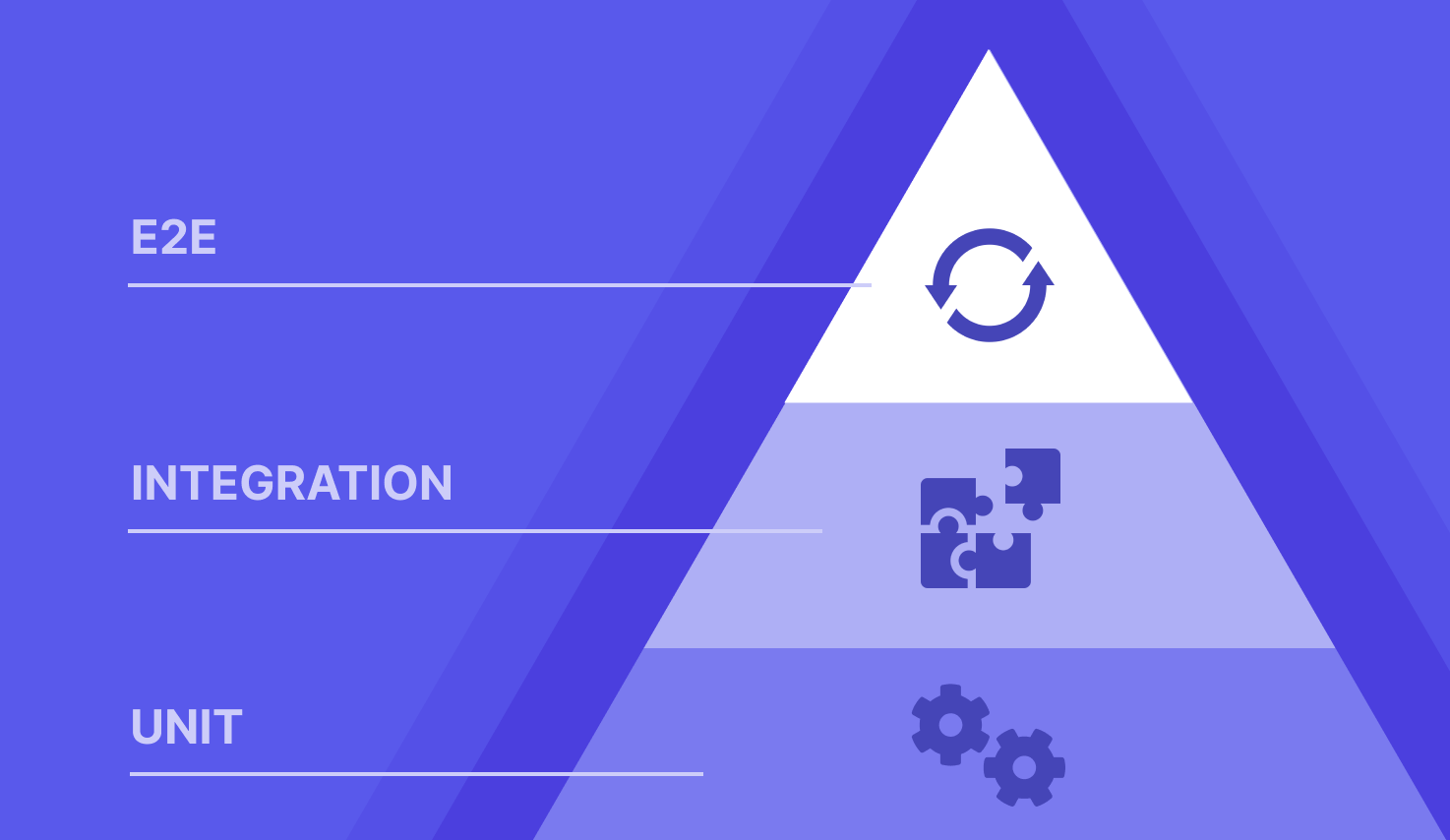
A comprehensive test strategy includes 3 layers:
- Unit tests (base): Test individual components like functions or methods in isolation.
- Integration tests (middle): Verify that modules work together correctly and data flows as expected between them.
- E2E tests/ system tests (top): Validate the entire application from UI to backend, ensuring the system works as a whole. These give the highest confidence in business requirements but are slower and more complex — so they should focus on critical workflows only.
In a well-balanced test strategy, E2E tests should only account for 5-10% of the total number of tests. This figure is around 15-20% for integration tests and 70-80% for unit tests.
Challenges of end-to-end testing
1. Setup complexity
Setting up E2E tests isn’t trivial. The more third-party services, the harder it gets. When systems depend on multiple microservices, cloud APIs, or external providers, test orchestration becomes fragile and bloated. This is especially painful in production-mirroring environments.
2. Flakiness is sometimes inevitable
Flaky E2E tests undermine engineering velocity. Failures that are not actual regressions create noise, erode trust, and introduce risk fatigue. Teams often lack the observability tooling to identify root causes quickly enough. Modern platforms now address this with AI self-healing — automatically detecting and adapting to UI changes that would otherwise break tests.
3. Debugging failures is a challenge
Unlike unit or integration tests, E2E failures are often opaque. Logs are verbose, contexts are shared, and side effects cascade unpredictably. Without precise traceability, a red CI run becomes a forensic investigation. Best-in-class tools address this with recorded videos, annotated screenshots, and highlighted lines of code that pinpoint failures immediately.
4. Test data management
E2E scenarios often require specific data setups — user accounts, product listings, order history. Keeping data consistent and resetting state between runs is difficult, especially when tests modify a database or call external systems. Without careful isolation, leftover data from one test can pollute others.
This guide to test data management covers the process, techniques, and tools for keeping test data consistent across runs.
How a NASA failure proves the importance of E2E testing

The 1999 Mars Climate Orbiter disaster is one of the clearest real-world examples of why end-to-end (E2E) testing matters.
Here's the story: NASA lost a $125 million spacecraft because one team used imperial units (pounds), while another assumed metric units (newtons).
Why did this happen? Because no test ever verified the full journey from data generation to thruster execution. The error slipped through multiple layers because each part worked in isolation, but the system failed as a whole.
That proves the importance of end-to-end testing in ensuring that the system works in concert.
Types of End to End Testing
There are two types of end-to-end testing. They describe how you test your application, either from the user’s perspective (horizontal), or the system’s internal logic and layers (vertical).
1. Horizontal E2E testing
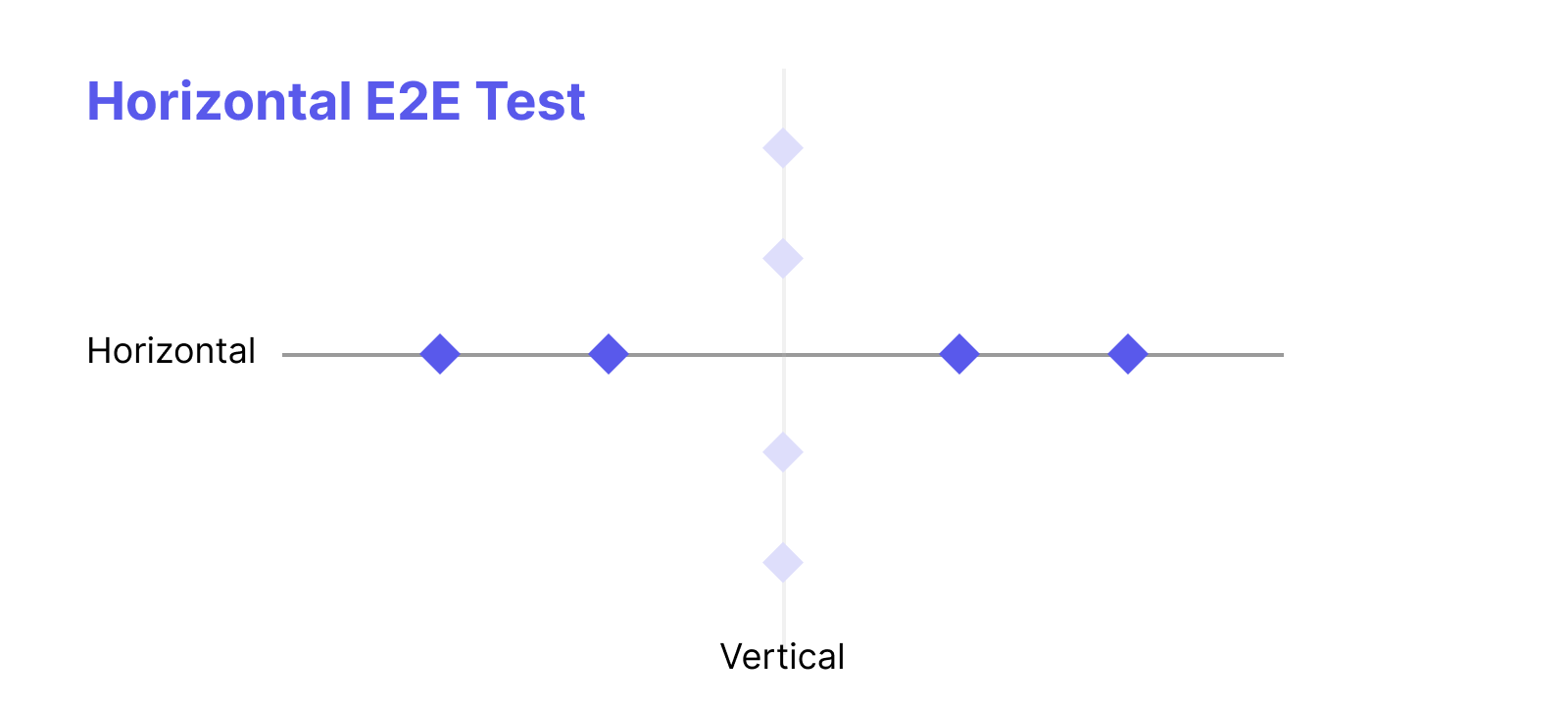
Horizontal end to end testing is what the end user thinks of when they picture E2E testing. I
Testers put themselves in the user's position and verify that each individual workflow in the application works correctly from start to finish. It focuses on:
- User workflows and complete application flows
- UI interactions
- Customer-facing functionality end-to-end
In other words, you’re testing the app from the outside in, exactly like a real user would.
2. Vertical E2E test
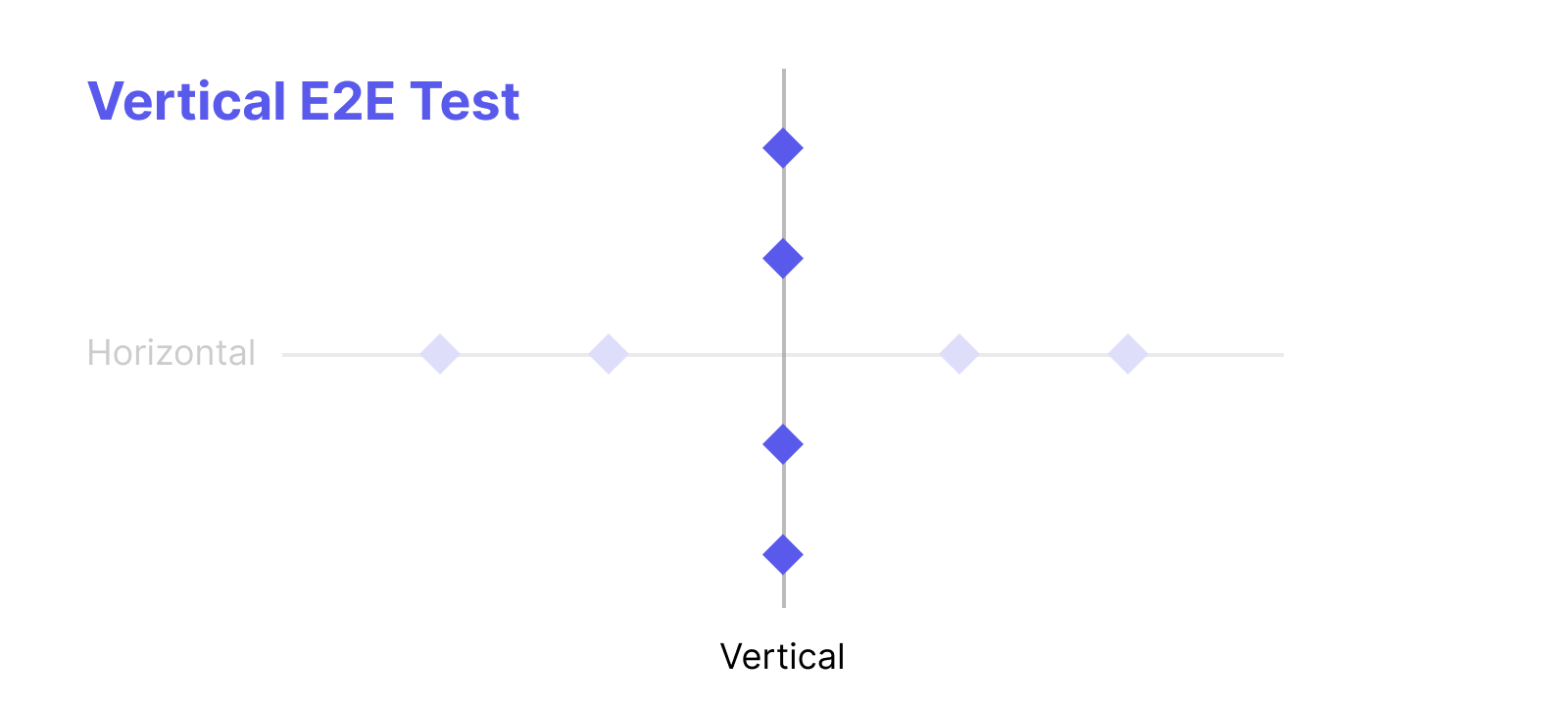
Vertical E2E testing is a more technical approach.
Rather than following a user journey, testers work across the layers of the system — ensuring that the right data reaches the right place at the right time across background processes. It focuses on:
- Backend services and APIs
- Databases and data integrity
- Integration between internal and external services
This tests the depth of one part of the system rather than the breadth of a user journey.
How to perform end-to-end testing
End-to-end testing follows the same process as other types of testing:
- Test planning. Starts once integration testing is complete. Outline test objectives based on the initial client requirements and the application architecture.
- Test design. Set up a test environment that matches the requirements. The environment is often already configured from previous test runs, so testers can reuse the existing configs. Run risk analysis and usage analysis to put resources where they matter, then create test cases, using automation testing tools to cut the time spent on test design.
- Test execution. Run test cases locally and remotely, and check progress against the original test plan.
- Results analysis. Analyze the results, pinpoint the root cause of each bug, and send the findings to the development team. Finish with a retrospective to review the process and agree on improvements.
📚 Read more: How to write a test case
Automated end-to-end testing vs manual E2E testing
E2E testing can be automated or manual, and most teams use both.
Aspect | Automated E2E testing | Manual E2E testing |
|---|---|---|
Best for | Repetitive workflows, regression testing, and validating functionality | Exploratory testing and scenarios that need human judgment |
When it runs | In CI/CD pipelines after code changes or deployments, ideally on every pull request | When testers need to explore new or risky areas of the app |
Main risk | Flaky tests caused by timing or environment inconsistencies, and upkeep as the app changes | Slower and harder to repeat consistently |
How to approach E2E automation testing
- Automate critical workflows first. Login, checkout, and onboarding come first, so the pipeline stays fast.
- Keep environments and data stable. Use isolated, seeded datasets and reset state between runs.
- Avoid hardcoded delays. Use dynamic waits, such as waiting for elements to load.
- Write modular tests. Small, reusable steps are easier to maintain.
- Prefer API-level tests where they fit. API-focused E2E tests break less than browser UI tests and are easier to debug.
- Plan for UI change. Use self-healing to adapt to UI changes, and review scripts regularly to keep them in line with application updates.
End-to-end testing vs integration testing
Here is a comparison table for the differences between end-to-end testing and integration testing:
Aspect | Integration Testing | End-to-End Testing |
Perspective | Technical team’s point of view | Final user’s point of view |
Goal | Ensure that application components work together | Ensure that the User Experience is consistent |
Scope | Multiple components within in one applications | The scope may span across the entire technology stack of the application |
Cost | Less expensive to implement | More expensive to implement due to the hardware - software needed to best simulate real-world scenarios |
Time needed | Faster than E2E testing (about less than 1 hour for 200 tests) | Longer than Integration testing (may take up to 4 - 8 hours) |
End-to-end Testing vs Functional Testing
Here is a comparison table to illustrate the differences between end-to-end testing vs functional testing:
Aspect | Functional Tests | End-to-End Tests |
Scope | Testing is limited to one single piece of code or application. | Testing crosses multiple applications and user groups. |
Goal | Ensures the tested software meets acceptance criteria. | Ensures a process continues to work after changes are made. |
Test Method | Tests the way a single user engages with the application. | Tests the way multiple users work across applications. |
What To Validate | Validate the result of each test for inputs and outputs. | Validate that each step in the process is completed. |
End-to-end testing vs System testing
System tests verify a complete, functional area of the application in isolation. It’s about validating a major block of functionality, but not the entire user journey.
End-to-end tests validate the entire flow from start to finish, across multiple systems, layers, or components.
Put simply:
- System tests check complete subsystems behave correctly.
- End-to-end tests check the entire system behaves correctly as a whole, across real-world workflows.
End-to-end testing best practices
- Focus on critical paths, not everything. E2E tests are expensive to run and maintain. Reserve them for the workflows where failure causes the most damage — login flows, checkout, onboarding. Cover edge cases with faster unit and integration tests instead.
- Test like a real user. Get into the mindset of someone using the app for the first time. Use acceptance documents and user stories to design test cases that reflect actual usage patterns, not just technical paths.
- Use E2E to bootstrap legacy codebases. When there are no unit or integration tests, E2E tests often provide the clearest path to coverage without requiring risky refactors — wrapping critical paths with protection before going deeper.
- Prefer API-level E2E over UI tests where possible. Testing full user flows through a browser UI can be brittle and hard to maintain. API-focused E2E tests break less, are easier to debug, and deliver better ROI when validating business logic and cross-service integration.
- Integrate into CI/CD with shift-left practices. Run E2E tests automatically on every pull request, not just before release. Testing earlier in the development cycle — including in ephemeral preview environments per PR — dramatically reduces integration issues and the cost of fixing bugs.
- Manage test data carefully. Use isolated, seeded datasets per test run and reset state between runs. Leftover data from one test polluting another is a common source of intermittent failures.
- Bring QA in early. QA teams involved from the start can plan tests that truly reflect business needs. Cross-functional collaboration between developers, QA engineers, and product stakeholders leads to better scenario coverage and fewer missed bugs.
- Avoid E2E for exhaustive edge case testing. Covering all UI corner cases with E2E gets expensive fast. These are better handled with unit and integration tests, which are faster, cheaper, and less likely to rot.

Top end-to-end testing tools and frameworks
1. Katalon
Katalon is a software quality management platform that covers end-to-end testing from planning through reporting. With Katalon, QA teams can:
- Unify testing activities in one platform: test planning, test authoring, test execution, test artifact management, and analytics and reporting
- Create automated tests for web, mobile, and API, and run them across a wide range of environments
- Get AI-powered test case recommendations, generate synthetic test data, create test cases from plain-language input, and auto-maintain flaky tests
Best fit: teams that want web, mobile, and API E2E tests in a single workflow instead of stitching several tools together.
2. Autify
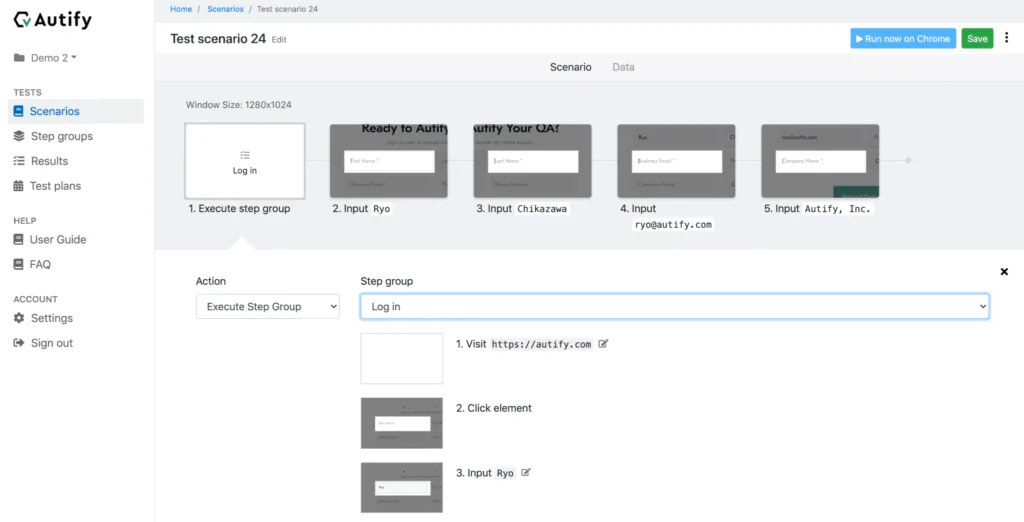
Autify is a test automation tool designed for web and mobile applications. It allows users to automate E2E tests by recording interactions using its Chrome extension, then execute these tests across multiple platforms, including Windows, Linux, and Mac, as well as various web and mobile browsers. Its key features include:
- Smart Test Automation – Utilizes AI and machine learning to detect UI changes and adapt test cases automatically.
- Visual Test Editor – Enables test creation through a simple drag-and-drop interface.
- Seamless Integrations – Connects with CI/CD tools like CircleCI, Jenkins, and GitLab.
- Comprehensive Test Reporting – Provides detailed analytics, reports, and test execution logs with screenshots and video recordings.
3. testRigor
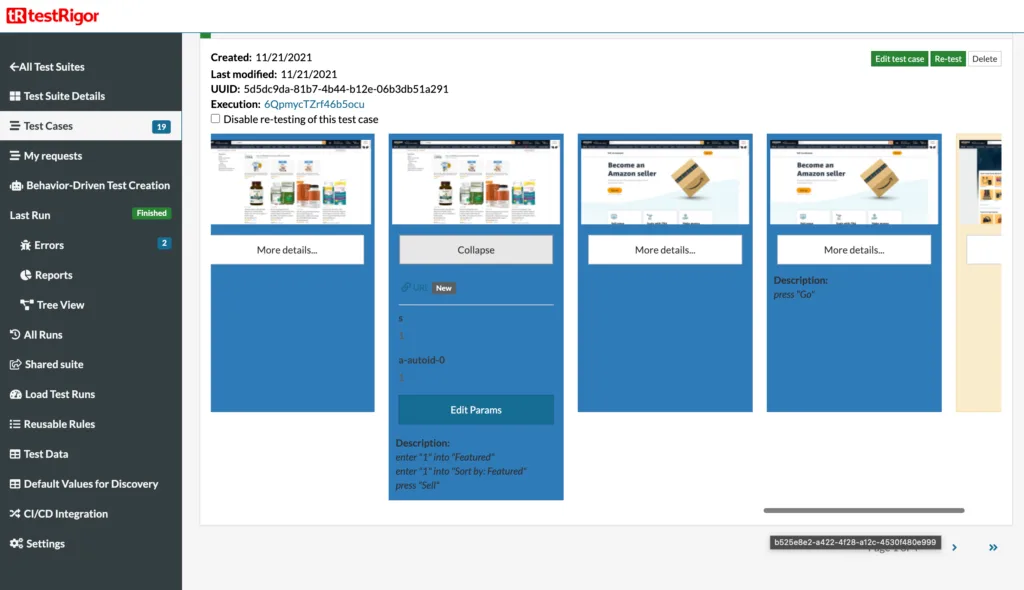
testRigor makes automated testing easy with simple plain commands, perfect for manual QA testers with little coding experience. Its AI-powered automation boosts test coverage with minimal effort. You can also create custom test cases for complex scenarios.
Key features:
- Simulates real user interactions for accurate testing.
- Codeless cross-platform testing for web, native, and hybrid mobile apps.
- Integrates smoothly with test case management systems.
📚 Read more: Top 10 Best End-to-End Testing Tools and Frameworks
Quick comparison of end-to-end testing tools
Tool | Platforms | Test creation | Notable capabilities |
|---|---|---|---|
Katalon | Web, mobile, and API | Automated tests, plus test cases from plain-language input | Planning through reporting in one platform, AI test case recommendations, synthetic test data, and auto-maintenance of flaky tests |
Autify | Web and mobile, run across Windows, Linux, Mac, and various browsers | Record interactions with a Chrome extension, or use the drag-and-drop visual editor | AI that detects UI changes and adapts tests, CI/CD integrations (CircleCI, Jenkins, GitLab), and reports with screenshots and video |
testRigor | Web, native, and hybrid mobile apps | Plain commands, codeless | Simulates real user interactions and integrates with test case management systems |
Running E2E tests is only part of the work, since teams also need a place to plan test cases, track runs, and report results. This roundup of end-to-end test management tools compares the options.
Frequently asked questions
E2E (End-to-End) testing verifies the entire application workflow from start to finish to ensure all components work together as expected. It is important because it simulates real user scenarios, catching issues that might be missed in unit or integration testing.
Integration testing focuses on verifying the interaction between specific modules or components, while E2E testing validates the entire user journey, including front-end, back-end, and external systems like APIs or databases.
Popular tools include: Selenium Cypress Playwright TestCafe Puppeteer These tools automate testing across various browsers and platforms to replicate user scenarios.
E2E testing is typically performed: After integration testing is complete. Before major releases to ensure the application works as expected. Regularly in CI/CD pipelines to validate workflows after changes or updates.
Setting up realistic test environments and data. Longer execution times compared to unit tests. Flaky tests caused by timing or environment inconsistencies. Maintaining tests when application changes frequently.
Use stable test environments with consistent data. Avoid hardcoded delays; use dynamic waits (e.g., wait for elements to load). Write modular tests to improve maintainability. Regularly review and update test scripts to align with application updates.
E2E testing can be both automated and manual: Automated E2E Testing: Ideal for repetitive workflows, regression testing, and validating functionality. Manual E2E Testing: Useful for exploratory testing and scenarios requiring human judgment.
E2E tests are integrated into CI/CD pipelines to validate the application after code changes or deployments. They help catch critical issues before they reach production, ensuring a smoother release process. However, only critical workflows are typically included to avoid slowing down the pipeline.



Test everything. Ship with confidence.
From generating test cases to spotting failures, Katalon's AI works across your entire pipeline, automatically.
