


Test automation pays off when the basics are done well. This guide covers best practices for every stage of automation, from planning and tool choice to writing stable tests, running them in CI/CD, and acting on the results.
Test automation pays off when the basics are done well. Teams rarely fail because they picked the wrong buzzword. They fail because tests are flaky, hard to maintain, or automating the wrong things.
This guide shows how to implement automation testing in seven stages, with best practices for each one, then covers the most common test automation challenges and how to get past them. If you are new to the topic, start with what is automation testing.
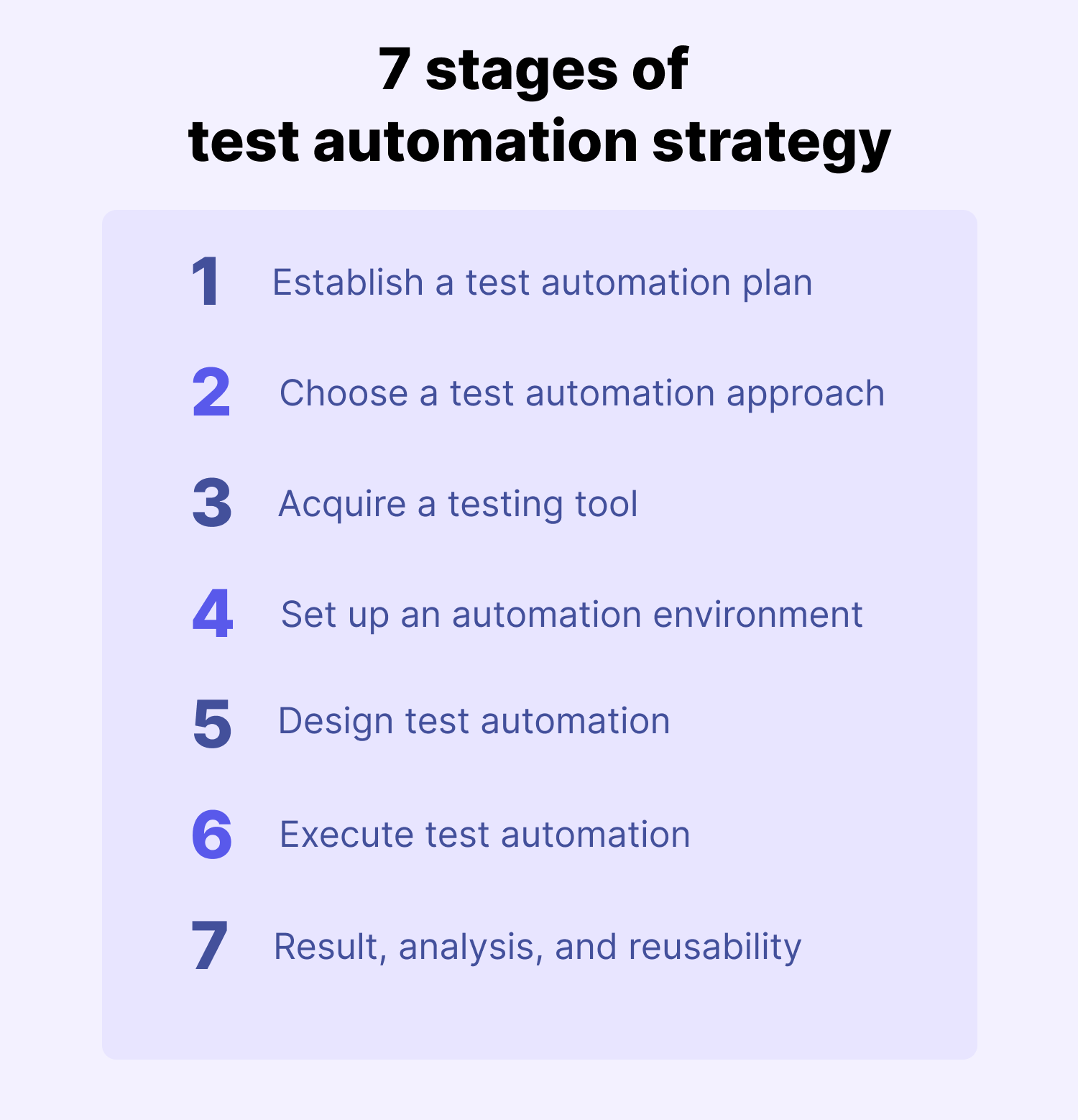
How to implement test automation, in seven stages:
- Establish a test automation plan
- Choose a test automation approach
- Acquire a testing tool
- Set up an automation environment
- Design test automation
- Execute test automation
- Analyze results and maintain the suite
1. Establish a test automation plan
Every automation effort starts with a plan: what you'll automate, why, who owns it, and how you'll know it's working. Define the scope and priorities, check the resources you have, and name the risks before anyone writes a script. Our guide to building a test automation strategy covers the plan itself in more detail.
Tips:
- Plan early. Automation needs machines, licenses, and people's time, and any of those can become a bottleneck if you wait until the sprint it's needed.
- Automate with intent. The best candidates run often and rarely change: regression, smoke, and sanity tests, plus API tests, data-driven tests, business-critical flows like login and checkout, and tests with a clear pass/fail result that take hours by hand. A good rule of thumb: if you run the same check every sprint or every pull request and its expected result rarely changes, automate it. Here's more on how to select test cases for automation.
- Keep some testing manual. Exploratory testing, UX and accessibility checks, one-off tests, features that still change every sprint, anti-automation features such as CAPTCHAs, OS-native features, and tests that need physical hardware are usually better done by people. See manual vs. automation testing for where each fits.
- Set goals you can measure. Tie automation to outcomes leadership cares about: defects caught before release versus after, mean time to detect and resolve defects, regression cycle time, manual hours saved, and test execution time. Track a few short-term wins alongside long-term business impact. For example, insurer SAGA measured its automated regression testing by scenarios covered per release (100+ per product), testing capacity (3x), and time spent on testing (95% less).
2. Choose a test automation approach
Your approach decides how maintainable your tests will be a year from now. Most teams build on one of six types of test automation frameworks: linear, modular, library architecture, data-driven, keyword-driven, or hybrid. Whichever you choose, roll it out as a defined process, the same way you would any other software.
Tips:
- Run a risk analysis. List the potential risks, their likelihood and impact, how you'll mitigate them, and what that costs.
- Get the right people involved early. Automation is an investment, so bring in developers, product owners, manual testers, and management to agree on goals and what to automate. A small proof of concept and an ROI estimate make that conversation much easier.
- Review test plans with development. Priorities change, so check that test plans still match what's being built, and keep them documented and up to date.
3. Acquire a testing tool

There are hundreds of test automation tools, and no single one fits every team. Start from your requirements, not the tool: the tool should solve your problem, not force you to reshape your testing around it.
Tips:
- Choose for your team's real skills. If no one on the team writes code, a code-only framework will stall. If most of your testers are moving from manual testing, a low-code tool lowers the entry barrier, while a scripting mode keeps engineers productive.
- Shortlist by your application, then test them. Build a list of requirements from your application under test and the experience of people who've used the tools, then run trials and use vendor consultations before you commit.
- Know the tradeoffs of open source. Selenium for web testing and Appium for mobile testing are flexible and widely supported, but they need strong programming skills and don't come with built-in reporting. Katalon Studio supports no-code, low-code, and full-code test creation in one tool, across web, mobile, API, and desktop, and works alongside the Selenium and Playwright ecosystems.
4. Set up an automation environment
A stable environment is what makes test results trustworthy. If tests fail because the environment drifted, people stop believing the failures.
Tips:
- Mirror production. Your test environment should match staging, and staging should match production.
- Treat test data as part of the design. Decide where test data lives, whether it needs masking, and what happens to it after a run. Keep it in a managed repository so data-driven tests can reuse it.
- Keep credentials out of scripts. Store usernames, passwords, and API keys in environment files or a secrets manager. It's safer, and the same tests can run against staging and local environments without edits.
- Clean up at startup, not teardown. If a test crashes mid-run, teardown may never run. Clearing old data at the start means every test begins from a known state.
- Tag the data your tests create. Mark test-created records with a test ID, timestamp, or prefix, so they're easy to clean up and trace back to a run.
- Plan browser and device coverage. For cross-browser and mobile testing, use a device farm or a cloud service such as Katalon Test Cloud instead of maintaining your own lab.
5. Design test automation
Once you have a plan, a tool, and an environment, write tests alongside development so they keep up with changes. Cover both positive flows and negative ones, such as invalid data or unauthorized access.
Tips:
- Start with simple, stable tests. Begin with critical happy paths (sign up, sign in and out, password reset, create, update, and delete a core object, add to cart and check out with a mock payment, admin-only page access) on deterministic flows with stable UI and data and few external calls, on one browser, in headless mode. Keep each test short: one user goal, under 60 seconds, no dependencies on other tests. Expand to more browsers and devices once those pass reliably.
- Keep tests independent and modular. Each test should run on its own, without relying on data or state from another test. Small, focused tests are easier to reuse, debug, and run in parallel.
- Use dynamic waits, not fixed sleeps. Wait for a condition, such as an element becoming visible or a request completing, instead of
sleep(5). Tests run faster and fail less. - Add dedicated test attributes. Selectors like
data-test-id="submit-button"don't break when a designer changes the layout or button text. - Test behavior, not pixels. Assert that a feature works and the user gets the right outcome, not that a button is exactly 40 pixels wide.
- Use a maintainable structure. The Page Object Model or the Screenplay pattern keeps UI interactions in one place, and modeling business actions (log in, place an order) instead of click paths keeps tests meaningful as the UI evolves.
- Write test code like product code. Use descriptive names (
loggedInAdminUser, notuser1), move repeated steps into reusable helpers, keep pull requests small, and save comments for decisions that aren't obvious from the code. - Use data-driven and BDD approaches where they fit. Data-driven tests reuse one flow across many input sets, and behavior-driven development keeps testers and stakeholders working from the same user stories.
- Stress-test new tests before merging. Run each new test several times, alone and with the rest of the suite, before it joins your regression suite.
6. Execute test automation

This is where the preparation pays off. Run tests as part of your delivery pipeline, not as a separate event.
Tips:
- Run tests in CI/CD. Trigger them on every code push, pull request, or deployment so feedback arrives while the change is still fresh. See our list of CI/CD tools for options.
- Run independent tests in parallel. A payment test shouldn't wait for a login test to finish. Parallel runs keep feedback fast as the suite grows, but only if tests don't share state: give each test its own data, and use isolated environments or mock services instead of a shared database or filesystem. A test that passes alone but fails in parallel usually has a hidden dependency.
- Organize tests into suites. Group tests by module, test type, priority, positive or negative scenario, and environment, then schedule suites or trigger them on code changes. See how to build a regression test suite.
- Remove environmental noise. Run tests on stable servers and networks, and use mock services for dependencies that aren't available, so failures point to real problems.
7. Analyze results and maintain the suite
Automation only helps if someone acts on the results. Agree in advance how failures get triaged, who fixes them, and how fast.
Tips:
- Track suite health. Watch test duration, pass/fail trends, failure frequency, and flake rate against a baseline, so you can spot tests that slow the pipeline or fail intermittently. Here's how to build a test report.
- Fix flaky tests right away. A test that fails at random teaches people to ignore failures, and that's how real bugs slip through. Find the root cause: often it's the test, but sometimes it's a real race condition or timing bug in the application.
- Find slow tests. Time each run and single out tests that keep getting slower, then speed them up or restructure them.
- Compare results across versions. Check outcomes against previous releases to find gaps in coverage.
- Report in one place. Katalon TestOps brings manual, automated, and AI-generated test results into one system of record, with reporting on quality and release readiness.
- Refactor regularly. A suite that never gets cleaned up builds the same technical debt as any other codebase.
- Make quality a team habit. Write tests alongside new features, review test coverage in code reviews, discuss automation in sprint planning, and make sure developers and product owners can read and contribute to end-to-end tests, not just QA.
Common test automation challenges and how to overcome them
Even with good practices, teams tend to run into five common challenges in automation testing.
- Getting buy-in. Automation needs time and money before it pays back, so it needs support from developers, testers, and management. Show value with a small proof of concept, share the numbers, and present the cost and ROI up front.
- Picking the wrong tool. A tool that doesn't fit your application or your team gets abandoned. Define requirements from your application under test, talk to people who've used the tools, and trial before you buy.
- Finding the right skills. Record-and-playback alone doesn't make a maintainable suite, and developers alone may not test from a user's point of view. Pair testers who know the product with people who know the framework, and choose tools that work for both.
- Keeping up with change. In agile teams the application changes every sprint, and tests that break with every UI change drain time. Modular design, stable test attributes, and tools with self-healing locators keep maintenance under control.
- High upfront cost. Frameworks, licenses, infrastructure, training, and the hidden cost of coordination all come before the payoff. Start small, measure the time saved, and use those results to justify the next phase.
For the specific technical reasons automation projects break down, from timing issues to hardcoded data, see what makes test automation fail. For functional testing specifically, see our automated functional testing best practices.
Frequently asked questions
A plan defines your scope, priorities, timeline, owners, resources, and risks. Without one, teams automate the wrong tests, run into tool and infrastructure bottlenecks, and overrun budgets and schedules.
Automate tests that run often and rarely change: regression, smoke, API, data-driven, and business-critical flows with a clear pass/fail result. Keep exploratory, UX, accessibility, one-off, and fast-changing tests manual, since automating them costs more in maintenance than it saves.
Pick a framework type that your team can maintain (linear, modular, library architecture, data-driven, keyword-driven, or hybrid), then roll it out as a defined process. Choose tools for your team's real skill mix, and trial them against your own application before committing.
Consistency: your test environment should match staging, and staging should match production. Treat test data as part of the design, keep credentials in environment files or a secrets manager, and reset data at the start of each test.
Run tests in CI/CD on every change, run independent tests in parallel, and keep servers and networks stable. Then track duration, pass rates, and flake rate, fix flaky and slow tests quickly, and report results in one place.
Replace fixed sleeps with dynamic waits, use dedicated test attributes instead of fragile selectors, make each test independent, and reset test data at startup. Then treat every new flaky failure as a bug and find its root cause right away.
The most common are getting buy-in, choosing a tool that fits, finding the right skills, keeping tests up to date as the application changes, and the upfront cost. A small proof of concept, tool trials, mixed-skill teams, and modular test design address most of them.
Defects caught before release versus after, mean time to detect and resolve defects, regression cycle time, manual hours saved, and test execution time. Pair quick wins with longer-term business impact when you report to leadership.
Use a clear structure such as the Page Object Model, keep tests small and independent, move repeated steps into reusable helpers, review test code like product code, and refactor regularly.




Test everything. Ship with confidence.
From generating test cases to spotting failures, Katalon's AI works across your entire pipeline, automatically.
