.svg)


We are pleased to let you know that the latest enhancement of Katalon Studio version 4.5 has just been released. This test automation tool is an incredible alternative to both open-source and costly commercial solutions.
This version offers many nice new features and improvements:
- Context-sensitive help links: you now can quickly get help from a specific screen where help is needed.

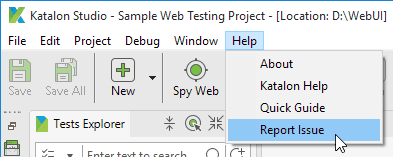
- Reporting issues: you can report any issue and bug to the Katalon Team within Katalon Studio.
- Improved autocomplete: Katalon Studio is now smarter by providing more code suggestions and auto-completions in the scripting mode.

- Parallel execution for mobile testing: you can now manually start multiple web automation tests on different connected iPhone devices simultaneously.
- Simplified UI: users can expand or collapse the Data Binding and Log Details windows to simplify the layout and improve the project content readability.

Please refer the Release Notes for more details and download the free tool here
And more, the tool’s documentation now has more useful information, and it is easier to find. You can also watch Tutorial Videos for setting up your automation environments, recording your first test cafe or execute the sample project effectively.
We hope you enjoy Katalon Studio v4.5.
Thanks and happy testing!
The Katalon Studio Team.
PS: If you don’t want to miss helpful news and tips from Katalon Studio, please follow our Email Whitelist Instruction
|
