.svg)




Writing a bug report sounds simple. But when done wrong, it leads to one outcome: the report gets ignored.
And it happens more than most QA teams admit. Engineers read vague summaries, unclear steps, or missing context, and just reply with a cold: “Can’t reproduce.”
That’s why we created this bug report template. It’s the one we wished we had early in our QA careers. It helps you provide the right information to help developers fix bugs faster. In this guide, you’ll get:
- A simple checklist on what makes a great bug report
- Side-by-side examples of good vs bad reporting
- A free bug reporting template (Excel + Google Sheets)
- Tips on using AI to speed up your reports — without breaking structure
- Advice on how QA leads use bug data to stand out
This isn't just about reporting bugs. It's about writing reports that actually get read — and respected.
Let’s get into it.
Why most bug reports get ignored
Every QA has been there. You log a bug, describe it as clearly as you can, attach a screenshot, and move on. Hours later, you see a developer’s reply: “Can’t reproduce.”
That short message means lost time for everyone. It also means your bug report didn’t communicate what it needed to.
Most bug reports get ignored because they leave too many questions unanswered:
- The environment is missing.
- The description is vague.
- The severity is unclear.
- The expected result is nowhere to be found.
Developers can’t fix what they can’t see, so the bug sits there, forgotten.
From a developer’s point of view, each incomplete report creates friction. They need to guess which version you tested on. They need to retrace steps that weren’t listed. They need to test again and again, hoping to replicate the issue. It turns a simple fix into hours of detective work.
The truth is that every bug report template you use is more than a document. It’s a reflection of your clarity, discipline, and professionalism. When your report is structured, developers notice. When it’s messy, they notice that too.
What makes a great bug report (checklist for beginners)
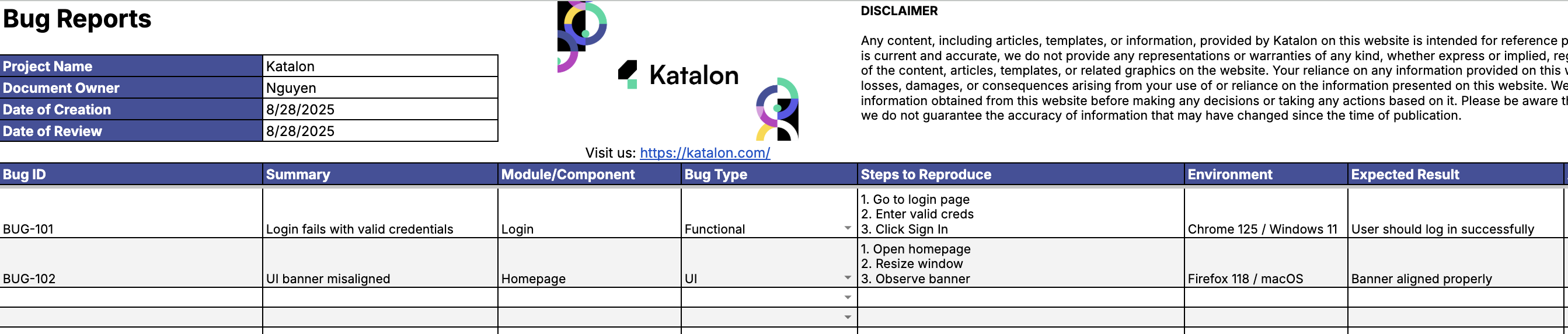
A great bug report does one thing well: it answers every question a developer might ask before they even ask it.
That means more than describing the issue. It means showing that you’ve thought through the impact, verified the conditions, and clearly separated fact from assumption. A good bug report template makes this process easier, but the thinking starts with you.
Here’s a simple checklist to guide every report you write:
- What went wrong? Describe the exact behavior you observed
- Where did it happen? Mention the screen, module, or feature where it occurred
- What was expected vs. actual? Clarify what should have happened, and what actually did
- How severe is it? Label the severity based on user impact and visibility
- Who’s responsible? Point to the owning team or component, if known
This framework helps you avoid over-explaining or under-informing. Each part serves a purpose — helping devs triage faster, test more accurately, and fix issues without chasing details.
Let’s look at a quick example. Two reports. Same bug. One is vague. The other gets to the point:
| Bad | Good |
|---|---|
| "Login not working" | "Login fails with 401 error on Chrome 125 [Windows 11] when entering correct credentials on staging" |
| No screenshot, no version info, no steps to reproduce | Includes environment, browser version, steps to reproduce, and expected behavior |
Clear reporting shows your attention to detail. When engineers see a report like that, they know you respect their time. They’ll return the favor by fixing faster.
And once you build that habit, your reports become more than tickets. They become proof of your thinking, your process, and your value as a QA.
Download the free bug report template (Google Sheets & Excel)
You’ve seen what a great bug report looks like. Now you can download a free bug report template that puts everything into practice.
We built this with input from QA leads across teams. It’s easy to use, fully customizable, and ready to help you write reports that actually get read.
Here’s what’s inside the file:
- Tab 1: Bug Reports Log — structured with all key fields including summary, steps, environment, expected vs actual, and severity
- Tab 2: Bug Metrics Dashboard — auto-calculates MTTR, tracks reopen rate, and shows active bugs by severity
It’s built for clarity, and works with the tools you already use. Whether you log bugs in Jira, track them manually, or just want a better view of QA progress — this sheet gives you structure from day one.
✅ Free
✅ Customizable
✅ QA-lead-approved
Enter your work email to download instantly.
How to use the template step-by-step
Once you’ve downloaded the bug report template, it’s time to put it to work. Each tab is designed to help you stay clear, consistent, and efficient.
Tab 1: Bug Reports Log
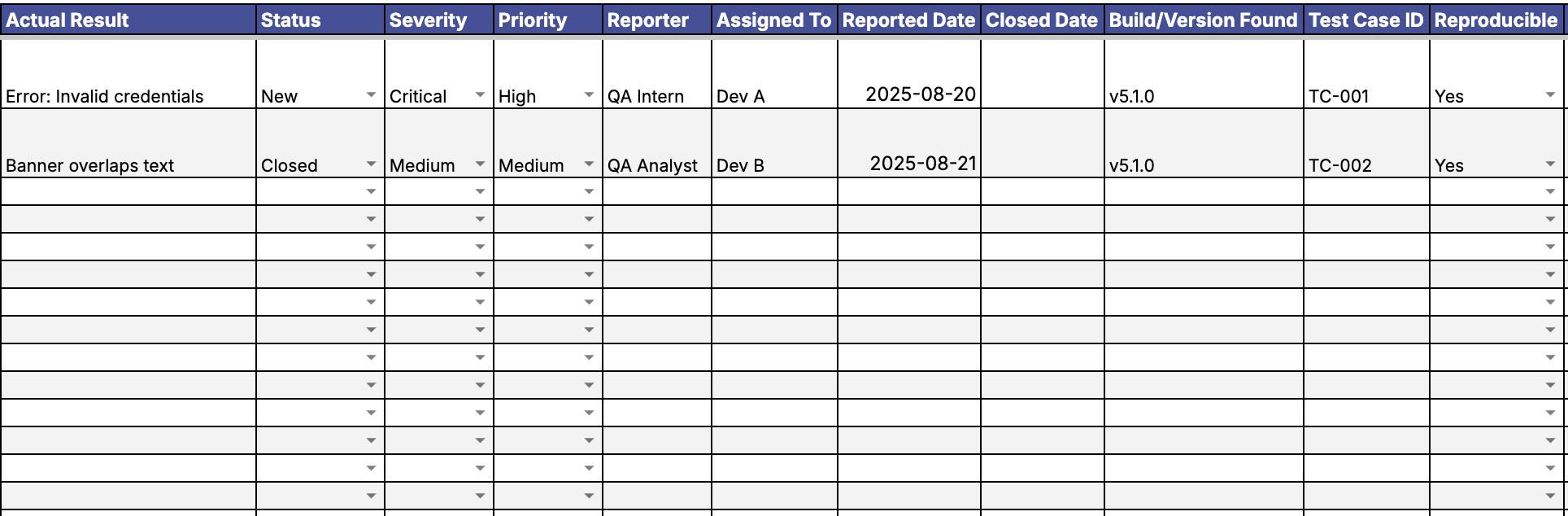
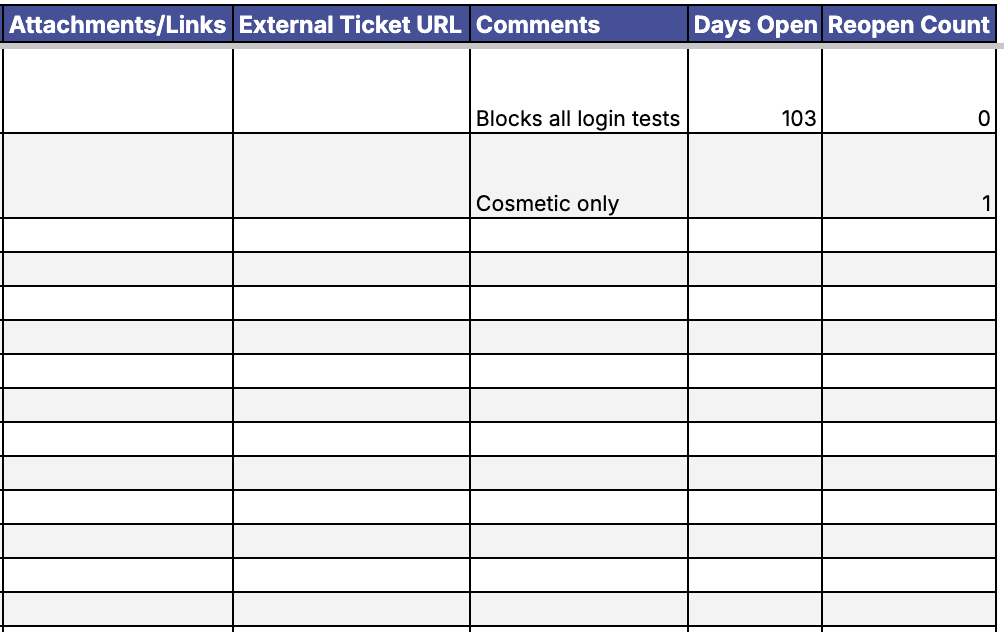
This is where you log each bug with all the context your developers need. Every column is labeled and preformatted to guide you through the reporting process.
Here’s what to fill out:
- Summary: Short, clear title that describes the bug
- Module: Feature or area where the issue happened
- Steps to Reproduce: Numbered list of what actions triggered the bug
- Environment: Device, browser, OS, and app version
- Expected vs. Actual: What should have happened, and what actually happened
- Severity: Business impact of the bug
- Priority: How urgently it should be addressed
Example: "Login fails on Chrome 125 [Windows 11] when using valid credentials in staging environment. Expected: redirect to dashboard. Actual: 401 error."
Tab 2: Bug Metrics Dashboard
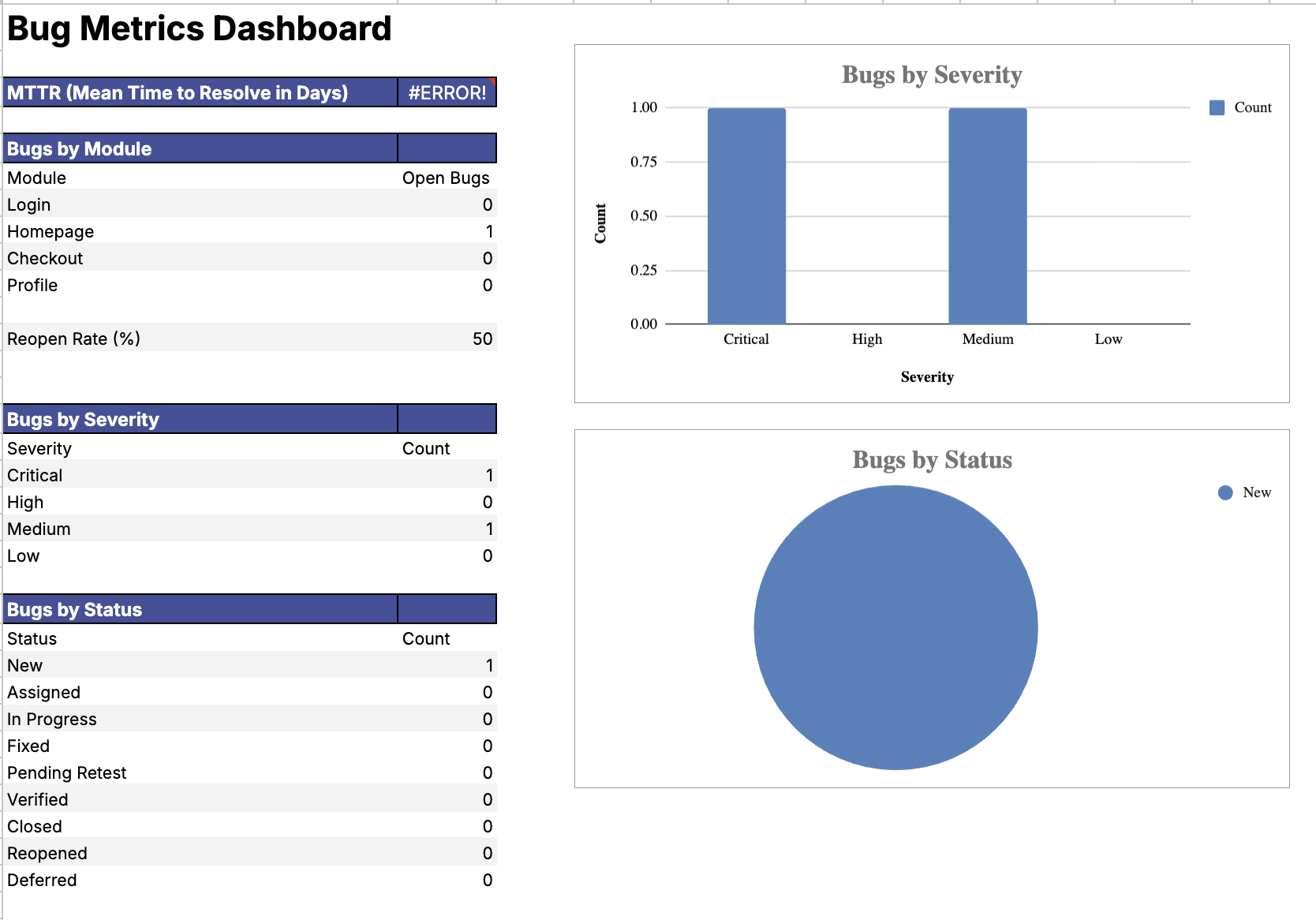
This dashboard updates automatically based on the bugs you log. No formulas needed. It gives you a fast view into how your team is doing.
Key metrics include:
- Mean Time to Resolve (MTTR)
- Bug Reopen Rate
- Open Bugs by Severity
- Bugs by Module
You can filter the data by date, module, severity, or priority. This gives you a real-time snapshot of quality across your product.
Using a structured bug reporting template like this not only helps you report faster but also makes every report easier to trust. You bring order to chaos and make your QA work visible at a glance.
How to customize it with AI (Gemini, ChatGPT, or Perplexity)
AI tools like Gemini, ChatGPT, or Perplexity can help you sharpen your bug reports faster than ever. With the right prompts, they can turn vague summaries into clear, concise statements that save engineers time.
Here are a few ways to use AI inside your bug reporting process:
- Rewrite a bug summary to make it more actionable
- Clarify the expected vs. actual behavior
- Suggest steps to reproduce based on initial notes
For example, you can paste your original summary into ChatGPT with a prompt like: "Rewrite this bug summary to be clearer for developers". Within seconds, you get a sharper version that’s easier to understand.
However, formatting matters. That’s why this bug report template exists — to preserve structure while giving you flexibility.
💡 Tip: Copy your AI output into a clean cell. Never overwrite structured columns. That way, you keep formulas, filters, and dashboards working exactly as intended.
Think of AI as your assistant, not your system. It can enhance your reports. The template ensures they stay readable, usable, and complete.
Bonus: learn to think like a QA lead
Once you start logging bugs with structure, you’ll notice something powerful. The same bug report template that helps you track issues can also help you think like a QA lead.
QA leads don’t just look at bugs. They look at patterns. They ask why bugs happen, where they cluster, and how fast the team responds. That’s how they improve quality with data, not guesswork.
Use your dashboard metrics to analyze trends over time. Check your MTTR to see how long it takes to close bugs. Track your reopen rate to understand where communication or testing gaps might exist. Spot which modules or browsers have the highest number of issues, and plan your next regression cycle around them.
Example insight: “Most reopened bugs come from Homepage. Prioritize Regression testing in that area for the next sprint.”
You can also bring these insights into performance reviews. When you show data-backed improvements, you demonstrate ownership.
That’s the mindset shift. A well-used bug reporting template doesn’t just make you faster. It helps you grow into the kind of QA who sees beyond the bug, into the process behind it.
Common mistakes this template helps you avoid
Even skilled testers fall into the same reporting habits. The bug is real, but the report misses something. With this structured bug report template, those gaps disappear before they cause friction.
Here’s how the template helps you stay on track:
| Mistake | Solution |
|---|---|
| Forgetting environment | Dedicated “Environment” field |
| Mixing up severity and priority | Separate dropdown columns |
| Writing too vague | Prompts to clarify expected vs. actual |
| Missing attachments | Attachment or link column |
| No metrics tracking | Dashboard auto-calculates key metrics |
With every column in the template working for you, it’s easier to report clearly, think critically, and avoid repeat issues across your team.
Related resources to level up your QA reporting
Once you’ve mastered the basics of using a bug report template, you can go even further. These resources will help you sharpen your QA skills, automate your process, and understand the bigger picture behind bug tracking.
- Bug life cycle explained — Learn how a bug moves from discovery to closure, and how teams handle each phase effectively
- How to find bugs on websites — Explore practical techniques and tools to improve your bug-hunting process
- Submit bugs from Katalon Studio to Jira — Streamline your reporting workflow with seamless integration
- Join the Katalon Community: Bug Reports Forum — Share real-world bug reports, get feedback, and learn from fellow testers
These links will give you practical tools, real-world context, and a deeper understanding of how professional QA teams operate every day.
Final thoughts: one template, endless confidence
You don’t need more templates. You need one system that works every time. A clear process. A structured approach. A bug report template that helps you sound like the QA pro you are becoming.
This template does more than organize bugs. It saves hours, reduces guesswork, and shows your team you care about quality, not just tickets.
Every QA who got promoted started by mastering how they write bug reports. It’s one of those habits that sets the foundation for everything else. When your reports are sharp, your impact becomes visible.
|
