.svg)


.png)

Regression testing is one of the most critical parts of the release cycle. It confirms that the new code works, and that old features still behave the way users expect.
But here’s the catch: regression testing always comes in late. And without structure, it gets messy fast with unclear scope and scattered test cases. That means high chances of missing critical flows.
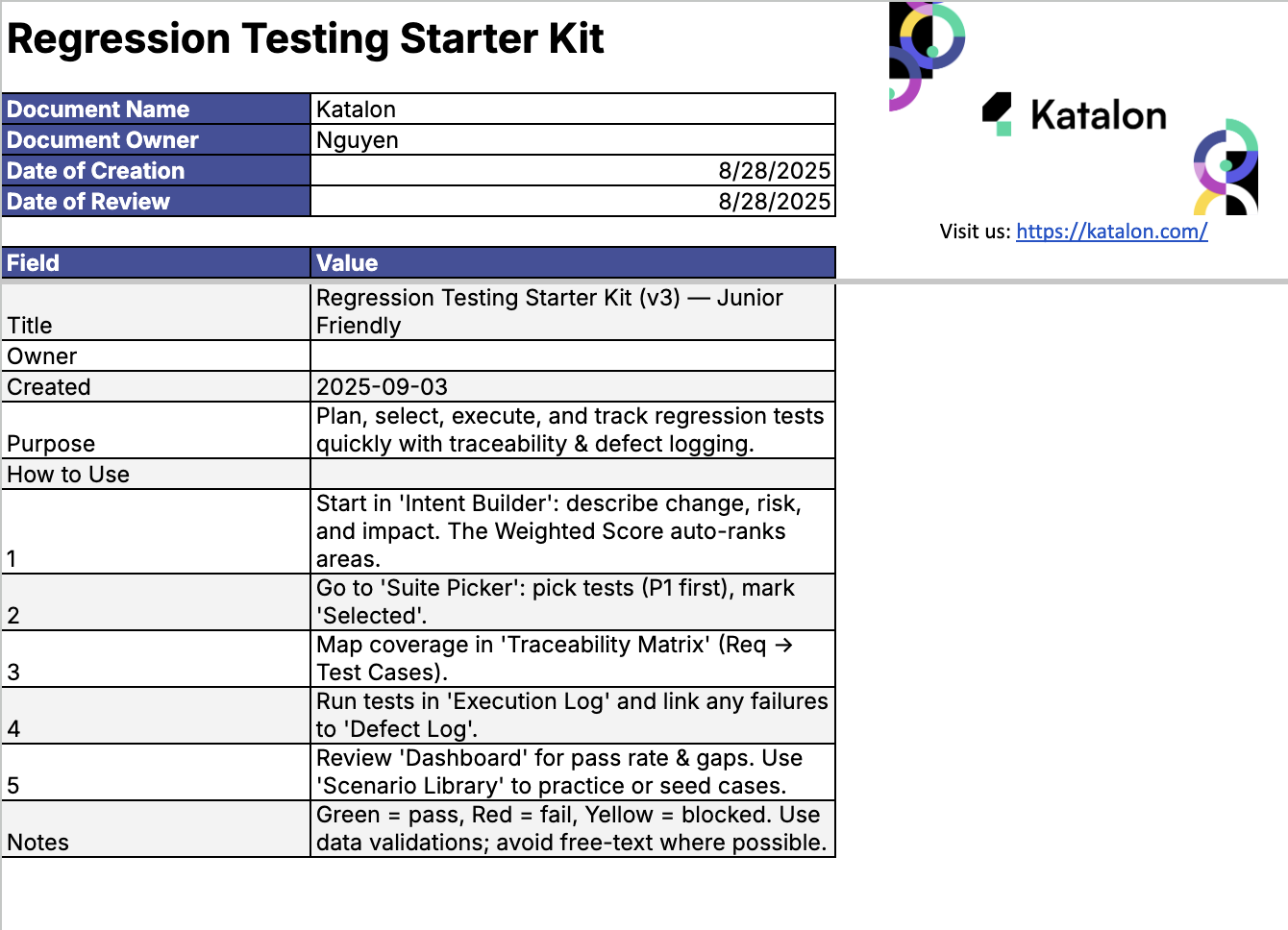
The Regression Testing Starter Kit is built to solve that. It’s a simple Excel template that helps you plan, select, and track your regression tests all in one place.
In this guide, we’ll walk you through:
- What regression testing means and why it matters
- Why a structured kit works better than a checklist
- What’s inside the Regression Testing Starter Kit (Excel)
- How to use it, step by step
- Example: a junior tester under real-world release pressure
If you're looking to bring clarity and speed to your testing cycles, this kit is for you.
Let’s get started.
Why regression testing always feels endless?
Every QA team has been there. The sprint is closing, the build arrives, and testing begins when everyone is already running out of time. Regression testing becomes a race against the clock even when the intent is to ensure stability before release.
When the team doesn’t have a single source of truth for what changed, what to retest, or what to prioritize, regression testing starts to stretch endlessly. People test everything just to be safe, but still feel uncertain about coverage.
That’s why you need the Regression Testing Starter Kit. It’s a simple Excel-based tool that turns scattered efforts into an organized workflow. You can see exactly what needs attention, assign priorities, and keep every result traceable from change to test to defect.
What is regression testing (in simple terms)?
Regression testing is the process of re-running test cases to confirm that recent code updates still allow existing features to work correctly. It ensures that new changes add value without affecting what already performs well.
Think of it like a safety net for your application. Each time developers push an update, testers run a set of regression tests to check that the product still behaves as expected. It’s how QA teams preserve reliability while keeping development fast.
Before every release, regression testing plays a vital role. It verifies that both new and old functions align with business expectations. When done consistently, it builds confidence that every update will perform smoothly in production.
Why you need a regression testing kit (not just a checklist)?
Using a checklist is better than flying blind. Yet a checklist alone can still leave you unsure of what to test next. That’s where a structured kit comes in.
With the Regression Testing Starter Kit you get a unified framework for traceability, prioritisation and reporting. You move from wondering what to test to executing knowing you’re covering what matters most.
- Traceability: link requirements to test cases, test results to defects and defects to business impact.
- Prioritisation: focus on high‑risk features without ignoring the core ones that keep working.
- Reporting: view dashboards that show pass rates, automation coverage and blockers instead of manually building slides.
When you adopt a full kit instead of a static checklist you spend less time debating what to test and more time actually testing. Your regression cycles become faster, clearer and more outcome‑driven.
Inside the regression testing starter kit (Excel overview)


The Regression Testing Starter Kit is organized into key tabs so your testing process becomes transparent, structured and efficient.
- Intent Builder — define the type of change, assess risk and mark whether automation can cover it. Then let the sheet auto‑weight priorities so you know what to test first.
- Suite Picker — select the regression tests you want to run and mark them as P1, P2 or P3. You’ll clarify which tests matter most and avoid arbitrary picks.
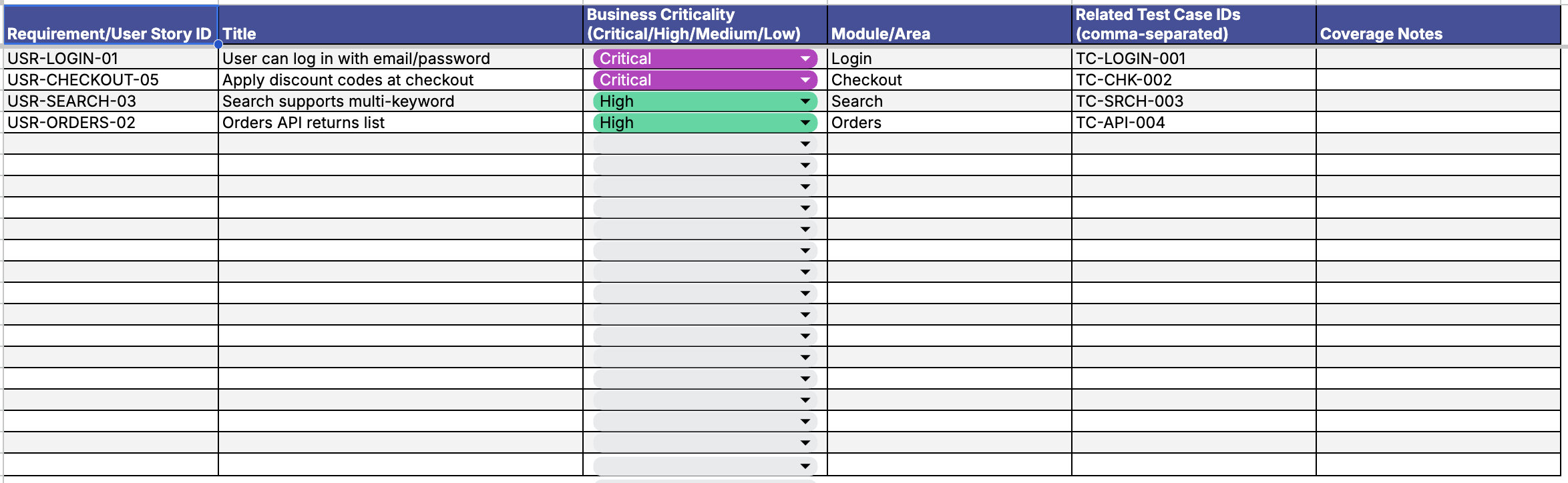
- Traceability Matrix — link each test case to a user story or requirement. This builds a clear line from business need to test to result.
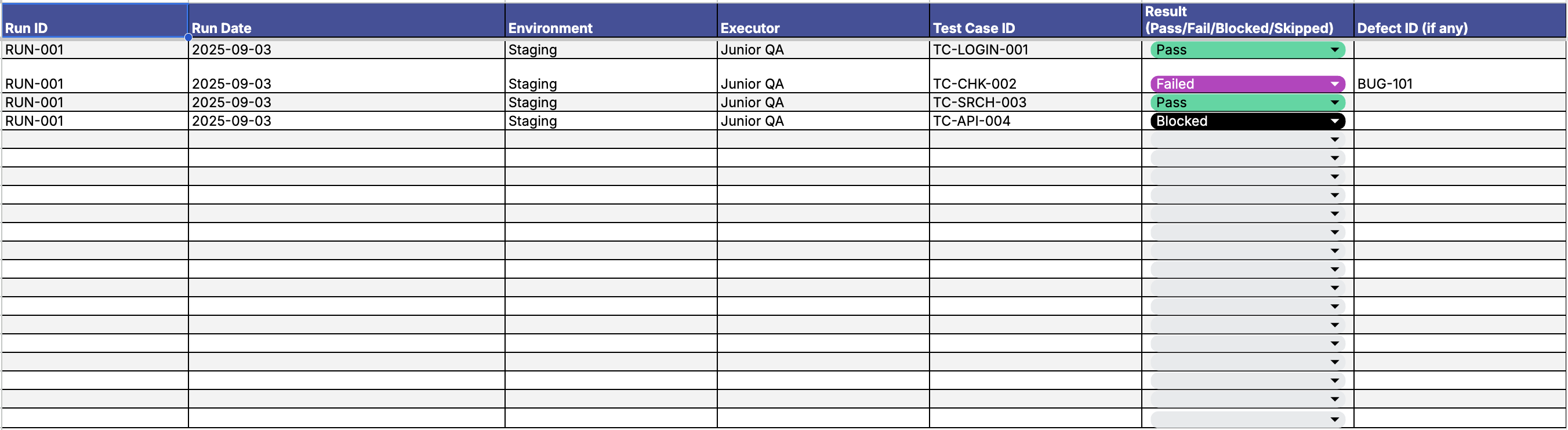
- Execution Log — track pass or fail statuses, attach defect IDs and add notes. You’ll create a rich execution history instead of a list of unchecked boxes.
- Defect Log — document every bug with root cause, affected tests and statuses. You’ll see how issues originate and grow insight into test gaps.
- Dashboard — view live metrics such as pass rate, automation coverage and blocker count. You’ll turn raw data into actionable insight for your team and stakeholders.
- Scenario Library (optional) — store reusable test examples or patterns, especially useful for junior testers who need proven templates to work confidently.
Each tab in this Excel tool supports the end‑to‑end process of regression testing: from change intake to test selection, to execution, to defect review and insights. When you use the kit you’re not just tracking tests. You’re managing your regression testing lifecycle.
In short, the structure of the starter kit gives you alignment, visibility and speed. You’ll spend less time managing logistics and more time executing meaningful regression tests.
How to use the regression testing Excel template?
You’ve downloaded the Regression Testing Starter Kit. Now let’s walk through exactly how to use it with clarity and purpose.
- Start with the Intent Builder. This is where you define what has changed in the build. You mark the change type, evaluate risk and automation fit. The tool then calculates test priority. No second guessing.
- Go to the Suite Picker. Based on your intent and priority, select the regression test cases that are relevant. Tag them by severity so you always start with the highest risk areas first.
- Open the Traceability Matrix. Here you map test cases to requirements or user stories. This shows which stories are covered and which are not. It keeps you honest with coverage.
- Run your tests and update the Execution Log. You mark test status as Green [Pass], Red [Fail], or Yellow [Blocked]. Each log entry has a place to attach defect IDs and add notes. You now have a record anyone can follow.
- Switch to the Defect Log. Add any bugs found during regression. Note the test that caught it, write the root cause, and track the resolution status. It creates a shared understanding of what’s broken and why.
- Finally, use the Dashboard to monitor test progress and report outcomes. You’ll see pass rate, blockers, and automation levels. The visuals are instantly shareable with stakeholders or the dev team.
💡 Tip: Stick to the color codes. They speed up standup reviews and help others scan results without digging through the logs.
Once you’ve gone through the cycle a few times, the kit becomes second nature. You’ll reduce confusion, shorten test cycles, and know exactly where your release stands.
Why this kit works better than a generic template


Most test templates help you record things. The Regression Testing Starter Kit helps you decide.
It guides you from intent to test selection to reporting. Each part of the kit exists for a reason. Each tab drives decisions. There’s no fluff. Only structured actions that reduce guesswork and bring clarity fast.
The best part is how the logic flows. You start by thinking through the change. The kit then connects that change to priority-weighted test cases. It auto-maps them to related user stories. You test, log results, and report. The entire QA lifecycle is contained in one place.
Download the Regression Testing Starter Kit (Excel)
If you’ve made it this far, the only thing left to do is try the kit yourself.
The Regression Testing Starter Kit is ready-to-use out of the box. No account needed. No setup required. It opens in Excel and works right away.
Plan smarter. Pick tests based on change type and risk. Track results. Link defects. Visualize coverage and automation in one place. Everything you’ve seen in this article is already built in.
Whether you’re shipping daily or preparing for a major release, this kit makes regression testing a smoother, more predictable process.
Get your free copy of the Regression Testing Starter Kit (Excel):
- Designed for clarity and speed
- Perfect for individual testers or growing QA teams
- Includes built-in dashboard, test mapping, and defect logging
Related templates you might need next
Once you’ve implemented the Regression Testing Starter Kit, there are more tools that can help streamline your QA workflow even further.
These templates are built with the same goal in mind: making manual testing, automation, and test planning faster and easier for everyone on the team.
- QA Test Scenarios Template — Document test flows clearly and quickly. Great for mapping out common user journeys.
- Manual vs Automation Decision Matrix — Helps you choose the right approach for each test case based on stability, frequency, and effort.
- Test Case Management Template — Organize, tag, and track all your test cases in one centralized place.
Each one complements your regression testing strategy. Together, they build a complete system for test planning, execution, and reporting.
|
