.svg)




Most QA teams build and run test cases every sprint. But without a shared structure, tests get reactive, repetitive, or incomplete—leading to missed edge cases, duplicated effort, and late-cycle surprises.
That’s where QA Test Scenarios come in. A test scenario maps out what you’re testing at a business flow level before you dive into writing test cases. It gives your team a clear, reusable view of what matters—so you test smarter, not just more.
In this guide, we’ll cover:
- What a QA Test Scenario is (and what it isn’t)
- Why scenarios improve coverage, communication, and traceability
- When to use scenarios vs. skipping them
- A step-by-step framework to write your own
- Real examples pulled directly from our free Excel template
Let’s get your testing aligned, scenario-first.
Introduction: Why QA Test Scenarios Matter
Too often, QA teams jump straight into test case writing without taking a step back. The result? Reactive testing, duplicated checks, inconsistent coverage, and confusion when bugs slip through.
QA Test Scenarios solve this by providing a structured way to think about what needs to be validated—before the first step is written. They align business logic with quality goals, making testing more deliberate, transparent, and collaborative.
In modern QA, especially in Agile and DevOps workflows, relying on test cases alone can miss the bigger picture. Scenarios help teams see user flows, edge cases, and risk areas with clarity—so testing efforts stay aligned with real-world usage and business impact.
This article, along with a free downloadable Excel template, will show you how to shift from random testing to scenario-driven quality coverage. The goal: more traceable, reusable, and priority-aligned QA processes that scale with your product and team.
What Is a QA Test Scenario?
A QA Test Scenario is a high-level description of what functionality or user flow should be tested. It outlines the goal of testing without diving into exact steps or technical details. In simple terms, it tells you what to test, not how to test it.
For example, a scenario might be “Verify user can reset password via email link.” This sets the direction for multiple test cases like valid email flow, expired token, and invalid user ID.
Scenarios play a critical role in ensuring coverage of business logic before a single test case is written. They help QA engineers map out all major user flows and edge cases early, minimizing gaps and surprises later.
You can think of a test scenario as a roadmap. The test cases are the driving directions, and individual test steps are each turn you take. When structured properly, the flow looks like this:
Scenario → Test Case → Test Step
This hierarchy keeps your testing process aligned, scalable, and easy to trace back to requirements.
Why QA Teams Need Test Scenarios
- QA Test Scenarios bring structure and clarity to how teams validate software. They ensure no critical user journey gets missed, especially as applications grow more complex.
- Scenarios also improve collaboration. Testers, product managers, and developers can all align on what’s being tested and why. When written well, they serve as a shared reference point across the team.
- Another key benefit is prioritization. When teams outline high-level flows upfront, they can focus resources on what truly matters instead of spending equal effort on every edge case.
- Test scenarios reduce duplication, especially when multiple testers work on overlapping areas.
When done consistently, test scenarios also help with audits and QA reporting. They offer a high-level overview of what was tested and why, making your documentation both defensible and useful.
Step-by-Step: How to Create QA Test Scenarios
A well-structured QA Test Scenario starts long before writing. It begins with understanding the product and ends with reusable, business-aligned documentation. Here's a clear step-by-step method your team can apply immediately:
1. Understand Requirements: Start with user stories, acceptance criteria, and business logic. This context shapes what needs to be validated.
2. Identify Key Modules: Break the system into logical areas like Authentication, Checkout, or Security. This keeps your scenario list organized and scannable.
3. Define Objectives: Clarify the user behavior or business function being validated. This brings purpose to the scenario.
4. Write Scenario Statements: Keep it short and action-focused. Example: Verify login with valid credentials. This makes the intent immediately clear to any reader.
5. Add Expected Outcome: Define what success looks like. Use measurable language: User is redirected to dashboard within 2 seconds.
6. Assign Priority: Use High, Medium, or Low labels based on business risk or user impact. This helps teams focus effort where it matters most.
7. Decide Test Type: Label scenarios by their intent: Functional, Negative, Security, Usability. This informs the QA approach and test case structure.
8. Review & Update Regularly: As requirements evolve, scenarios should too. Review at the end of each sprint to keep your library accurate and aligned.Follow this framework, and your QA Test Scenarios will guide quality coverage across teams and cycle.
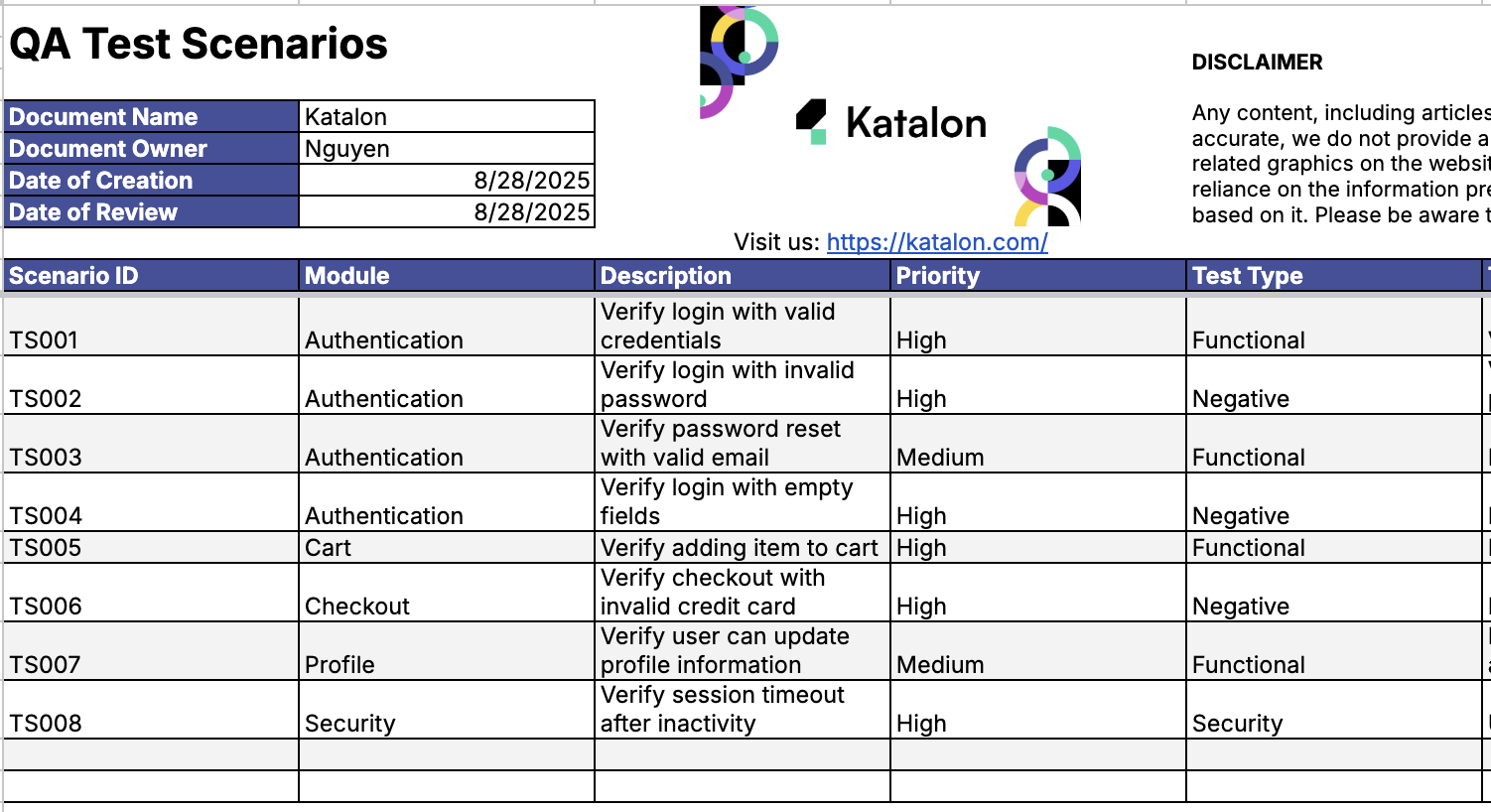
Here’s how QA Test Scenarios are structured inside the downloadable Excel template. This format brings consistency, clarity, and alignment to every part of the QA process.
| Scenario | Module | Description | Priority | Test Type | Expected Outcome |
|---|---|---|---|---|---|
| TS001 | Authentication | Verify login with valid credentials | High | Functional | User logs in successfully |
| TS005 | Cart | Verify adding item to cart | High | Functional | Item appears in cart |
| TS008 | Security | Verify session timeout after inactivity | High | Security | User is logged out automatically |
Download the Free QA Test Scenario Template
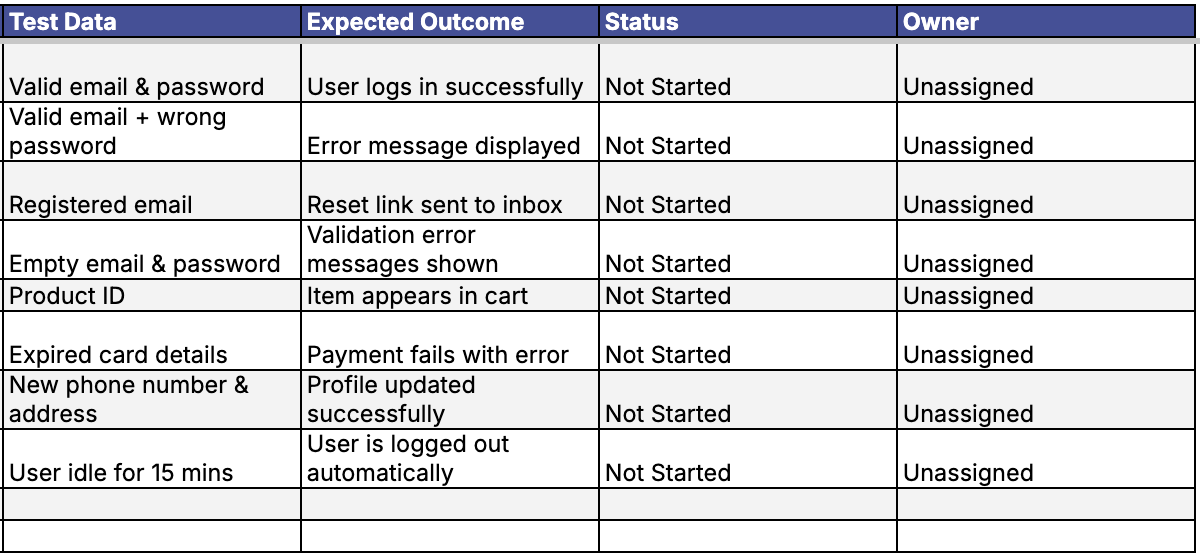
The QA Test Scenario Template is designed to give your team a clean starting point without overcomplication. It includes all the core fields your QA team needs to stay aligned and move fast:
- Module
- Description
- Priority
- Test Type
- Test Data
- Expected Outcome
- Status
- Owner
This template works great for QA Engineers with 1 to 5 years of experience who need structure without excess overhead. It’s also ideal for Test Leads or QA Project Coordinators managing distributed teams and fast-changing release cycles.
By standardizing the format across your scenarios, you improve traceability, reduce ramp-up time for new team members, and keep documentation aligned sprint after sprint. Whether you’re scaling coverage or preparing for audits, this template saves hours of planning and manual setup.
Best Practices for Managing Scenarios
Well-managed QA test scenarios create consistency and reduce rework across teams. Here’s how to keep your scenario library clean, clear, and actionable:
- Keep each scenario simple and business-focused — one goal, one flow. This improves traceability and reduces confusion during test execution.
- Avoid mixing too many variations in a single scenario. Create separate entries for clear validation and reusable test design.
- Use consistent naming and organize by module. This helps QA leads and automation engineers scan and locate key flows quickly.
- Link to related test cases or automation scripts using IDs. This strengthens your documentation trail and supports full lifecycle visibility.
- Review scenarios every sprint to stay in sync with changing features, user stories, or acceptance criteria.
- Prioritize automation for high-frequency, high-impact scenarios. These yield the most return on effort in regression and continuous testing cycles.
Follow these practices to make your QA test scenarios not just readable, but valuable throughout the product lifecycle.
Best Practices for Managing Scenarios
Well-managed QA test scenarios create consistency and reduce rework across teams. Here’s how to keep your scenario library clean, clear, and actionable:
- Keep each scenario simple and business-focused — one goal, one flow. This improves traceability and reduces confusion during test execution.
- Avoid mixing too many variations in a single scenario. Create separate entries for clear validation and reusable test design.
- Use consistent naming and organize by module. This helps QA leads and automation engineers scan and locate key flows quickly.
- Link to related test cases or automation scripts using IDs. This strengthens your documentation trail and supports full lifecycle visibility.
- Review scenarios every sprint to stay in sync with changing features, user stories, or acceptance criteria.
- Prioritize automation for high-frequency, high-impact scenarios. These yield the most return on effort in regression and continuous testing cycles.
Follow these practices to make your QA test scenarios not just readable, but valuable throughout the product lifecycle.
Common Mistakes & How to Avoid Them
| Mistake | Why it hurts | Better practice |
|---|---|---|
| Writing overly detailed scenarios | Hard to maintain, overlaps with test cases | Keep high-level, business oriented |
| Ignoring updates after new releases | Outdated coverage | Version control or owner assignment |
| Skipping user perspective | Gaps in flow testing | Validate from real user paths |
| Treating scenarios as optional | Missed edge cases | Integrate in QA checklist |
QA test scenarios work best when treated as a living part of the testing process, not a one-time task. Avoiding these pitfalls helps your team stay aligned, agile, and accurate.
Similar Resources
|
