.svg)




A manual test case is a written instruction that guides a tester through a specific set of actions to validate a feature or function. It is simple in form but powerful in impact—especially when clear, consistent, and tied to real outcomes.
Whether you are validating UI changes, testing a new API, or reviewing complex workflows, a structured manual test case template helps your team stay aligned, reduce errors, and document exactly what was tested and why.
In this guide, we will walk you through:
- What makes a good manual test case
- The key fields every manual test case template should include
- How to make your test cases easy to execute and maintain
- Common mistakes to avoid when writing test steps
- Downloadable templates to get started fast
Let’s dive in.
Why a manual test case template still matters?
Manual test cases help you spot things automation cannot catch easily. Think of confusing button placements, poor error messages, or inconsistent visual alignment. These are bugs in user experience, and only a human can catch such bugs.
The problem with manual testing is that it can be tricky to properly tracked compared to test automation. When test documentation is missing, teams duplicate work. Regression bugs slip back in without a trace. And when something breaks, nobody knows if it was tested or not. Clear documentation prevents that chaos before it starts.
A well-written manual test case template helps your testers focus, your leads track progress, and your stakeholders trust the results. It is still one of the best tools for delivering clarity in complex systems.
When to use this template?
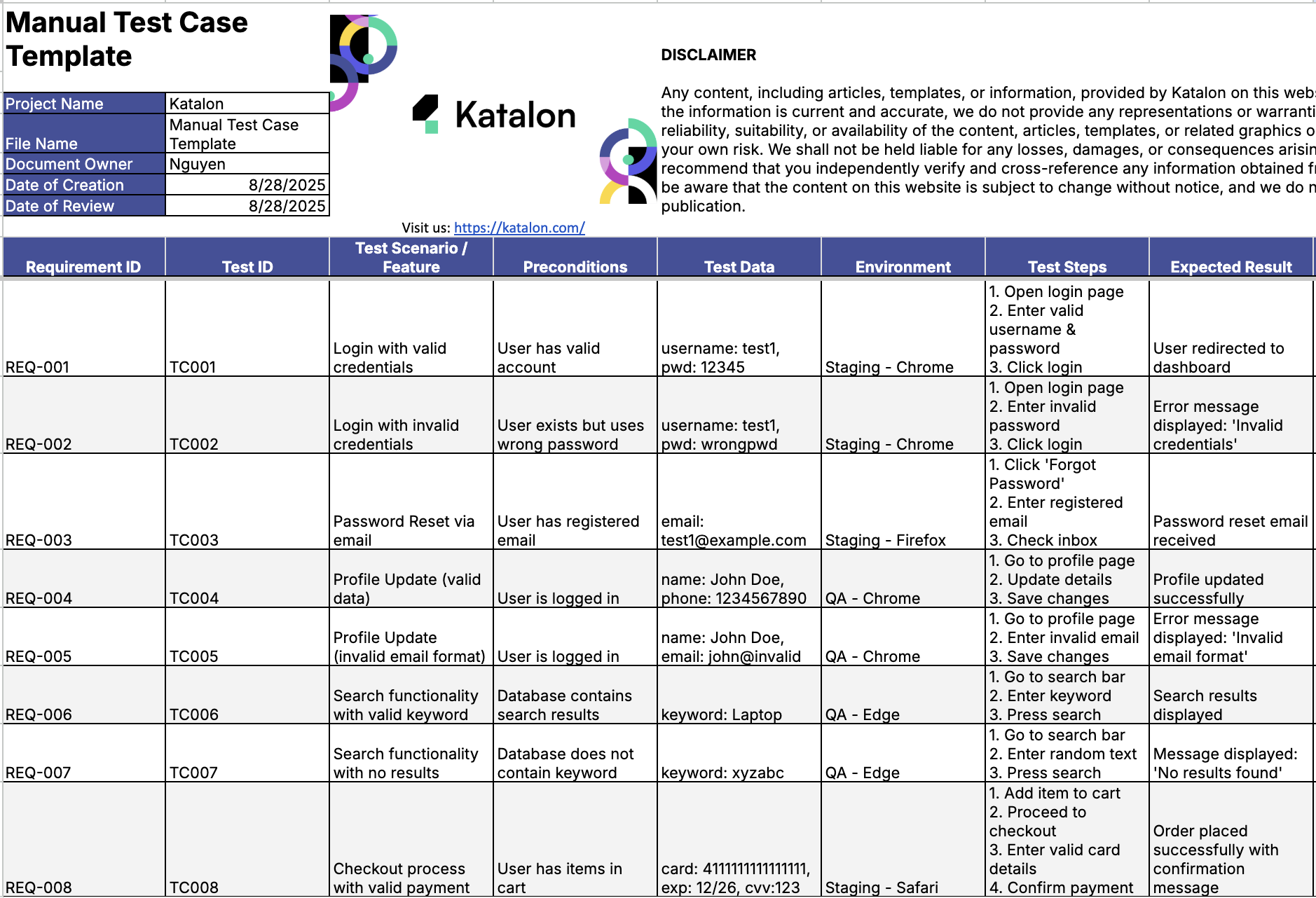
The manual test case template shines when you need repeatability, traceability, and clear evidence of what was tested. It works best in structured contexts where results matter and follow up is needed.
Most useful scenarios include:
- Feature testing, where new functionality needs clear steps and expected outcomes
- Regression cycles, to ensure previously working features stay stable after changes
- Exploratory documentation, when testers capture discoveries in a repeatable format for future reference
The template helps certain roles more than others:
- Junior QA testers gain clarity on exactly what to test and how to record results.
- QA leads get visibility into progress, blockers, and coverage.
- Product managers and clients receive concise evidence of validation, without digging through raw bug logs.
For very fast checks, prototypes, or short lived experimental builds, you should choose lightweight notes or a checklist instead. Those formats give speed and just enough structure while the feature is still evolving. When the feature stabilizes, move it into the manual test case template for full coverage and traceability.
Key principles that make a manual test case effective
A good manual test case template is not about length or complexity. It is about precision and clarity. Every case should serve one purpose, link to one requirement, and produce one clear result.
- Single-purpose. One case equals one validation. For example, “Login with valid credentials” should be its own test. Do not combine it with “Login with invalid credentials.” When a test fails, you should know exactly which behavior broke and why. Simplicity helps isolate issues faster.
- Traceability. Always connect each test case to a specific requirement or story ID, like “REQ-004.” When defects resurface later, that link helps you track what was expected and whether it has regressed. Traceability turns your test suite into a living map of product behavior.
- Objectivity. Replace subjective statements like “System behaves correctly” with measurable outcomes such as “Dashboard loads within two seconds” or “Error message displays in red text.” Clear criteria make reviews easier and results more consistent.
- Clarity over cleverness. A test case should be readable by anyone on the team, not just the person who wrote it. If another tester cannot follow your steps and reproduce your result, the documentation has failed. Clarity is the true mark of quality in testing.
Follow these principles in every section of your manual test case template. They turn ordinary test steps into actionable documentation that drives confidence and collaboration.
Inside the template: what to prioritize (and what to watch for)
A manual test case template can have many fields, but not all of them carry equal weight. Some columns move the needle more than others. Let’s focus on the three that truly drive clarity, action, and trust.
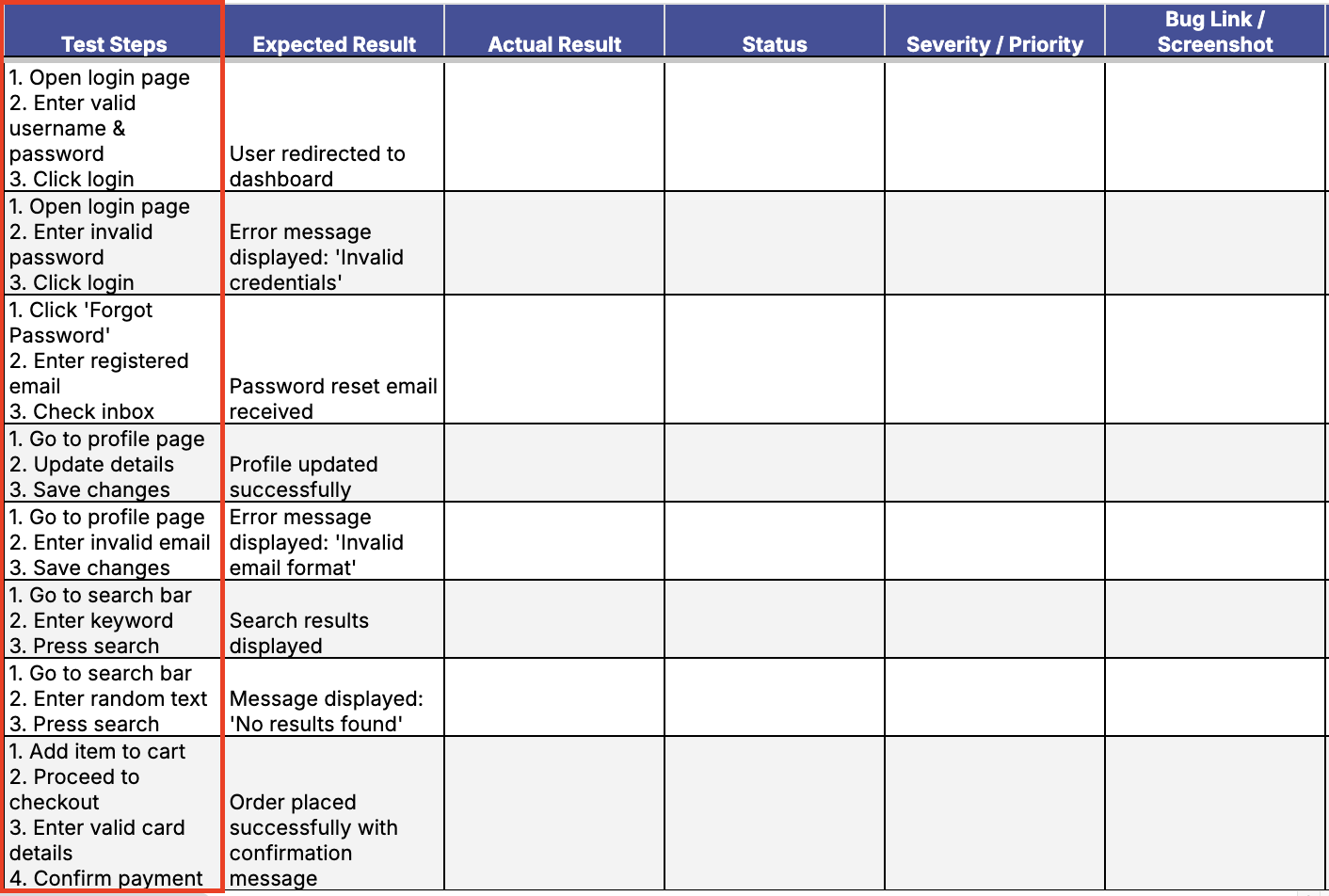
🔹 Test Steps
Purpose: Test steps define reproducibility. They make sure every tester executes the same actions in the same order.
Common mistake: Steps that are too broad, like “Login to app,” leave too much to interpretation. This leads to inconsistent test execution.
Pro tip: Start each step with a verb. Limit each step to one action only. For example, “Click the login button” is better than “Try to log in.”
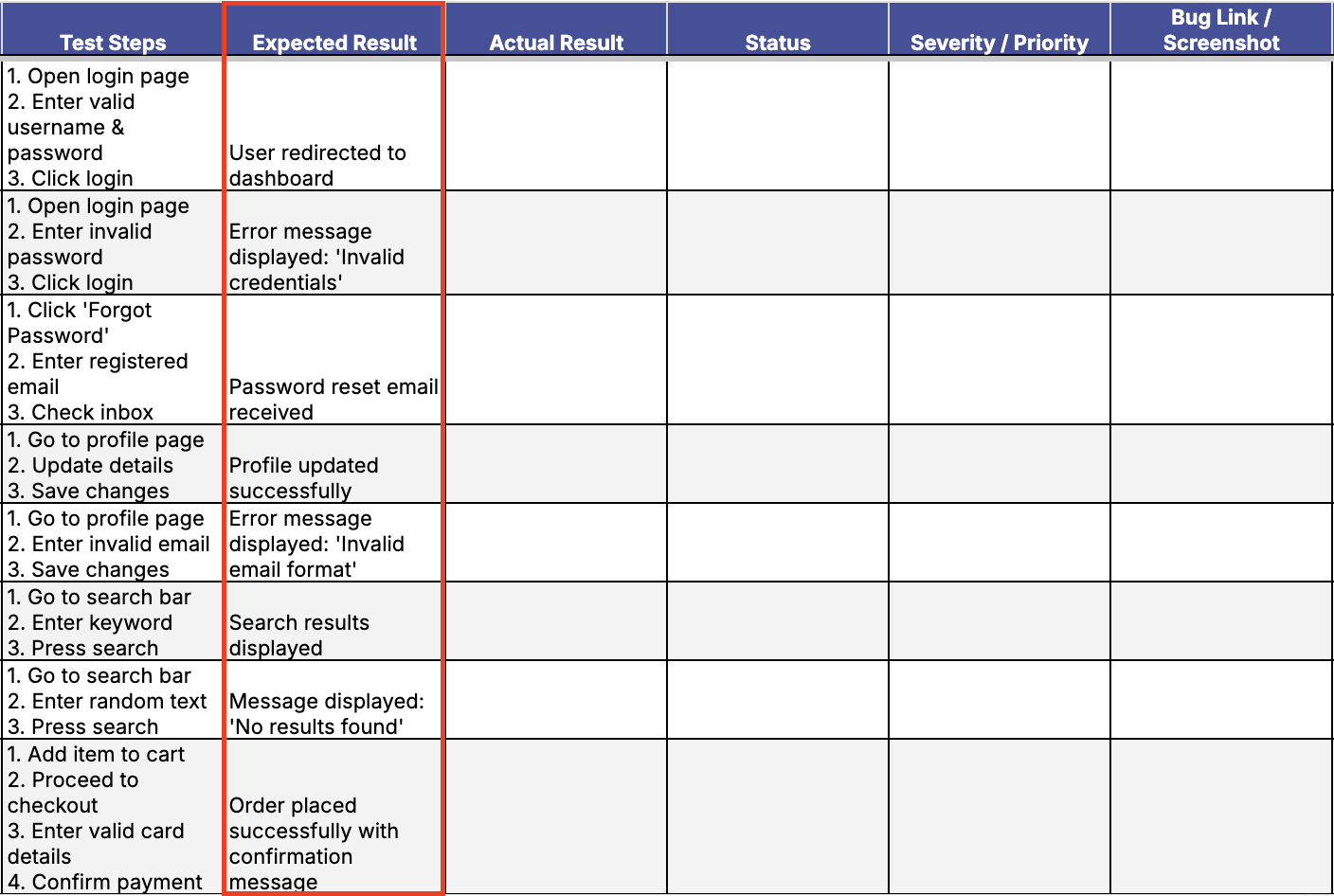
🔹 Expected Result
Purpose: This column defines your pass or fail line. Without it, you cannot objectively judge the outcome.
Common mistake: Vague phrases like “Works fine” lead to confusion during peer reviews or audits.
Pro tip: Quantify your result. Say “Dashboard appears within two seconds” or “Confirmation message shows in green with correct ID.”
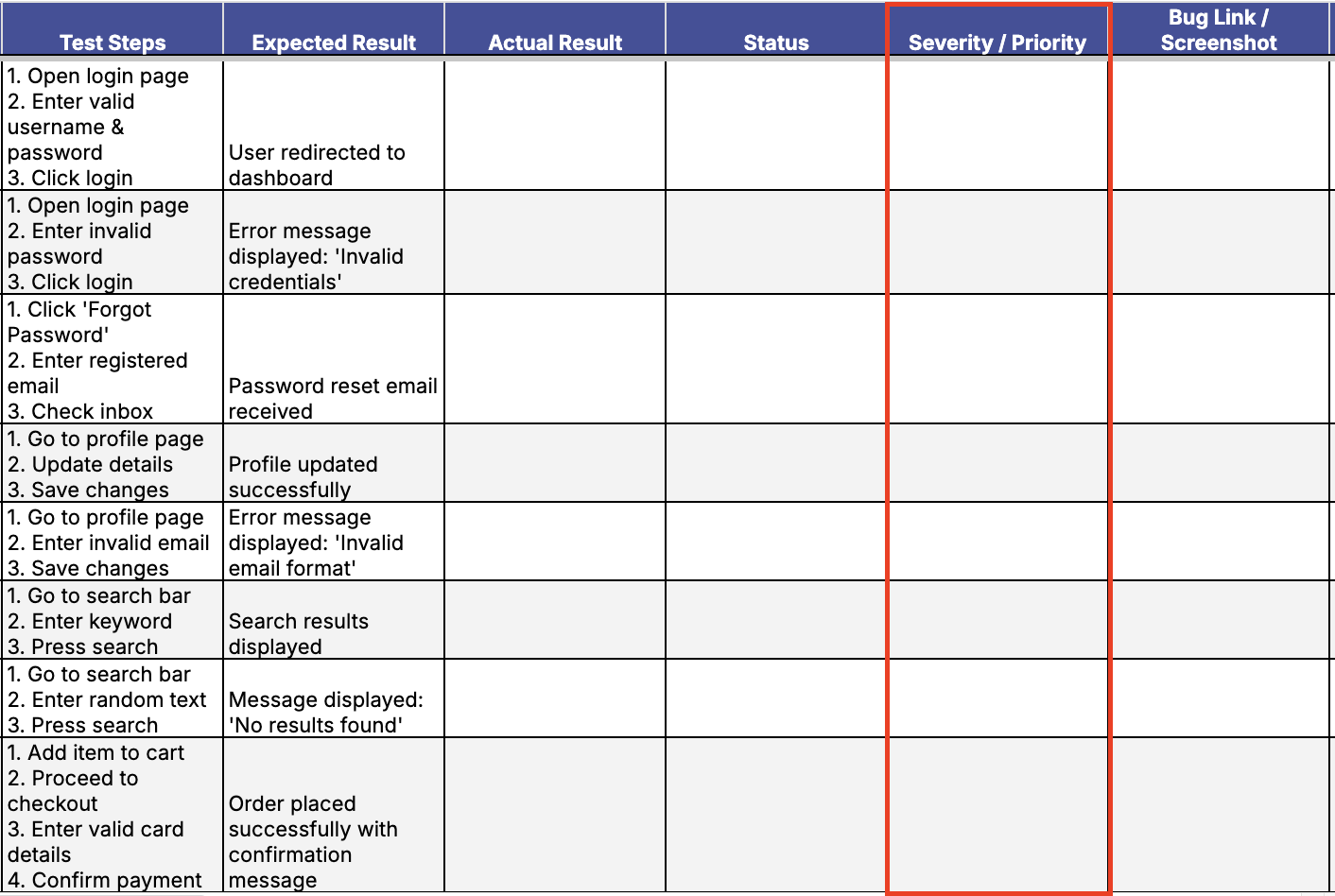
🔹 Severity / Priority
Purpose: This field tells devs what to fix first. It influences triage, sprint planning, and release decisions.
Common mistake: Marking every issue as “Critical” dilutes urgency and weakens trust across teams.
Pro tip: Save “Critical” for issues that block core flows, cause data loss, or prevent go-live. Use “High” or “Medium” when appropriate to maintain credibility.
These three elements make every manual test case more actionable. They remove guesswork, align your team, and keep testing efforts focused on impact. The rest of the template supports traceability, accountability, and version control—but these core columns make your testing valuable on day one.
Common mistakes — ranked by severity
Even the best teams slip up. But not all mistakes are equal. Below is a quick-reference table showing the most common manual test case pitfalls and why they matter.
| Mistake | Severity | Why it matters |
|---|---|---|
| Missing Expected Result | High | Causes wasted execution; no one knows what “pass” means |
| Combining multiple verifications in one test | High | Hard to debug; one failure hides others |
| Skipping environment details | Medium | Makes defects hard to reproduce |
| Vague test data (“valid user”) | Medium | Inconsistent test runs |
| Ignoring failed cases post-run | Low | Common but acceptable in early iterations, as long as logged later |
Each of these issues affects how your team interprets and acts on manual test case templates. By catching them early, you build tests that are trusted, repeatable, and reviewable at every stage of QA.
How to keep the manual test case template useful?
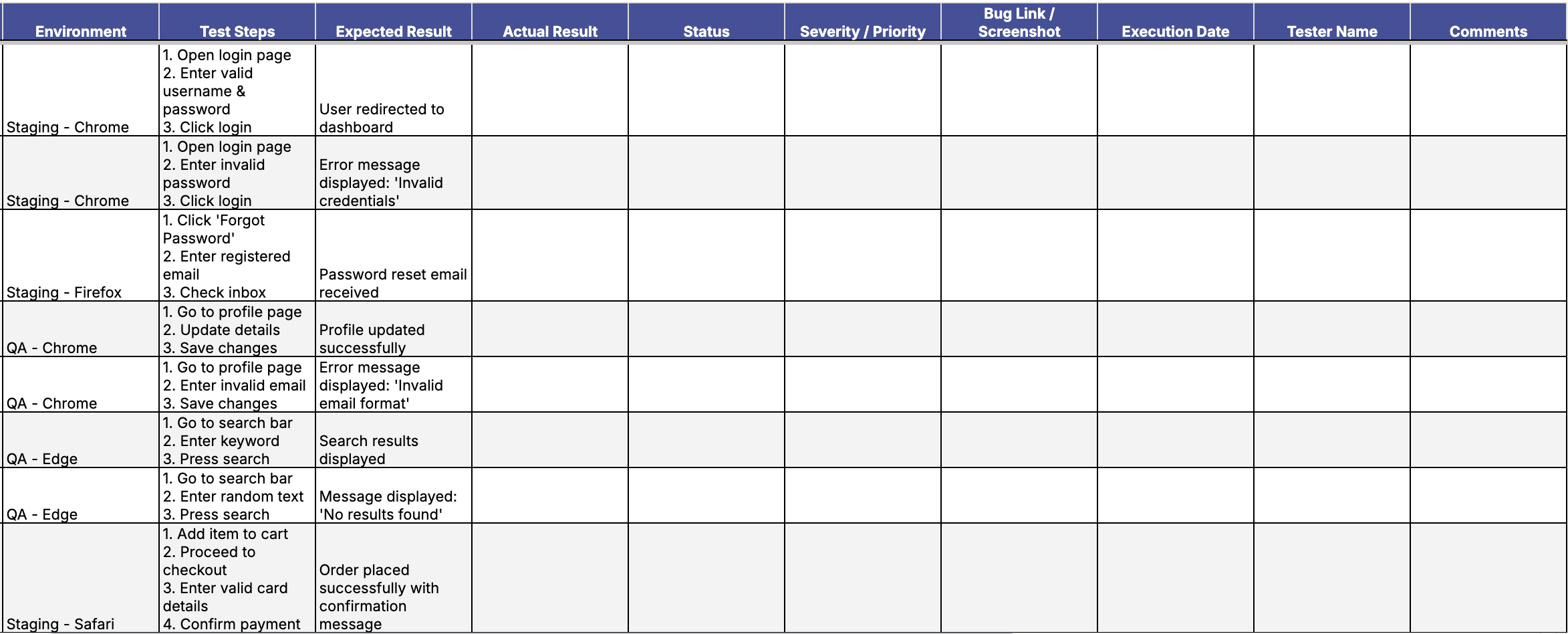
A manual test case template only delivers value if it reflects how your product actually behaves. But in fast-paced teams, maintenance can fall behind. The good news? You don’t need constant updates — just smart timing and ownership.
- Schedule cleanup with purpose: Set a recurring review at the end of each release cycle. This way, updates are tied to delivery milestones, not an arbitrary calendar.
- Use fail-rate as a signal: When a test case fails or gets skipped often, that’s your built-in alert. Review the steps, data, and result logic to spot drift.
- Mark cases as ‘Legacy’ instead of deleting: This preserves historical traceability. You keep a record of what was tested and when, even if the case is no longer relevant.
- Delegate cleanup rotation: Assign one QA per sprint to review and refresh documentation. This distributes the work, and keeps the test suite healthy without burning anyone out.
With these practices in place, your manual test case template becomes a living asset — always just updated enough to stay sharp and useful without turning into a maintenance burden.
Download the manual test case template
Start using your manual test case template by downloading the Excel version below. It comes pre-filled with essential columns so you can start logging tests immediately.
But here’s the key: customization is not optional:
- Adapt the columns to fit your team’s workflow maturity.
- Add an API field if your system is service-heavy.
- Include an Automation Status column to align with your hybrid testing approach.
- Include Test Data References for reusable datasets.
- Build it into your actual QA workflow, not just your documentation folder.
Templates are only as good as the feedback that shapes them. If you notice inefficiencies or think of a feature that would help, share your thoughts in the Katalon Community Forum or post in the Katalon subreddit. That’s how a static file becomes a continuously improving resource for teams everywhere.
Similar Resources
|
