


October brought a steady run of releases across Katalon True, Katalon AI, Katalon TrueTest, and Katalon Studio. This post pulls together everything customer-facing that shipped between October 1 and October 30, 2026, organized by product so you can jump straight to the part that matters to your team. Katalon Studio has its own dedicated post, so you will find only a short summary of it here.
Katalon True: Manual Testing and Integrations
Keep Active Manual Testing Aligned With the Latest Test Case Version
Testers can now explicitly pull the latest test case version into a running manual TestPak execution. When unchanged steps stay the same, their results and evidence are retained, so teams no longer have to restart the whole execution just because a test case changed.
Compare Test Case Versions Before Execution or Review
Reviewers can compare field and step differences side by side across versions. Per-version change summaries explain what changed, which makes it easier to decide which version to use before you run or review a test.
Connect Manual Results to the Right ADO and Xray Structure
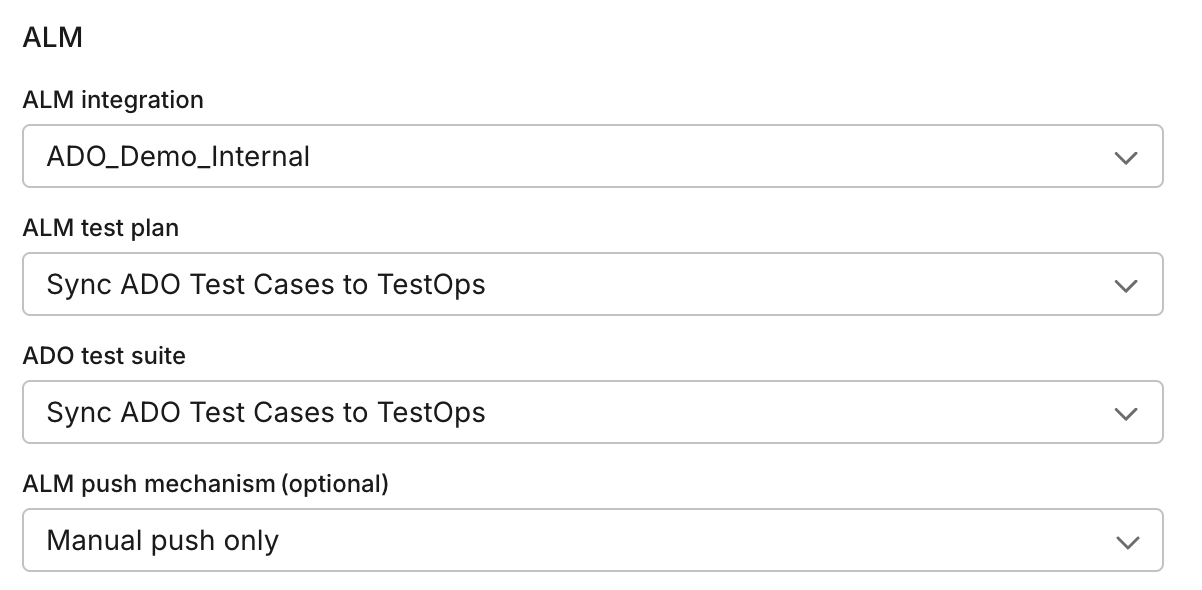
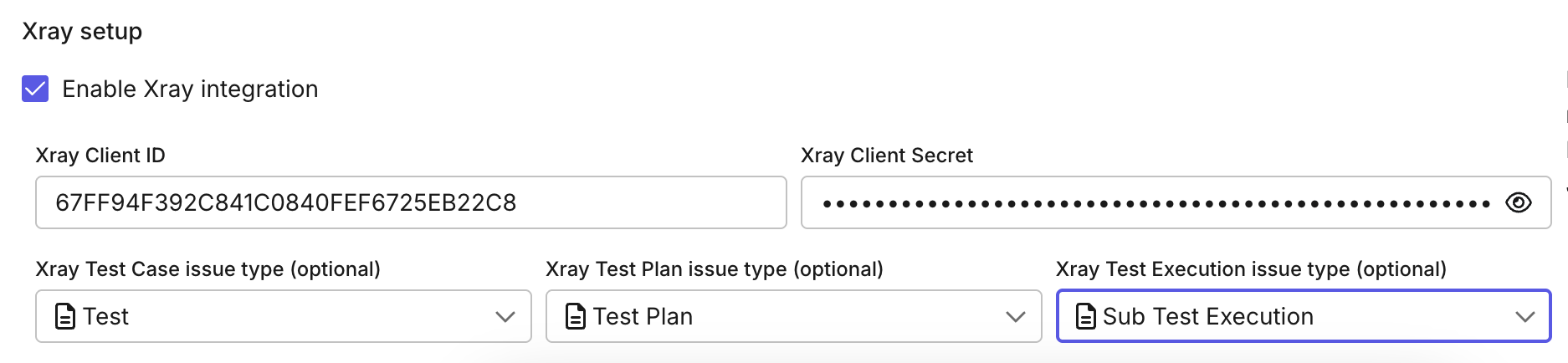
Result targeting is more precise for teams that report into other tools:
- Azure DevOps: select the intended suite and resolve its configuration-specific Test Point.
- Xray: choose the configured Sub Test Execution issue type and the parent ticket when pushing results.
Report Richer Defects With More Required Issue Details
Documents, PDFs, videos, and logs can now carry into Jira and Azure DevOps defect reports. Katalon True also supports more Jira field types, including Team, so testers can complete required issue information while they report a defect.
Push Test Cases From Katalon True to Azure DevOps
From Tests > Test Cases, teams can export Cloud test cases into Azure DevOps as native ADO Test Cases. Exports support fresh creation or syncing to ADO items that are already linked, which completes the reverse direction of ADO import.
Map Jira Defect Types Per Project Integration
Project integrations can now define which Jira issue types should be treated as defects, instead of relying only on the literal Bug type. Once an admin sets this up in TestOps, testers choose the configured defect issue type in the Report Defect dialog.
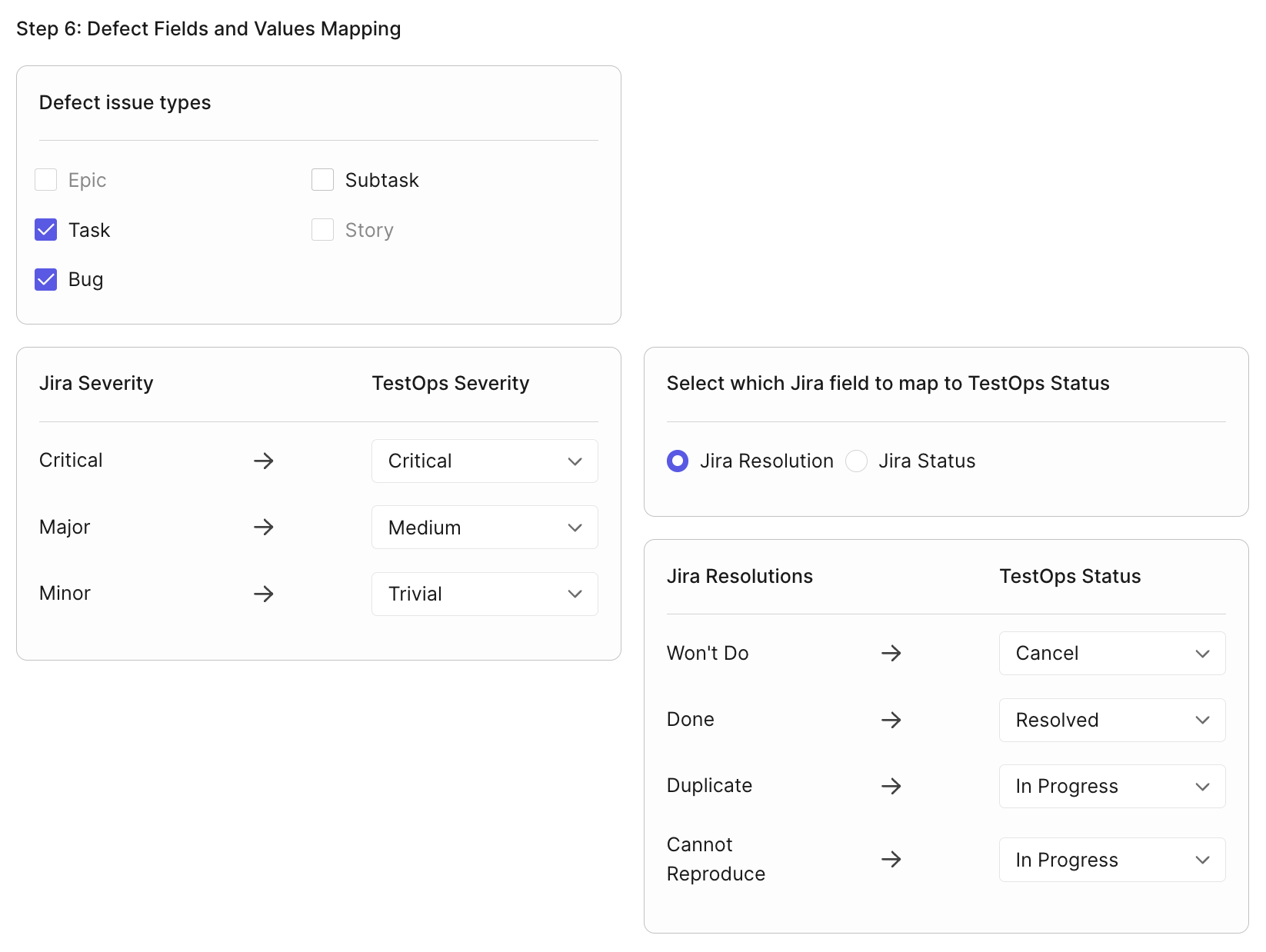
Specify which Jira issue types TestOps treats as Defects.
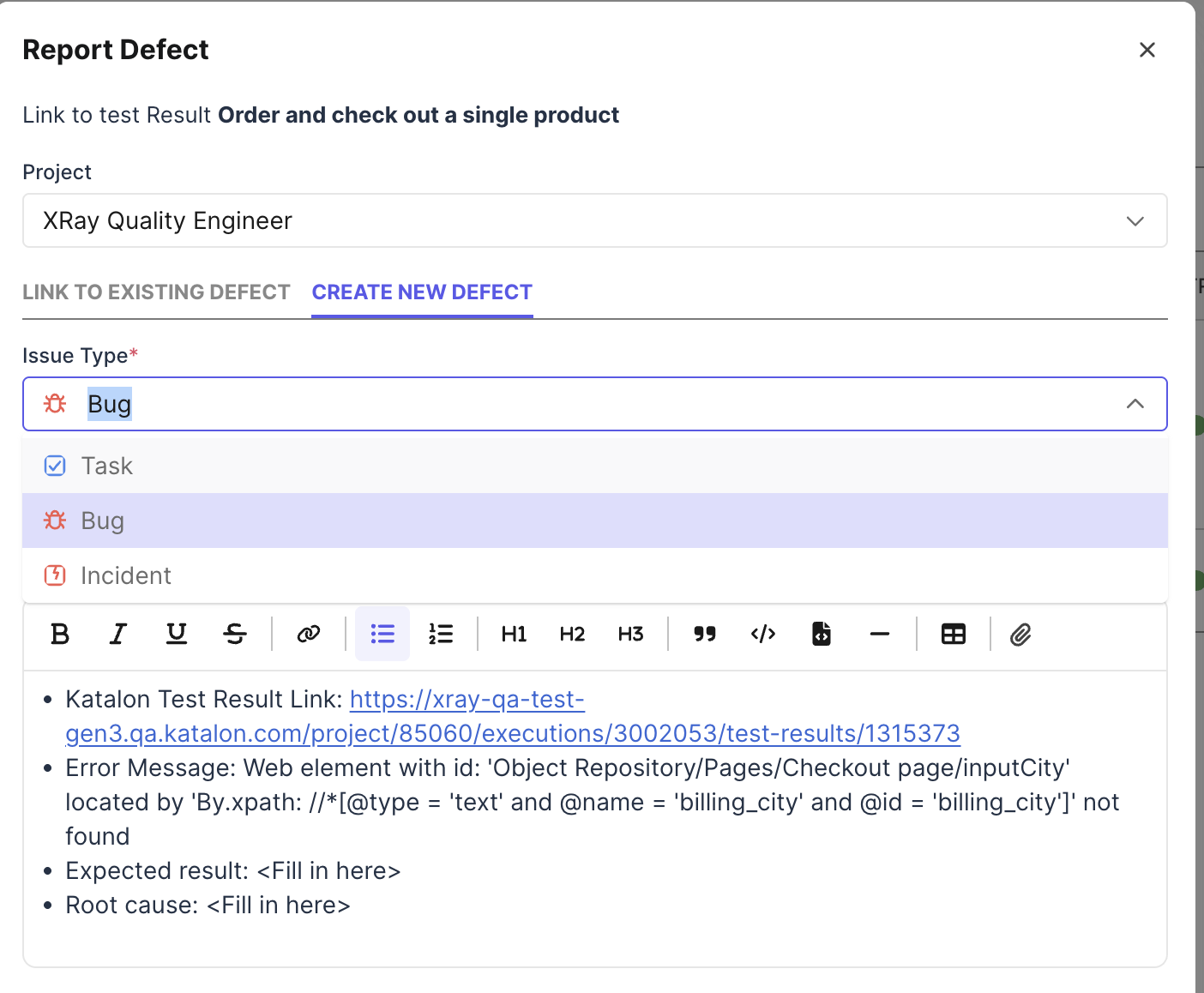
Then users can choose the desired type in the Report Defect dialog.
More Katalon True Enhancements
- Test Suite folders in Katalon Cloud: rename, move, duplicate, and delete Test Suite folders, which helps when you reorganize regression suites or duplicate a folder structure for another cycle.
- Live Testing selections persist: app, configuration, URL, environment, and private or local testing settings are restored after a session ends, and the device list polls so device status stays current.
- Dashboard click-through: configurable table links take you from dashboards to the underlying records for investigation.
- Faster test case work: start Add Test Step and Call Test Case directly from View mode without switching to Edit first.
- Longer TestOps secrets: secret values now support up to 48 KB, which unblocks longer Jira API tokens and similar credentials.
- Live Mobile Browser picker: the new Mobile Browser UI lists the full browser and OS-version matrix, so you do not need to fall back to the old picker.
- Accessibility: Tests, Plans, Live Testing, Analytics/Reports, Project Settings, Account, and Get Started received WCAG 2.1 AA improvements for names, roles, contrast, keyboard focus, layout reflow, and form feedback.
- Reliability: import processing, HAR parsing, manual-test consumption, and True Parallel cleanup were hardened so one bad batch or dependency is less likely to stall processing.
Katalon AI: Project Context, Review Feedback, and Charts in Chat
Set Project Context for Katalon AI
Project Settings > AI now brings together the sources Katalon AI reads before it answers or acts in a project, so it is not limited to the current prompt. Alongside the Knowledge Base, there are two new pieces:
- Agent Rules: project admins maintain project-wide rules that define shared team standards for AI-assisted testing.
- Project Memory: each member can store personal preferences within a project, either through the Project Memory dialog or by asking chat to remember a preference.
Katalon AI Learns From Test Case Review Feedback
When you discard a generated test case draft, a Why discard? menu captures the reason in the same action. Katalon AI can then derive personal memory suggestions from your saved edits and reasoned discards, and apply them to later generations once you accept them. Suggested memories stay under your review, and they do not become project-wide rules automatically.
Test Case Generation From Requirements, End to End
The requirement-to-test workflow now includes recovery from missing-scenario arguments, in-page follow-up questions, recommended choices, and draft refresh. Teams can generate cases from a requirement, answer clarification questions on Requirement Detail, and refresh the latest drafts.
Saved-File Cards, HTML Previews, and Charts in Chat
Files generated by Katalon AI now appear in replies. Reports and dashboards can render in the side panel, including charts, up to 10 MB, and larger files offer download instead of preview.
Katalon AI can also answer data questions with chart pages rendered directly in the chat thread. KPI tiles, charts, and table-view toggles make trend and breakdown answers easier to inspect without leaving the conversation, and generated chart pages are saved under Artifacts where enabled.
Run With AI Improvements
The new Run with AI interface is on for all users, including a TestCloud environment picker in the quick-run dialog. Manual test runs can target native Android apps on TestCloud real devices and run up to five cases in parallel. AI Sessions progress updates live without a page refresh, and rerunning an AI test run started by someone else now sets the executor to the current user.
For live execution, folder search can include descendants when you want AI to search a parent folder and its subfolders. Subfolder search is opt-in, and the default still returns direct contents. Expanded live video also keeps playing, so you can expand an execution stream without restarting it.
More Katalon AI Enhancements
- Direct links after AI writes: Katalon AI and MCP write actions return links to created or changed test cases, suites, folders, and related resources.
- Clearer run failures: runs end as Failed and explain the cause when a model service, provider quota, environment preparation, or Katalon Tunnel dependency fails.
- Account AI key model search: account-level AI key settings include model search inputs for capability tiers.
- Save-conflict recovery: failed draft saves show clearer messages, hints, and actions such as Rename or Change folder.
Katalon TrueTest: Attribute Checks and Session Error Search
Add Verify Element Attribute Value to a Test Case
Select or enter an attribute name and an expected value, or leave the expected value blank to check for an empty attribute. Katalon TrueTest compares values exactly and generates WebUI.verifyElementAttributeValue in the test case.
Search and Inspect User-Session Errors
Katalon TrueTest adds a User Sessions error-search experience that lets you search by captured error type and by case-insensitive error-message substrings. Applications Under Test can also be searched by name in Account Settings.
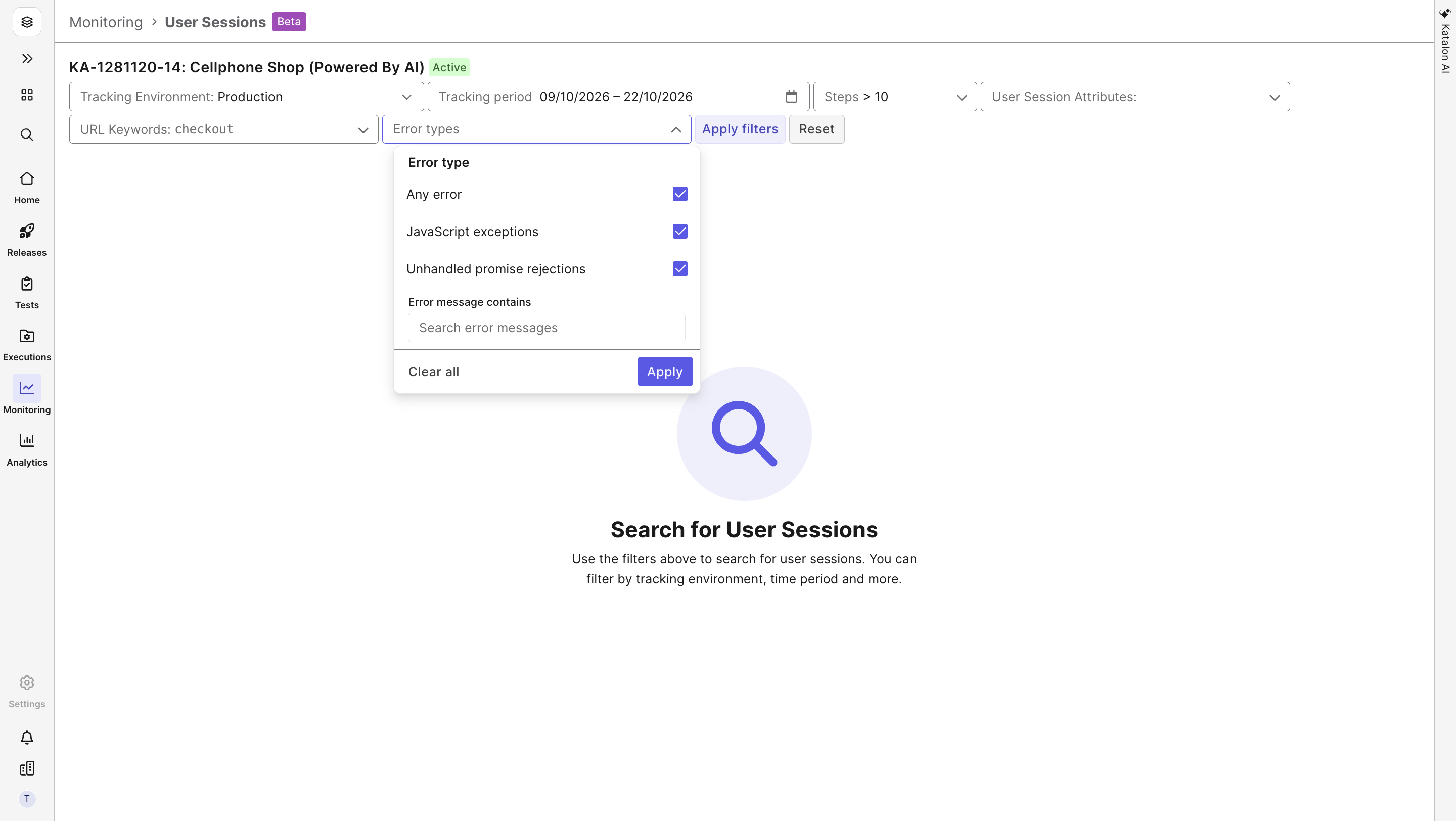
Search and inspect user-session errors
Katalon Studio: Highlights
Studio 11.6 and 11.7 shipped in October with the full details in What's New in Katalon Studio 11.7.0 and 11.6.0. The headline updates include:
- Recording and executing tests for hybrid mobile applications that combine native screens with embedded WebView content.
- AI-assisted setup of data-driven tests through MCP tools, plus a new
writeStepDefinitiontool that completes the BDD authoring workflow. - Pausing a running suite between test cases and resuming from the next case.
- Dynamic Test Suites that accept AND/OR tag queries with parentheses.
- Direct editing of XPath locators in Web Test Objects.
- Import of Postman environments alongside collections.
- A more consistent dark theme, with improved contrast, icons, and colors across the Start Page, Log Viewer, Job Progress, the Katalon AI Assistant chat window, and the Web and Mobile Recorders.
See Dynamic Test Suites With AND/OR Tag Queries in Action
See XPath Locator Editing in Action
See Postman Environment Import in Action
Wrapping Up
October's releases cover manual testing, defect reporting, Azure DevOps and Jira connections, Katalon AI context and review feedback, and Katalon TrueTest session error search. To see how they fit your workflow, start a free trial.
Frequently asked questions
October's releases cover Katalon True (manual test versioning, Azure DevOps, Xray, and Jira upgrades), Katalon AI (project context, review feedback, charts in chat, and Run with AI), Katalon TrueTest (Verify Element Attribute Value and session error search), and Katalon Studio 11.6 and 11.7.
Yes. Testers can explicitly pull the latest test case version into a running manual TestPak execution. When unchanged steps stay the same, their results and evidence are retained, so the whole execution does not need to restart.
Yes. From Tests > Test Cases, teams can export Cloud test cases into Azure DevOps as native ADO Test Cases, either creating them fresh or syncing to ADO items that are already linked. This completes the reverse direction of ADO import.
Both live in Project Settings > AI alongside the Knowledge Base. Agent Rules are project-wide standards that project admins maintain for AI-assisted testing. Project Memory stores each member's personal preferences within a project, through the Project Memory dialog or by asking chat to remember a preference.
When you discard a generated draft, a Why discard? menu captures the reason in the same action. Katalon AI can derive personal memory suggestions from your saved edits and reasoned discards and apply them to later generations once you accept them. These suggestions stay under your review and do not become project-wide rules automatically.



Test everything. Ship with confidence.
From generating test cases to spotting failures, Katalon's AI works across your entire pipeline, automatically.
