.svg)




Testing doesn’t stop at unit tests. Once components start talking to each other, things get messy fast. That’s where integration testing comes in, to make sure your systems work well together, not just on their own.
An Integration Test Plan helps you bring order to that chaos. It outlines what to test, how to test it, and how to track results across your environment. Whether you’re working with APIs, databases, or microservices, a solid plan ensures you’re not missing key interactions that could break in production.
In this guide, we’ll walk you through:
- What integration testing really is (and why it’s often misunderstood)
- The most common challenges teams face when building integration tests
- Why having a structured Integration Test Plan template helps both junior testers and seasoned QA leads
- How to use this plan in real-world CI/CD pipelines
- Strategies to write high-value integration tests
- A free downloadable template you can start using today
If you’ve ever struggled with overlapping test cases, unclear responsibilities, or shaky coverage, this is for you.
Let’s get started.
What is integration testing and why it matters
Integration testing is how we check that different parts of a system work together as expected. It’s where individual units, already tested on their own, are combined and evaluated as a whole.
Unlike unit tests, which focus on internal logic, integration testing looks at the interactions between components. This could be between microservices, APIs, third-party services, or internal modules. The goal is simple: make sure the system behaves correctly when everything is wired together.
You might test with real services, like actual databases and APIs. Or you can use mocked components to speed things up. Both approaches are valid, but it depends on the context, the stability you need, and how close you want the test to feel to production.
To get the most out of integration testing, it’s important to understand where it fits in the bigger picture. This is where the test pyramid comes in:

The test pyramid helps guide your strategy. At the base are unit tests [fast and isolated]. In the middle sit integration tests [focused on component collaboration]. At the top are end-to-end tests [simulating full user flows].
Martin Fowler explains this well in his article on the test pyramid, where integration tests are shown as the balancing layer between speed and realism.
A good integration test plan makes sure this layer is well-designed. It ensures your components are playing well together and catching issues before they reach users.
Common integration testing challenges
Integration testing sounds simple on paper, but in practice, there are a few challenges that can slow teams down. Most of these come from unclear expectations and tooling gaps between QA and development.
Let’s start with alignment:
- Developers often write integration tests during development.
- These are usually logic-based and API-driven.
- Meanwhile, QA might define integration testing as validating how two systems or services behave together in staging or production-like environments. Both are valid, but they need to be reconciled.
Some QA teams import developer integration tests into regression suites. This makes sense in fast-moving teams that value traceability. But the trade-off is increased test maintenance and duplicated logic. If not tracked properly, you end up with overlapping tests in both the test suite and the pipeline.
Another challenge is deciding how deep your integration tests should go. Do you mock the database to isolate the logic, or use a real database to test end-to-end behavior? Do you stop at the API layer, or test the flow through the UI?
| Test scope | Use case |
|---|---|
| In-memory database | Faster feedback during development or CI |
| Real service/database | High-confidence testing before release |
| API-level integration | Validating service communication and data flow |
| UI-level integration | End-user workflows and real-world interactions |
Prioritization is key. Focus on high-value flows where systems interact across boundaries. These are areas where silent failures can occur, and where users are most impacted. A strong integration test plan highlights these paths and ensures they are covered early and often.
When QA and Dev teams align on the definition, scope, and purpose of integration testing, you create a smoother feedback loop. And that leads to faster delivery, higher quality, and greater confidence across the board.
Who benefits from an integration test plan template?
A good integration test plan template is more than a spreadsheet. It’s a shared framework that helps different roles stay aligned while keeping testing organized, traceable, and outcome-driven.
Here’s who gets the most value out of using one:
- Junior QA engineers: They get a clear structure for documenting test cases, filling out test data, and tracking actual vs expected results. The template reduces guesswork and helps them follow repeatable QA workflows.
- QA leads: They can quickly scan for blocked tests, analyze pass and fail trends, and identify regression coverage gaps. This supports better release decisions and stronger reporting to stakeholders.
- Teams using CI/CD pipelines: Integration testing becomes visible, trackable, and auditable. The template serves as a living document of the system’s behavior across builds and deployments.
When every team member uses the same integration test plan template, it reduces duplication, keeps documentation clean, and makes sure test evidence is never lost in emails or chats. Over time, it becomes a reliable source of truth for system interactions.
Inside the integration test plan template
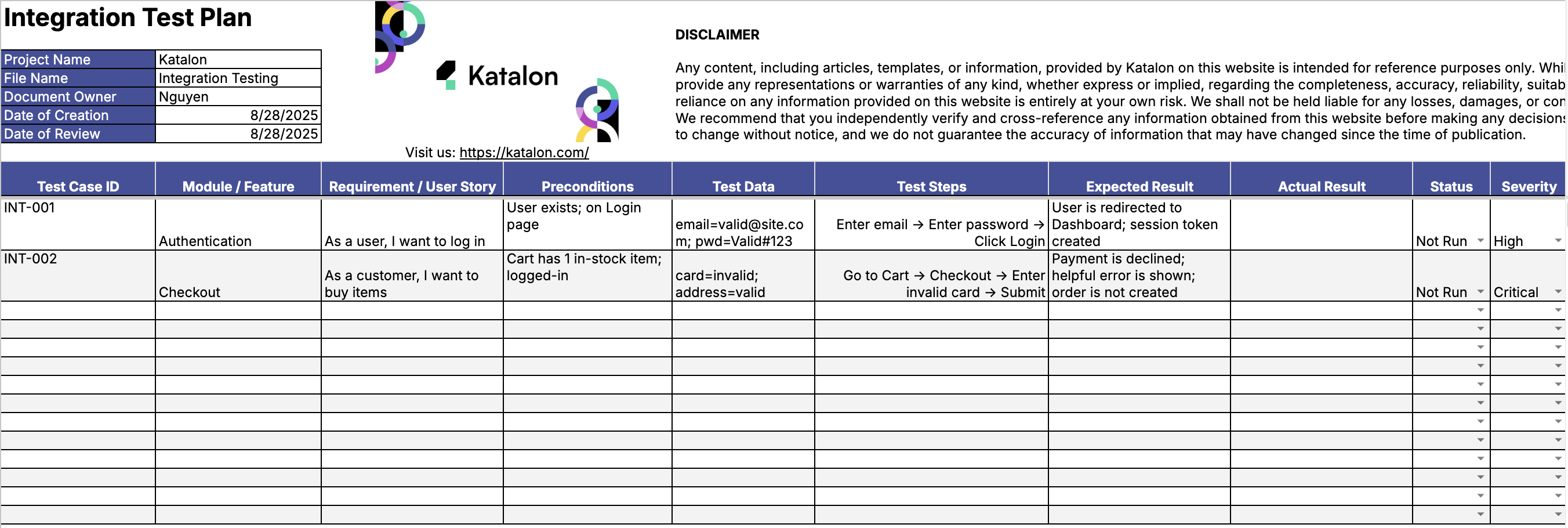
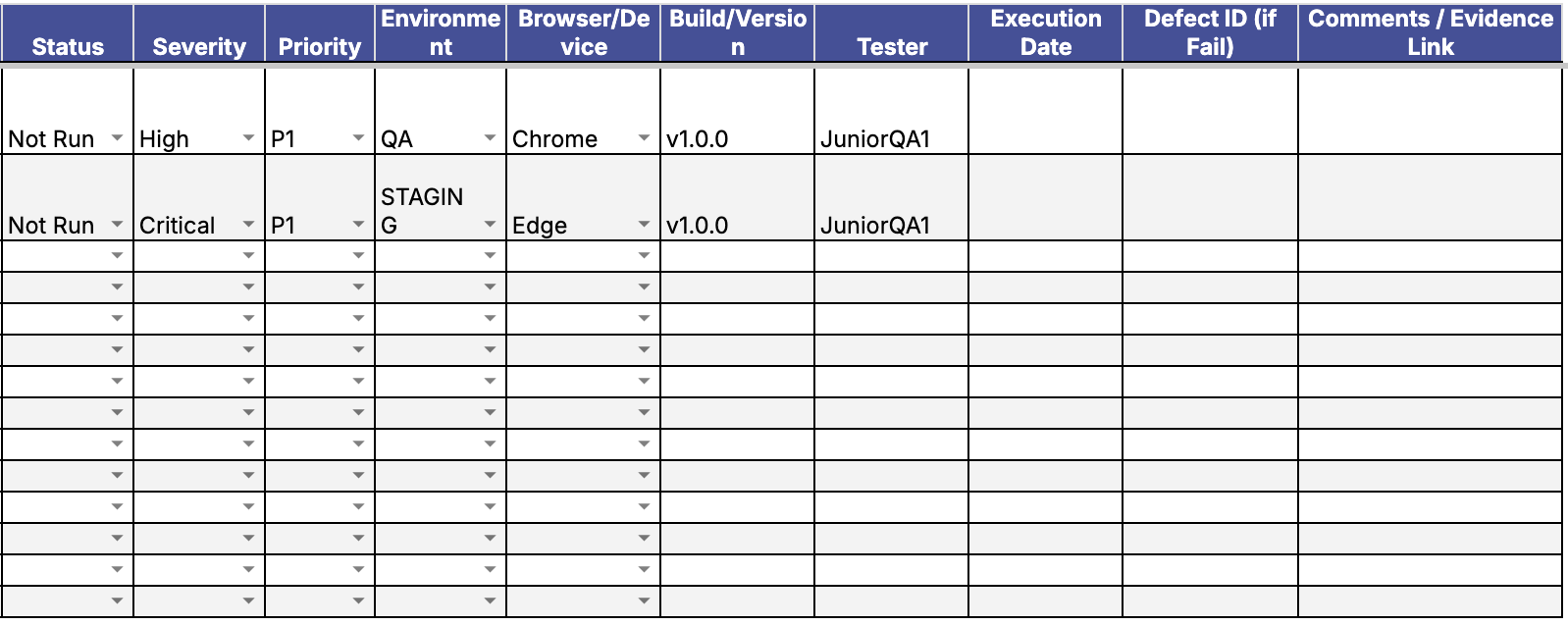
The integration test plan template is built to give structure without slowing you down. It’s clean, familiar, and ready to use. Each tab plays a specific role in helping teams plan, execute, and report integration tests with confidence.
Tab 1 – Test Case Sheet
This is where most of the work happens. You log your test cases here with fields for:
- Module name and related requirement
- Preconditions that must be met before execution
- Clear, step-by-step test instructions
- Expected results and actual outcomes
- Status of the test case [pass, fail, blocked]
- Severity and priority to help triage
- Environment details [browser, OS, version]
Each field is built to support traceability. You can follow the path from a requirement to the exact test case that verifies it, and from there to any linked defects if something breaks.
Tab 2 – Summary
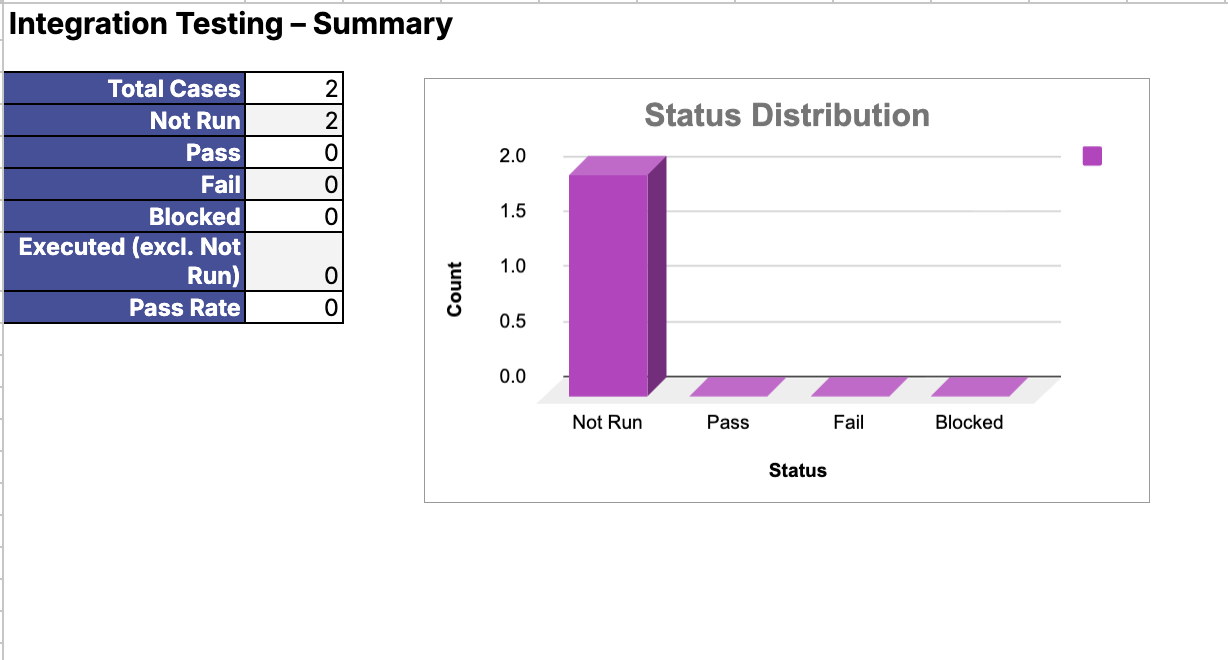
This tab gives you automated calculations. Total test cases, pass and fail counts, and how many are blocked. At a glance, you can see how stable the system is and where to focus your next round of tests.
It’s especially useful for QA leads reporting to project managers or syncing with product teams during release cycles.
Tab 3 – How-To Guide
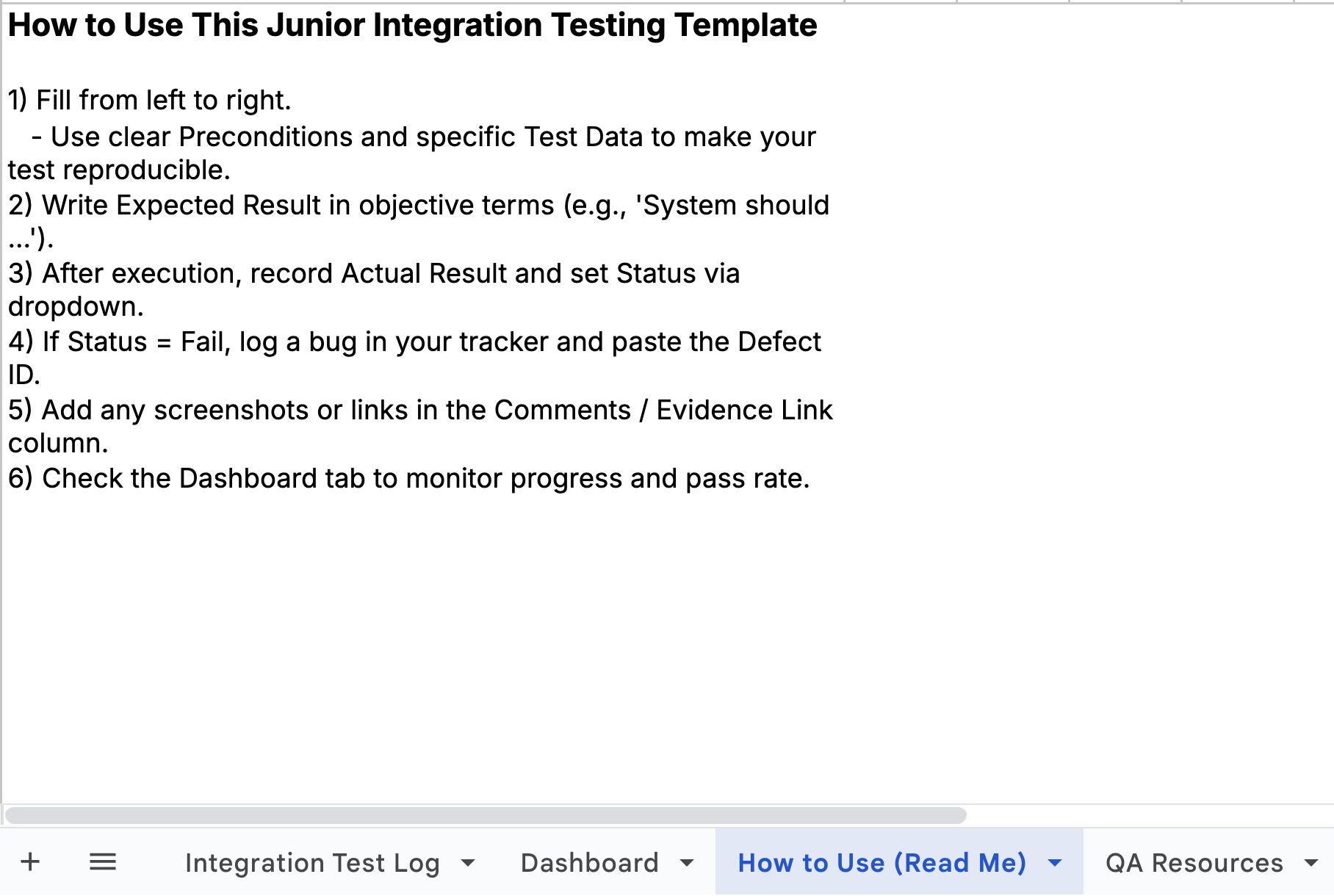
This tab is the instruction manual. It tells your team how to fill in each field, where to link defect IDs, and how to attach test evidence like screenshots or logs.
For new hires or distributed teams, it keeps everyone consistent without extra meetings.
Together, these tabs create a clear workflow. From requirement to test to defect, everything is documented and traceable. This is what makes the integration test plan template a valuable asset across QA teams, especially in Agile or DevOps environments where clarity and speed matter most.
How to use the template in real projects
The integration test plan template is simple by design, but powerful when used correctly. It fits right into your QA workflow and works just as well for manual testing as it does alongside automation pipelines.
Start by filling the test case sheet from left to right. Define the module, write down any preconditions, and add clear test steps. Use reproducible test data to keep results consistent across runs.
During execution, record actual results as they happen. Mark the status of each test case accurately. If a test fails, link the relevant defect ID directly in the row to keep everything traceable.
The summary tab updates automatically. Use it to check how many tests passed, how many failed, and where coverage gaps may exist. This view is perfect for sprint reviews or release checkpoints.
In teams that use CI/CD, the template pairs well with tools like TestRail or Katalon TestOps. You can connect automated test results to specific test cases or use the template to report on regression coverage. Just be selective. Only duplicate tests from pipelines when they serve reporting or compliance goals.
A strong integration test plan should reflect reality, not just documentation. The goal is to maintain a current view of how your system behaves, supported by clear data and visible trends.
Practical integration test strategies
Integration testing becomes more effective when guided by a focused strategy. The goal is to catch issues where components meet while keeping the test suite fast, reliable, and maintainable.
One smart move is to connect your automated integration tests to your regression suite. This keeps your test coverage aligned with the most critical system flows. It also ensures that integration logic gets validated every time code is pushed or merged.
Service mocking is another key decision. When speed and isolation matter, mocking services is the right approach. Tools like test containers or mock servers let you simulate responses from external APIs or databases without hitting real infrastructure.
On the other hand, use real services when you need to validate end-to-end behavior. For example, testing payment workflows or identity providers often requires a real integration to uncover edge cases in authentication, timeouts, or error handling.
| Approach | When to use |
|---|---|
| Mocked services | Fast CI pipelines and isolated failure debugging |
| Real services | End-to-end coverage for high-risk user flows |
API-level integration tests work well for most core workflows. They are faster than UI tests and easier to maintain. You can validate request structure, response formats, and system behavior without depending on a visual interface.
To improve the depth of your integration test plan, review production or staging bugs. Look for patterns. Are most bugs coming from service timeouts, data mismatches, or authorization errors? These insights help you target weak spots in your coverage.
Every strategy has trade-offs. Mocked services offer speed. Real services bring confidence. API tests offer flexibility. UI tests surface user-impacting issues. Choose based on value and maintenance cost. A good mix wins.
Benefits of using Katalon’s integration test plan template
The Katalon integration test plan template gives your team a head start. It removes setup friction and delivers a structure that scales with your QA process.
Everything is pre-built and intuitive. From the test case sheet to the summary dashboard, the layout supports traceable execution and structured reporting. This helps QA teams stay organized during fast regression cycles and sprint reviews.
Audit and compliance requirements are easier to manage too. Every test case links clearly to its purpose, outcome, and any related defects. This makes it easy to prove coverage during audits or vendor assessments.
It also supports cross-functional collaboration. QA and Dev teams can share a common format for integration testing without switching tools or rebuilding documentation.
The template works well on its own, but it also plays nicely with modern toolchains. You can pair it with TestRail for result tracking, or connect it with CI/CD pipelines to monitor automated integration tests.
If you are building or updating your integration test plan, this template gives you a fast, proven framework to start strong and scale easily.
Download the free integration test plan template
Start building a smarter integration test plan with less effort. This free Excel template is ready to use out of the box and fully customizable to match your workflows.
Whether you are working in Agile teams, DevOps environments, or regulated industries, the structure supports your process. It fits into existing toolchains and scales from small projects to enterprise-level systems.
Download the integration test plan template and start improving your test visibility, traceability, and collaboration.
If you want to go further with test management, you can also request a Katalon demo and see how to streamline everything from creation to execution and reporting.
Key takeaways
Integration testing plays a vital role in validating how your systems behave together. It catches issues that only appear when services and components interact.
A well-structured integration test plan helps your team focus on the right test cases, reduce duplication, and maintain strong regression coverage across releases.
Using a proven template ensures that all test data, results, and traceability links are captured consistently. This supports both daily QA operations and long-term test management.
With the right plan in place, you get faster feedback, cleaner documentation, and stronger collaboration between teams.
|
