.svg)


Let’s get technical! Read this if you are a QA noob 🙂
But before you start: If you don’t know what Katalon Studio is, read this first, and get to know why I picked it to build web automation.
Katalon Studio at a Glance
To be mentioned, before looking at the studio, Katalon project offers an IDE tool for Chrome, called Katalon Recorder. It’s an extension that records actions, captures web elements, plays the automated test case you recorded and speaks Selenese.
It’s a simple “click and record” tool but it’s not 100% reliable. After the record is done, it still requires editing to be reused.
When creating test objects the most important thing to consider is reliability.
Playing around with the recorder it is a good way to get a feeling of how to structure the test case, but the best and most reliable results you can get are by working with the Studio.
Katalon Studio uses a series of properties to identify and locate an object.
Test objects are the individual elements to be tested and can be targeted by using the following Selection Methods:
- the Basic function
- the recommended CSS selector
- the Xpath.
The default method is the Basic function. When using the Spy Web inspector, it automatically generates an XPath and combines it with the objects’ properties that can be edited and selected at as and when required.

The combination of many properties has the advantage of being very specific, but at the same time can be a disadvantage as it might not be flexible enough.
Relying on location coordinates, such as Xpath*, on the other hand, is less stable and breaks easily.

*Option in google dev tool that allows copying the XPath directly from the elements viewer. Looking like this: //*[@id=”sb_ifc0″]
Create automated tests that are resistant to changes in the UI!
In order to create valid objects, testers should rely on a few valid “anchors” in the code, starting with ID, as a unique identifier; classes and other CSS selectors then follow. However, these are still not fully reliable…
If IDs are not sufficient or are not available, the best solution that my team and I have found so far was to inject some data attributes into the code.
Having access to the projects’ source code, and identifying the best target location, I could add my “data-qa” attribute that would have not been touched, removed, or modified by anyone in the team.
That’s a safe way to use selectors, due to the fact that the naming convention of IDs and classes can always change during the developing process, and possibly make your test fail and in continuous need of updates.

Once you have created all your test objects, you can use the built-in keywords from Katalon studio to add function and logic, to make it human readable and understandable, using the Manual mode:

In the Script mode, the steps will be translated into Groovy, a Java-syntax-compatible object-oriented programming language. If you are an advanced user, you can write your code directly into the editor.

When you are done with your test, you can run it in any of your preferred browsers, and even custom headless.
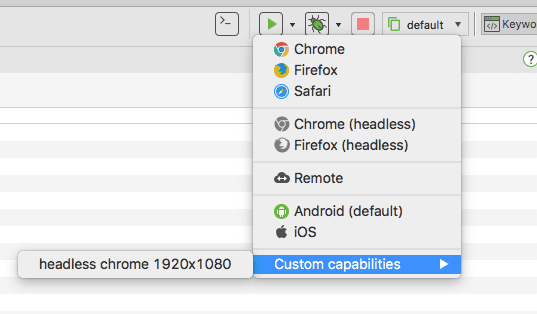
One of the perks of this tool lies in the fact that it can test in many environments. By creating global variables and different profiles you can decide where to run your test, e.g. production, stagings, or your local machine.

If your tests are up and running in your local system, you can integrate them with the CI and will be available for all your team members.
Author: Francesca Morando
Linkedin profile: https://www.linkedin.com/in/fmorando/
|
