.svg)



ACCELQ has earned its place as a popular no-code automation tool, but as your applications grow and your testing needs evolve, you may eventually feel the need for more flexibility, deeper platform coverage, or stronger scalability. That’s when teams often start exploring alternatives—tools that better match their development speed, tech stack, and long-term automation strategy.
The good news is that the testing ecosystem is rich with options. From AI-powered platforms to enterprise-grade solutions and open-source stacks, there’s no shortage of tools that can take your end-to-end automation to the next level.
In this guide, we’ll walk you through the top 12 ACCELQ alternatives, showing you:
- Where ACCELQ tends to fall short for fast-moving teams
- Which automation platforms offer greater flexibility and depth
- How each tool handles web, mobile, and API testing
- Which option fits your team’s skill set, scale, and workflow the best
Let’s dive in!
Limitations of ACCELQ

ACCELQ positions itself as a no-code, cloud-based automation platform—and for many teams, that simplicity is a welcome starting point. But as your application grows more complex or your testing strategy becomes more demanding, you may begin noticing friction in areas you didn’t expect. We’ve heard these challenges come up repeatedly from teams evaluating alternatives, and they tend to follow the same patterns.
Here are the most common limitations you may have encountered:
- Limited flexibility for complex logic: ACCELQ’s codeless approach is excellent for straightforward flows, but once you need advanced conditions, dynamic data handling, or highly customized validations, the visual model can feel restrictive.
- Steeper learning curve with model-based design: While powerful, ACCELQ’s modeling system requires users to think in terms of actions, entities, and flows. If your team is used to traditional scripting, this shift can slow onboarding.
- Cloud dependency: All executions run in ACCELQ’s hosted environment. For organizations with strict data governance, on-prem preferences, or specialized network setups, this can quickly become a blocker.
- Performance sensitivity with dynamic UIs: Heavily dynamic or rapidly changing applications sometimes lead to inconsistent element detection. Even with AI assistance, users report flaky or brittle tests.
- Pricing escalates at scale: As your suite grows, the cost of managing larger teams, more executions, and multiple environments can rise faster than expected.
- Limited customization for engineering-driven teams: Developers who want deeper control, script extensibility, or flexible integrations may find the codeless approach too limiting for complex pipelines.
To give you a clearer snapshot of where ACCELQ typically falls short, here’s a quick overview:
| Area | Limitation |
|---|---|
| Test authoring | Great for basic cases, but struggles with highly conditional or data-heavy scenarios. |
| Maintenance | Dynamic applications may lead to flaky flows and frequent updates. |
| Infrastructure control | Full reliance on ACCELQ’s cloud can conflict with security or on-prem requirements. |
| Extensibility | Codeless model reduces the ability to inject custom logic or integrate advanced engineering workflows. |
| Scalability cost | Costs increase significantly as teams add more suites and more parallel executions. |
If these pain points feel familiar, you’re not alone. Many teams reach a stage where ACCELQ’s convenience becomes a limiting factor rather than a catalyst for growth. That’s why exploring ACCELQ alternatives can make all the difference for your long-term testing strategy.
1. Katalon Platform

The Katalon Platform is one of the most complete alternatives to ACCELQ, especially if you’re looking for a solution that balances ease of use with deep technical capability. Instead of juggling multiple tools for test creation, execution, analytics, and maintenance, you get a unified ecosystem that handles web, mobile, API, and desktop testing from end to end. It’s built for teams that want to scale automation without losing control or flexibility along the way.
One thing we really appreciate about Katalon is how naturally it adapts to different skill levels. If your testers prefer codeless authoring, Katalon offers intuitive UI-driven workflows. If your engineers prefer scripting, they can write custom logic or blend code with codeless steps in the same project. This balance helps cross-functional teams move faster without compromise.
What you can achieve with Katalon:
- Automate across all major platforms: Web UI, mobile apps, APIs (REST, SOAP, GraphQL), and desktop applications.
- Use built-in testing frameworks: Data-driven testing, BDD, and reusable UI object management via the Object Repository.
- Run tests anywhere: Locally, remotely, on cloud providers, or at scale using TestCloud’s 3,000+ browser/device/OS combinations.
- Scale execution with Katalon Runtime Engine: Run parallel executions and accelerate large regression cycles.
- Integrate cleanly into CI/CD: Connect with GitHub Actions, Jenkins, Bitbucket, Azure DevOps, and other pipelines.
- Analyze results instantly: Access screenshots, videos, logs, and structured reports to speed up root-cause analysis.
AI-powered testing that elevates coverage
Katalon is also one of the first platforms to embed AI directly into the testing lifecycle—offering meaningful, practical benefits, not just buzzwords. The AI-driven capabilities simplify maintenance and expand your coverage without adding more manual work.
- Automatic test maintenance: AI detects locator changes and helps you fix test objects before they break.
- TrueTest for AI-generated regression testing: TrueTest analyzes real user behavior in production and generates regression tests automatically.
- Smart analytics in TestOps: Identify flaky tests, detect hidden risks, and pinpoint failure patterns faster.
TestOps: Visibility and control at enterprise scale
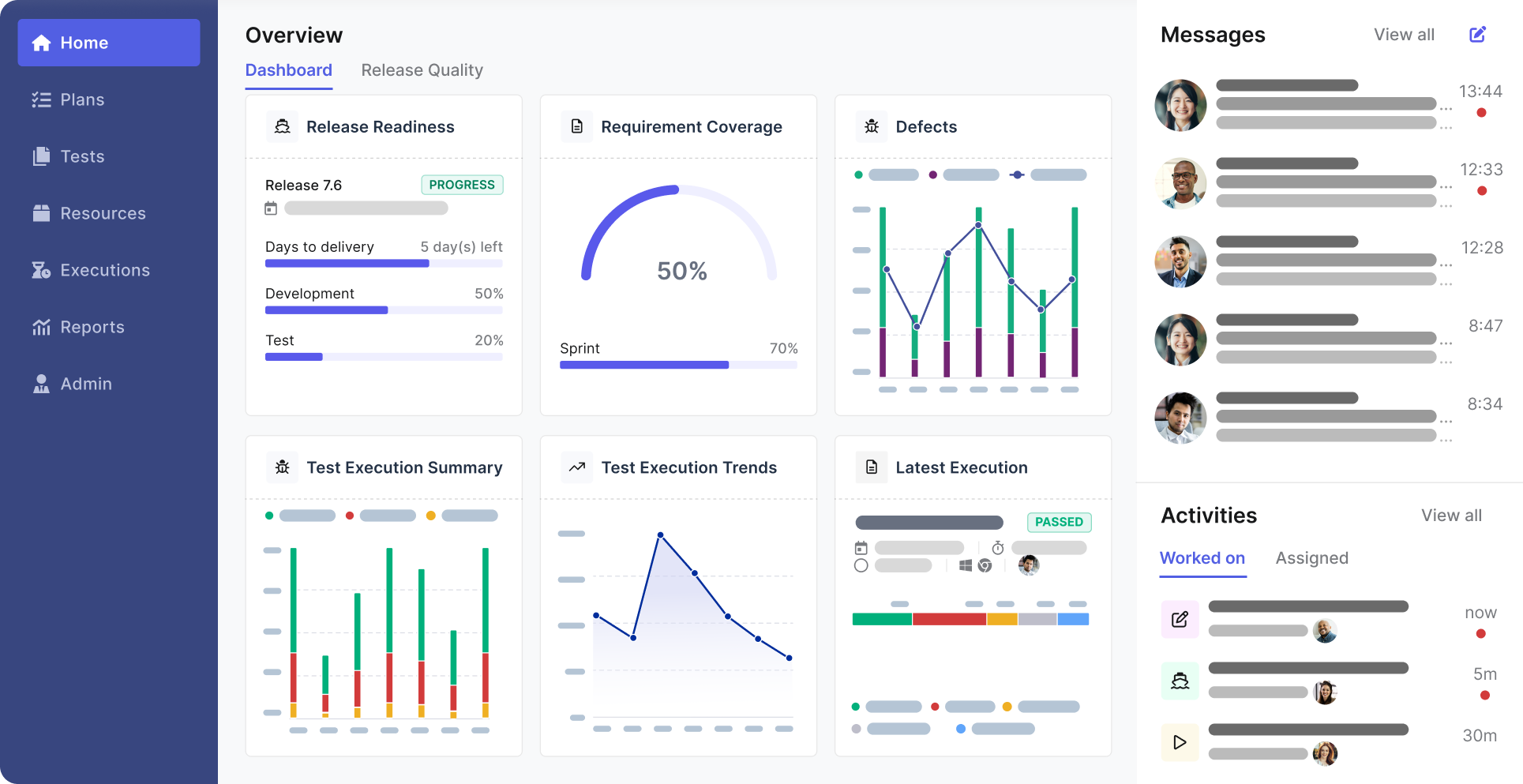
If you’ve ever struggled to keep track of hundreds or thousands of tests, TestOps will feel like a relief. It centralizes your entire testing operation so you can monitor quality trends, orchestrate executions, and maintain traceability across manual, automated, and AI-generated tests.
- End-to-end test management: Store, organize, and track every test case in one place.
- Real-time dashboards: View coverage, pass/fail rates, flaky test analytics, and requirement traceability.
- Execution orchestration: Schedule runs in CI, nightly builds, or custom event triggers.
TestCloud: On-demand execution without infrastructure overhead
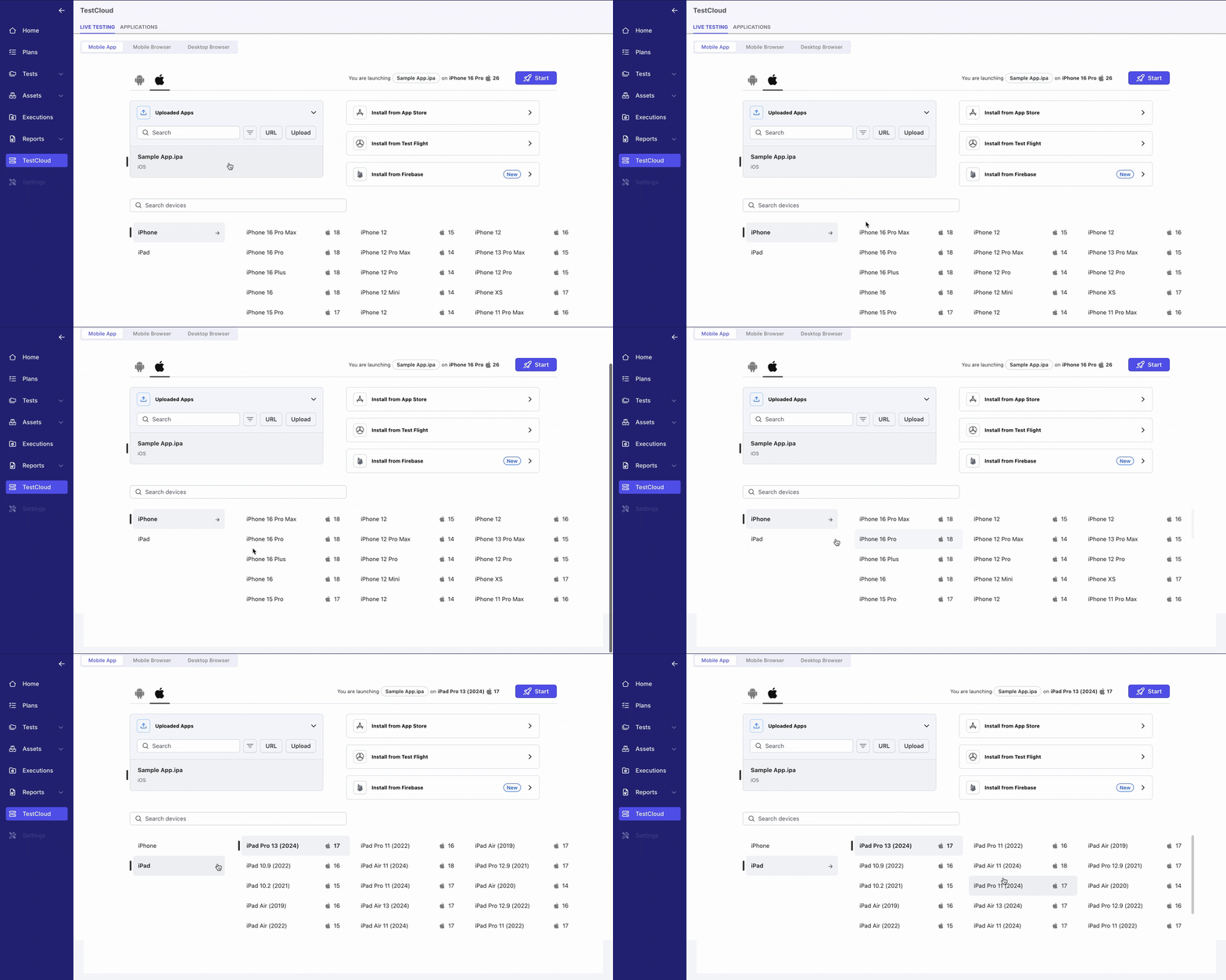
If you’re tired of maintaining device labs, TestCloud gives you instant execution environments. You can run test suites on thousands of browser-device-OS combinations without touching a single VM or emulator.
- 3,000+ real-world environments: From Chrome and Safari to Android and iOS device models.
- Flexible parallel execution: Slash regression runtime even on huge suites.
- Seamless integration: Trigger cloud runs directly from Katalon Studio or TestOps.
Put simply, the Katalon Platform offers one of the broadest and most scalable automation ecosystems available today. Whether you're managing small agile teams or enterprise-wide QA operations, Katalon gives you the tools to accelerate quality without adding complexity.
📝 Ready to see how Katalon fits your testing team? Request a personalized demo and explore the platform in action.
2. Tricentis Tosca

Tricentis Tosca is a heavyweight contender in the enterprise test automation space. If your organization runs complex end-to-end processes across SAP, Salesforce, mainframes, web apps, and packaged systems, Tosca is designed to give you industrial-strength coverage with strong governance. Compared to ACCELQ, it leans less on “quick-start” codeless simplicity and more on long-term, model-based consistency at scale.
Instead of scripting individual steps, you scan applications, generate reusable modules, and then assemble tests from those building blocks. This model-based approach can feel like a shift if you’re coming from classic UI recording or pure no-code tools, but it pays off when you manage thousands of test cases across multiple business units.
Where Tosca stands out as an ACCELQ alternative:
- Wide technology coverage: Supports web, mobile, APIs, SAP, mainframes, desktop apps, and packaged enterprise systems under one umbrella.
- Model-based automation: Reusable modules represent screens and controls, making it easier to update many tests with a single change.
- Risk-based testing: Tosca helps you prioritize test suites based on business risk, so you’re not just running everything blindly on every release.
- Built for regulated environments: Strong traceability, audit trails, and compliance features fit well in finance, healthcare, and other regulated industries.
- Tight integration with enterprise ecosystems: Works closely with CI/CD pipelines, test management, and ALM tools, fitting into large-scale delivery setups.
However, the power Tosca offers comes with trade-offs. If you’re expecting the same lightweight, low-friction experience as smaller cloud tools, you may find it more demanding in terms of setup, training, and cost.
Key challenges to factor in:
- Higher upfront investment: Licensing and rollout are typically suited to enterprises with the budget and scale to justify it.
- Longer onboarding: Teams need time to learn the model-based mindset and best practices; it’s not something you switch to overnight.
- Less ideal for small, fast-moving teams: For lean squads or startups, Tosca can feel heavier than necessary.
Here’s a concise comparison view of where Tosca fits in your decision process:
| Dimension | Tricentis Tosca |
|---|---|
| Primary focus | Enterprise-grade end-to-end automation across heterogeneous systems. |
| Authoring style | Model-based; tests are built from reusable modules rather than raw scripts. |
| Strengths vs. ACCELQ | Broader tech coverage, deeper governance, stronger fit for large, regulated organizations. |
| Trade-offs | Higher cost, more complex rollout, and steeper learning curve. |
If you’re running mission-critical systems across multiple platforms and need structured, enterprise-grade automation with clear traceability, Tosca is a serious upgrade path from ACCELQ. If your team is smaller or you prioritize lightweight tooling, you may want to keep exploring the other alternatives in this list.
3. Leapwork
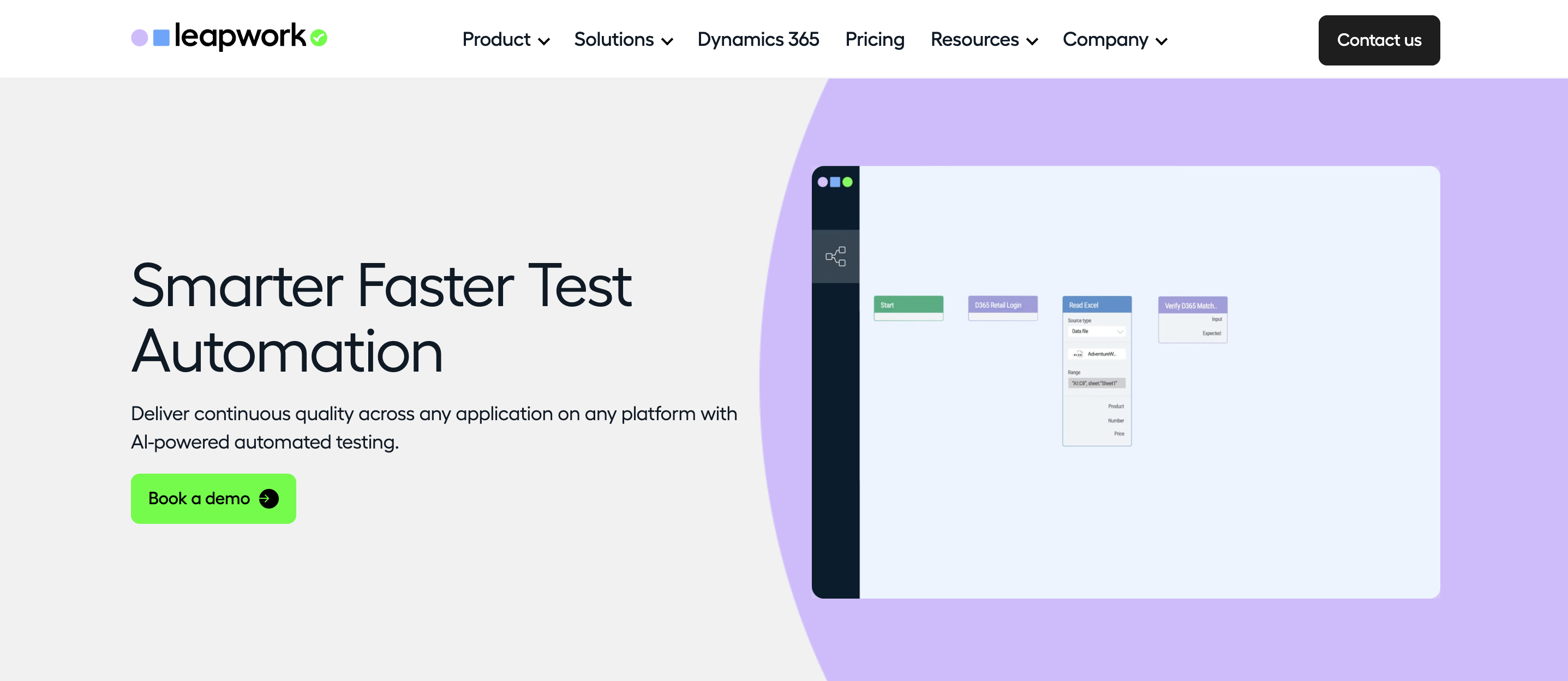
Leapwork is a no-code automation platform that takes a visual, flowchart-driven approach to test creation. Instead of writing scripts or building logic through layered configuration, you design your tests as connected blocks on a canvas. For teams that want business users, QA specialists, and non-technical contributors to collaborate in automation without feeling overwhelmed, Leapwork creates an inviting starting point.
You begin by mapping out your process as a series of steps: open this screen, submit this form, verify that result. Each step becomes a visual block, making the test easy to read and discuss. Over time, these blocks evolve into reusable components that reflect how your business actually works—not just how the UI is structured.
Where Leapwork shines as an ACCELQ alternative:
- Visual authoring that reduces complexity: You build flows instead of writing scripts, making it easier to align technical and non-technical contributors.
- No-code execution across multiple platforms: Supports web, desktop, virtual desktops, and selected enterprise applications.
- Reusable building blocks: Modular components help maintain consistency and reduce repetitive work across test suites.
- Centralized orchestration: Schedule, run, and monitor tests through a single control center.
- Detailed reporting and logs: Built-in dashboards make it straightforward to troubleshoot failures and measure stability trends.
Like any no-code tool, Leapwork also comes with trade-offs—especially if your team handles intricate logic or needs full engineering-level customization.
Challenges to consider:
- Visual flows become complex at scale: Large or intricate scenarios can lead to crowded diagrams that feel harder to maintain than clean code.
- Limited flexibility for edge cases: Advanced conditional logic, dynamic data transformations, or specialized validations may require creative workarounds.
- Enterprise-oriented pricing: Leapwork is positioned toward mid-size and large organizations, so smaller teams may find it harder to justify the investment.
Here’s a compact view of Leapwork’s positioning compared to ACCELQ and other alternatives:
| Dimension | Leapwork summary |
|---|---|
| Authoring style | Flowchart-based, fully visual, no-code. |
| Platform coverage | Web, desktop, enterprise apps, and virtual desktops. |
| Best suited for | Teams that want broader participation in automation without code. |
| Main trade-offs | Complex flows become harder to manage; less flexibility for technical edge cases. |
If your organization values collaboration, visual transparency, and low-code creation for a wide range of applications, Leapwork is a compelling ACCELQ alternative, especially for teams that want testing to be accessible to more than just engineers.
4. Testim

Testim is a popular AI-assisted automation tool that focuses heavily on speed and stability. If you're looking for an ACCELQ alternative that helps you build tests quickly without diving into complex frameworks, Testim is one of the more approachable options. Its highlight is the combination of record-and-customize authoring with AI-driven locator healing, which helps you keep tests stable even as your UI evolves.
When you walk through your application, Testim captures your interactions, creates smart locators, and structures your test flow into reusable components. This makes it especially attractive for teams that want to scale automation but don’t want the maintenance burden associated with fully scripted frameworks.
Here’s where Testim stands out:
- AI-powered stabilization: Dynamic locators automatically adapt to changes in the UI, reducing flaky failures and repetitive maintenance.
- Fast authoring workflow: Test creation feels fast and intuitive—ideal for teams that want near-immediate productivity.
- Reusable components: Common flows like login or checkout can be modularized and reused across your test suite.
- Cross-browser execution: Works across major browsers and cloud grids, supporting compatibility testing with minimal setup.
- CI/CD-friendly: Integrates cleanly with pipelines so your tests run automatically as part of deployments.
Still, Testim isn’t without limitations, especially if your workflows require more rigorous engineering control than no-code or low-code tools typically allow.
Challenges you should be aware of:
- Limited flexibility for advanced scenarios: Once your logic becomes highly dynamic or data-heavy, Testim’s visual model can feel limiting.
- Cost increases with scale: Larger test catalogs and higher execution volumes can push subscription costs up quickly.
- Modular design requires discipline: Without early standardization, complex flows may become inconsistent or harder to maintain over time.
To offer a clearer snapshot, here’s a side-by-side view of Testim’s strengths as an ACCELQ alternative:
| Dimension | Testim summary |
|---|---|
| Authoring speed | Extremely fast thanks to record-and-customize workflows. |
| Stability | Strong due to AI-generated and auto-healed locators. |
| Control & extensibility | Moderate; great for simple flows but restrictive for complex scenarios. |
| Best fit | Teams that need rapid authoring and AI stabilization without deep customization. |
If what you want is fast onboarding, AI-assisted stability, and an interface that feels intuitive rather than technical, Testim is a strong ACCELQ alternative worth exploring—especially if your application leans more toward predictable UI patterns and your team values speed over deep customization.
5. Functionize
Functionize positions itself as an AI-first automation platform, and that’s really where its value centers. Instead of depending on traditional locators or rigid scripting logic, Functionize uses machine learning models to interpret your application, execute actions, and adapt tests over time. For teams that struggle with flakiness in fast-changing UIs, this approach can feel refreshing—and in many cases, far more resilient than classical automation tools.
The moment you start building tests, Functionize watches your interactions, processes the DOM, analyzes visual cues, and builds what it calls “intelligent tests.” These tests become highly adaptable, even if your layout, structure, or dynamic elements shift frequently. It’s a compelling option if your product evolves day by day and you simply don’t have the bandwidth to maintain brittle scripts.
Where Functionize excels as an ACCELQ alternative:
- AI-driven execution: Tests rely on semantic understanding rather than fixed locators, offering higher stability for dynamic UIs.
- Fast test creation: Natural-language authoring and automatic step generation help teams ramp up quickly.
- End-to-end coverage: Supports web, mobile, and API testing with emphasis on complex user flows.
- Powerful self-healing: AI continuously adapts tests based on observed changes—often without manual intervention.
- Robust insights: Visual snapshots, execution histories, and ML-driven analytics simplify debugging.
But as with any AI-centered tool, you’re trading flexibility for abstraction. The more you rely on AI to decide how to interpret your application, the less granular control you have when designing highly specific or engineering-heavy scenarios.
Key limitations to consider:
- Limited transparency: AI-driven decisions can feel like a black box, making it harder to debug edge cases.
- Steeper platform learning curve: Although tests are easy to create, mastering Functionize’s workflow takes time.
- Enterprise pricing: It’s designed for mid-to-large organizations, not scrappy teams with tight budgets.
To help you weigh Functionize properly, here’s a quick breakdown of its strengths and trade-offs:
| Dimension | Functionize summary |
|---|---|
| Core philosophy | AI-centric testing with minimal reliance on locators or scripted logic. |
| Best use case | Teams with complex, fast-changing UIs that need resilient, adaptive automation. |
| Strengths vs. ACCELQ | Stronger AI modeling, deeper adaptability, richer execution intelligence. |
| Trade-offs | Less scripting freedom, heavier platform learning curve, enterprise pricing tier. |
If your automation struggles with frequent UI changes or if you want AI to shoulder most of the maintenance work, Functionize is a powerful ACCELQ alternative. But if your team prefers predictable, scriptable, or engineering-driven workflows, you may find other tools in this list more aligned with your approach.
6. TestSigma
TestSigma is a cloud-first automation platform built around the idea that testing should be accessible to everyone. Instead of relying on scripting or traditional frameworks, TestSigma lets you write tests in plain English and execute them across web, mobile, and API layers. If you're searching for an ACCELQ alternative that emphasizes simplicity and collaboration over deep technical control, TestSigma is a strong fit.
One of the reasons teams gravitate toward TestSigma is its low barrier to entry. You can jump in, type a natural-language step like “click the login button,” and the platform automatically interprets and executes it. It’s a refreshing experience for QA specialists and product teams who want to automate without diving into code-heavy tools.
Where TestSigma stands out:
- Natural-language authoring: Create and maintain tests using human-friendly commands rather than automation syntax.
- Cross-platform automation: Run tests on web browsers, Android and iOS devices, and APIs from one unified platform.
- Cloud execution out of the box: No infrastructure required—your tests run directly on TestSigma’s hosted environments.
- Team-friendly collaboration: Non-engineers can participate in test creation, review, and maintenance side-by-side with technical contributors.
- Reusable components: Modular tests simplify updates and reduce repetitive work, especially in large suites.
Despite its accessibility, TestSigma is not without boundaries. The simplicity that makes it appealing to broader teams may feel limiting for power users who want more granular control over automation logic or advanced engineering customization.
Challenges to keep in mind:
- Less flexibility for advanced technical workflows: Complex branching logic, intricate validations, and deep integrations can require workarounds.
- Expanding costs: As your test volume grows, cloud usage and storage can significantly increase total cost of ownership.
- Dependent on hosted infrastructure: Teams wanting fully on-premise or containerized control may find it restrictive.
Here’s a compact decision view to help you evaluate TestSigma in context:
| Dimension | TestSigma summary |
|---|---|
| Authoring style | Plain-English test steps with no scripting required. |
| Strengths | Fast onboarding, simple maintenance, broad platform coverage. |
| Ideal for | QA teams wanting accessibility and easy collaboration. |
| Trade-offs | Less customizable for highly technical test scenarios; cloud dependency. |
If your priority is quick test authoring, cross-platform execution, and a tool that invites broader participation in automation—not just your engineers—TestSigma is one of the most approachable ACCELQ alternatives you’ll find.
7. Ranorex
Ranorex has long been recognized as a dependable tool for teams working heavily with desktop applications, legacy systems, and enterprise software that doesn’t always play nicely with browser-only testing tools. If you’re exploring ACCELQ alternatives because you need stronger Windows desktop automation, more reliable element recognition, or deep integration with traditional tech stacks, Ranorex might be exactly what you’re looking for.
At its core, Ranorex blends codeless test creation with the option to extend your tests using .NET languages when you need more power. The recorder captures interactions across desktop, web, and mobile environments, while its object recognition engine handles dynamic UIs surprisingly well, specially in older or specialized interfaces where CSS and XPath simply don’t exist.
Where Ranorex shines as an ACCELQ alternative:
- Exceptional desktop automation: Suitable for Windows apps, legacy systems, ERP platforms, and custom enterprise software.
- Strong object recognition: Identifies elements in complex UI layers where browser-based tools often struggle.
- Codeless + scripted flexibility: Build tests visually and enhance them with C# or VB.NET when needed.
- Robust reporting: Screenshots, logs, videos, and step-level breakdowns are included in every run.
- Stable for long-term maintenance: Well-suited for mature companies with established QA processes and predictable release cycles.
That said, Ranorex may feel heavier than cloud-native tools, especially if your automation needs lean more toward modern web and mobile applications. It wasn’t designed for fast-moving agile teams trying to orchestrate large volumes of tests in highly distributed CI pipelines.
Key limitations to consider:
- Windows-centric ecosystem: MacOS and Linux environments receive limited support, which may restrict usability for cross-platform teams.
- Slower for rapid iteration: Compared to lightweight, cloud-based tools, setup and maintenance can require more overhead.
- Not ideal for fully cloud-native workflows: Works best in on-prem or hybrid environments, not high-scale cloud execution grids.
Here’s a quick comparison snapshot to help you evaluate whether Ranorex fits your situation:
| Dimension | Ranorex summary |
|---|---|
| Best known for | Rock-solid desktop automation and support for legacy systems. |
| Authoring style | Codeless recorder with optional C# or VB.NET scripting. |
| Strengths vs. ACCELQ | Superior desktop coverage, stronger deep-UI recognition, extensive reporting. |
| Trade-offs | Windows-heavy, slower iteration, limited cloud-native execution support. |
If your automation challenges revolve around desktop applications or specialized enterprise systems—and you want a stable, mature tool built for that world—Ranorex is one of the strongest ACCELQ alternatives to consider.
8. Perfecto

Perfecto is a cloud-based testing platform built for teams that need massive device coverage, enterprise reliability, and airtight performance in real-world environments. If you're exploring ACCELQ alternatives because you want deeper mobile testing, broader device access, or more robust cross-browser execution, Perfecto is one of the strongest candidates on the market.
Unlike tools that focus mainly on test creation, Perfecto’s strength lies in reliable test execution at scale. Whether you're running a quick smoke test or orchestrating thousands of parallel sessions across browsers and mobile devices, Perfecto is engineered to deliver consistency with minimal flakiness—even under high load.
Where Perfecto excels as an ACCELQ alternative:
- Massive real-device coverage: Access to a large cloud of physical iOS and Android devices, plus virtual and hybrid options.
- Enterprise-grade execution stability: Designed for high-volume teams that can’t afford inconsistent test runs.
- Cross-browser and cross-platform: Supports all major browsers, OS versions, viewports, and manufacturers.
- Rich debugging insights: Video recordings, network logs, performance metrics, and step-level snapshots.
- Hybrid testing capabilities: Covers both functional and non-functional layers, from usability to performance.
But Perfecto is not a lightweight tool. It’s engineered primarily for enterprises that require serious infrastructure and predictability. Teams seeking convenience, fast authoring, or simple workflows may find the platform more heavy-duty than necessary.
Challenges to keep in mind:
- Steeper learning curve: The platform’s depth takes time to fully understand and integrate into daily workflows.
- Higher pricing: Suited for enterprise budgets—not startup-friendly.
- Focus on execution, not creation: Perfecto isn’t designed to replace your test authoring tool; it's best paired with frameworks or platforms like Selenium, Appium, Katalon, or TestNG.
To help you evaluate Perfecto quickly, here's a streamlined decision view:
| Dimension | Perfecto summary |
|---|---|
| Primary strength | Large-scale, stable execution on real mobile devices and browsers. |
| Execution environments | Physical devices, emulators/simulators, cross-browser web. |
| Ideal for | Enterprises that need reliable testing at scale with broad device coverage. |
| Trade-offs | Higher costs, heavier onboarding, complements rather than replaces authoring tools. |
If your team needs bulletproof test execution across thousands of environments and you operate at a scale where consistency matters just as much as coverage, Perfecto is one of the most enterprise-ready ACCELQ alternatives you can adopt.
9. BrowserStack
BrowserStack is best known as a cloud platform for cross-browser and cross-device testing. If you are evaluating ACCELQ alternatives because you need broader environment coverage rather than a brand-new authoring experience, BrowserStack deserves a serious look. It plugs directly into your existing frameworks like Selenium, Cypress, Playwright, Appium, or tools like Katalon, so you can keep the way you write tests and simply upgrade where and how they run.
Instead of managing your own device lab or spinning up fragile VMs, you offload that complexity to BrowserStack. You get instant access to a large pool of real browsers and mobile devices, plus tools for live testing, automated runs, visual checks, and performance insights. For teams struggling with “it only breaks on this one browser on this one OS,” BrowserStack often becomes the missing piece.
Where BrowserStack stands out as an ACCELQ alternative:
- Huge browser and device coverage: Test on real desktop browsers, mobile browsers, and physical devices across OS versions and vendors.
- Framework-agnostic: Works with popular open-source frameworks and many commercial tools, so you are not locked into a single stack.
- Fast scaling of automation: Parallel execution lets you shrink long regression runs from hours to minutes.
- Live and automated flows: You can debug issues interactively, then codify them into automated suites using the same infrastructure.
- CI/CD integrations: Native plugins for common CI tools make it easier to shift testing left and run suites on every change.
However, BrowserStack is primarily an execution and environment platform, not a full end-to-end test management or authoring suite. If you are looking for a one-stop tool that handles everything from requirements to reporting and test design, you will still need another layer on top.
Challenges to consider:
- Not a standalone automation studio: You still need a framework or tool to author and structure your tests.
- Cost at high scale: As you add more concurrent sessions, teams, and projects, subscription tiers can become significant.
- Network and security considerations: Tunneling internal environments to a cloud grid requires coordination with your security and DevOps teams.
Here’s a compact decision view to place BrowserStack in your tool landscape:
| Dimension | BrowserStack summary |
|---|---|
| Primary role | Cloud grid for live and automated testing on real browsers and devices. |
| Best fit | Teams that already have frameworks and want to expand coverage and speed. |
| Strengths vs. ACCELQ | Broader environment grid, strong ecosystem integrations, flexible use with multiple tools. |
| Trade-offs | Requires a separate authoring solution; costs increase with concurrency and usage. |
If your main bottleneck is “where” tests run rather than “how” they are written, BrowserStack is a powerful ACCELQ alternative to add to your stack, turning your existing test assets into a scalable, cloud-based execution engine.
10. Applitools

Applitools is widely regarded as the gold standard for AI-powered visual testing. If you’ve ever struggled with flaky UI assertions, pixel-based comparisons, or brittle CSS-dependent checks, Applitools Eyes feels like stepping into a completely different category of testing altogether. Instead of relying on your test scripts to pinpoint every UI detail, Applitools uses visual AI to detect meaningful changes across screens, components, and workflows.
Where ACCELQ focuses on low-code automation and process modeling, Applitools specializes in ensuring your application looks right everywhere it runs. That makes it especially compelling for teams maintaining design-heavy interfaces or multi-brand experiences.
What Applitools brings to the table:
- AI-driven visual comparisons: The Eyes engine filters noise (font smoothing, rendering quirks, dynamic content) and highlights only real regressions.
- Ultrafast Test Cloud: Run visual checkpoints in parallel across numerous browsers and devices without setting up your own environment.
- Cross-framework support: Works with Selenium, Playwright, Cypress, WebdriverIO, Appium, and enterprise tools you may already use.
- Baseline management: Organizes visual snapshots so that design updates, theme changes, and UI refinements stay traceable.
- Smart locators for UI elements: Helps stabilize tests by identifying elements visually rather than relying solely on selectors.
Applitools integrates well when your primary challenge is catching UI defects that get past functional test automation. It becomes a natural pairing with tools like Katalon, Selenium stacks, or even ACCELQ itself—because it layers visual validation on top of your functional logic.
Things to consider before choosing Applitools:
- Requires an additional automation layer: Applitools is not a standalone test authoring platform; it enhances what you already use.
- Pricing scales with screenshot volume: High-frequency visual checks across many pages or devices can increase costs quickly.
- Team onboarding: While powerful, the concept of visual baselines requires guidance so teams understand how to review and approve changes efficiently.
To help you position Applitools as an ACCELQ alternative, here’s a quick comparison snapshot:
| Dimension | Applitools summary |
|---|---|
| Primary role | AI-powered visual validation for web, mobile, and component-level UIs. |
| Best fit | Teams with design-critical interfaces or high visual regression risk. |
| Strengths vs. ACCELQ | Superior UI regression detection, cross-browser visual coverage, and AI-driven element identification. |
| Trade-offs | Depends on another automation framework; costs scale with visual test volume. |
If you’re looking for an ACCELQ alternative that guarantees your product isn’t just functionally correct but visually flawless, Applitools is one of the most specialized and forward-thinking tools you can adopt.
11. TestComplete
TestComplete is one of the longest-standing UI automation platforms, known for its rich desktop testing capabilities and highly mature recorder. If your team works heavily with legacy Windows applications, thick client software, or mixed-technology enterprise stacks, TestComplete often becomes a natural consideration. Compared to ACCELQ’s cloud-focused approach, TestComplete leans toward a more traditional, scriptable environment with strong tooling around object identification and robust execution control.
One thing you’ll notice as you explore it is how much emphasis the platform places on flexibility. You can design tests entirely through keyword-driven steps, switch to scripting in Python or JavaScript, or blend both styles within a single suite. For many teams, that hybrid approach removes friction that comes with all-or-nothing low-code systems.
Highlights of what TestComplete offers:
- Deep UI automation for desktop apps: Strong support for Windows apps, including WPF, WinForms, Delphi, and older frameworks still common in corporate ecosystems.
- Cross-technology support: Web, desktop, and some mobile testing, with a consistent object recognition model across each environment.
- Keyword and script modes: Teams can work visually or drop into code whenever they need more control.
- AI-enhanced object detection: Helps stabilize tests and reduce maintenance when UI structure changes.
- Advanced debugging tools: Log views, breakpoints, object spy utilities, and recordings that help engineers pinpoint flaky steps quickly.
Although TestComplete is a powerful ACCELQ alternative, its strengths show up most clearly in environments that aren’t primarily cloud-native or browser-first. Enterprise QA teams using large internal apps often appreciate the amount of control it gives them.
Before selecting TestComplete, keep these points in mind:
- Windows-focused footprint: While it supports browser automation, its strongest capabilities revolve around desktop environments.
- Higher maintenance needs for complex UIs: Tests can grow brittle if object mapping isn’t carefully managed over time.
- Heavier setup compared with cloud platforms: Requires local or VM-based environments for execution and test authoring.
Here’s a helpful side-by-side snapshot to position TestComplete as an ACCELQ alternative:
| Dimension | TestComplete summary |
|---|---|
| Primary role | Comprehensive UI automation platform with deep support for Windows and enterprise desktop apps. |
| Best fit | Organizations with legacy software, thick client applications, and mixed-technology stacks. |
| Strengths vs. ACCELQ | Superior desktop testing, richer scripting options, more robust debugging and inspection tools. |
| Trade-offs | Less cloud-native, bigger setup footprint, and requires close attention to object repository management. |
If you're evaluating ACCELQ alternatives with a strong emphasis on enterprise desktop automation, TestComplete consistently stands out as one of the most capable and mature contenders.
12. Selenium-Based Stack
When teams look beyond ACCELQ, many eventually circle back to a classic option: building their own Selenium-based stack. Instead of relying on a single vendor for test design, execution, and reporting, you assemble a toolkit that fits your architecture and skills: Selenium WebDriver for browser automation, a test runner such as TestNG or JUnit, a BDD layer like Cucumber if you need it, plus your choice of reporting, CI/CD, and device grid.
We should think of this not as a product but as a framework ecosystem. You decide how opinionated or flexible it becomes. For some engineering-heavy organizations, this level of control is exactly what they want from an ACCELQ alternative.
What a typical Selenium-based stack looks like:
- Selenium WebDriver at the core: Low-level browser control with full access to DOM, cookies, network behaviors, and custom waits.
- Language of your choice: Java, Python, C#, JavaScript, and more, whichever your team is already comfortable with.
- Test runner and structure: TestNG, JUnit, NUnit, or similar to organize suites, retries, and parallel execution.
- Optional BDD layer: Cucumber, Behave, or SpecFlow if you want business-readable scenarios.
- Reporting and analytics: Allure, Extent Reports, or in-house dashboards for run history and defect correlation.
- Grid or cloud execution: Selenium Grid, Selenoid, or providers like BrowserStack and Sauce Labs to scale your runs.
If you’re comfortable with engineering-heavy workflows, this approach can become a powerful ACCELQ alternative. You get complete control over your architecture, your coding standards, and how deeply automation integrates with product code.
However, that freedom comes with responsibility. There is no out-of-the-box test management, no built-in AI for test generation, and no vendor-owned guardrails for best practices. We have to design our conventions, maintain libraries, and keep up with browser and framework changes ourselves.
Trade-offs you should consider:
- Setup and maintenance effort: Initial framework design, ongoing library updates, and infrastructure upkeep all fall on your team.
- Skill requirements: You need engineers who understand both programming and test automation patterns, not just business-level workflows.
- Slower time-to-value for non-technical teams: Business users and manual testers may find it harder to contribute directly without additional tooling layers.
To quickly frame Selenium-based stacks as an ACCELQ alternative, you can use this comparison lens:
| Dimension | Selenium-based stack |
|---|---|
| Ownership | Full control over architecture, libraries, and coding standards. |
| Cost profile | Lower licensing costs, higher internal engineering and maintenance cost. |
| Flexibility | Very high—can tailor everything from page object model to reporting and CI strategy. |
| Time-to-value | Slower initial ramp-up; strong long-term payoff once the framework stabilizes. |
| Best suited for | Engineering-driven teams that want full customization and are ready to invest in in-house automation expertise. |
If your team is willing to invest in framework design and you value long-term flexibility over short-term convenience, a well-architected Selenium-based stack can become a powerful, vendor-independent alternative to ACCELQ.
Conclusion
As we step back and look at the full landscape, it becomes clear that exploring ACCELQ alternatives isn’t just about finding a tool with a similar feature set. It’s really about discovering the platform that matches how you build, scale, and maintain quality across your applications. Every team has its own rhythm, its own architecture, and its own appetite for either no-code convenience or engineering-level control, and that’s why these twelve alternatives serve such different needs.
What we want you to walk away with is clarity. You now have a clear view of how each solution approaches end-to-end testing, where they shine, and where they may create friction. Some stand out with strong AI-driven authoring, others give you deep cross-browser coverage, and a few offer the kind of extensibility that only code-first frameworks can provide. And if your organization prefers a test architecture built to grow with internal standards, the Selenium-based route puts you firmly in the driver’s seat.
To help you recap quickly, here’s a compact comparison you can use when discussing options with your team:
| Category | Best fit |
|---|---|
| No-code and business-led testing | Leapwork, Tricentis Tosca, TestSigma |
| AI-powered authoring and maintenance | Testim, Functionize, Applitools (visual-centric) |
| Enterprise-grade cross-browser and device coverage | BrowserStack, Perfecto, Ranorex |
| All-in-one test management and execution | Katalon Platform, Tricentis Tosca |
| Engineering-led custom frameworks | Selenium-based stacks |
We hope you now feel much more equipped to evaluate what comes next in your automation strategy. Whether you’re chasing higher coverage, fewer flaky tests, faster release cycles, or simply a platform your whole team can contribute to, there’s a solution in this list that can meaningfully move your testing practice forward.
If you’re exploring a switch or building a new stack from scratch, take your time, map your real testing needs, and pick the tool that amplifies the way your team already works. With the right platform in place, your end-to-end testing can scale more smoothly, deliver stronger insights, and ultimately support releases you can trust
Additional Resources
|
