


What test documentation is, each type of test document and who writes and reads it, free templates, a worked release example, and how much documentation your team needs.
Test documentation is the set of documents a team creates before, during, and after testing to plan the work, record what was run, and prove the result. It covers the test strategy, test plan, test scenarios, test cases, traceability matrix, test data, bug reports, test execution logs, and the test summary report.
This page is the hub for those documents. It explains what each one answers and who reads it, links to a full guide for each and free templates for 7 of them, walks one release through every document, and covers how much documentation your team needs.
What is test documentation?
Test documentation in software testing, also called QA documentation or test documents, is the written record of how a team tests a product. Some documents are written before testing starts (the strategy, plan, scenarios, and cases), some during testing (run logs and bug reports), and one after (the summary report).
It isn't the same as documentation testing. Documentation testing checks that user manuals, help pages, and other product documents are correct. Test documentation records the testing itself.
Types of test documents and their hierarchy
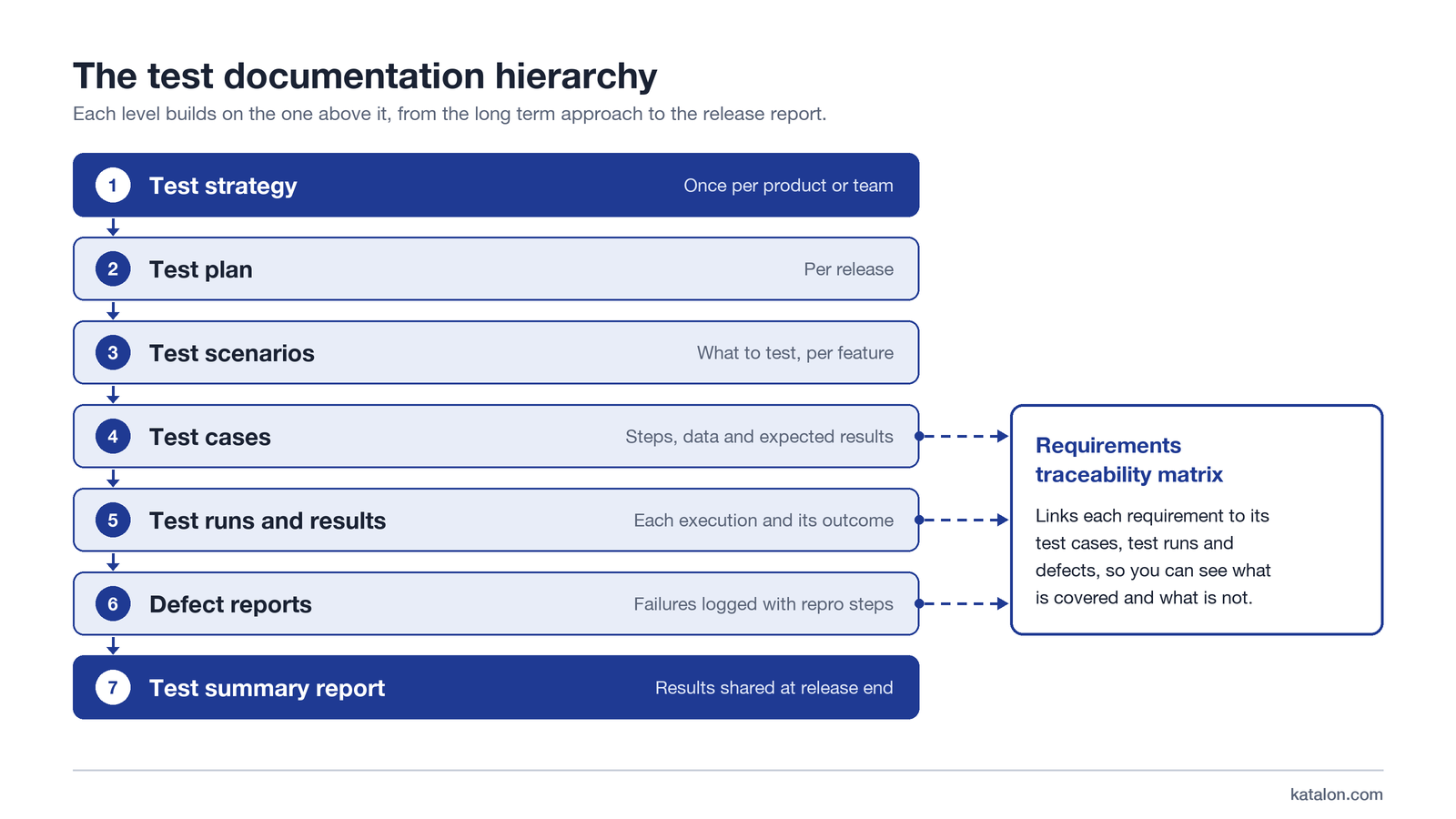
Test documents form a hierarchy, and each level builds on the one above it. The test strategy is written once per product or team and sets the long-term approach. The test plan is written once per release. Test scenarios and test cases follow from the plan, then test runs, defect reports, and finally the summary report. A requirements traceability matrix runs alongside all of them and links each requirement to its cases, runs, and defects. The diagram below shows the same order from top to bottom.
Document | What it answers | Who writes it | Who reads it | Phase |
|---|---|---|---|---|
Test strategy | How do we test across our products? | QA lead or head of QA | QA team, engineering leads | Before testing |
Test plan | What do we test in this release, who does it, by when, and when are we done? | QA lead | Product manager, developers, QA | Before testing |
Test scenarios | What should we check, one line per user goal? | Testers or QA lead | Product manager, business analysts, testers | Before testing |
Test cases and scripts | What are the exact steps, data, and expected results? | Testers and automation engineers | Testers, developers, auditors | Before and during testing |
Traceability matrix | Which tests cover each requirement, and with what result? | QA lead | Product manager, auditors | During and after testing |
Test data | Which inputs and accounts do the cases need? | Testers or the data owner | Testers | Before and during testing |
Bug reports | What broke, and how do we reproduce it? | Testers | Developers | During testing |
Test execution log | What ran, where, and did it pass? | The test tool or the tester | QA lead | During testing |
Test summary report | Did the release meet its exit criteria? | QA lead | Product manager, stakeholders, auditors | After testing |
Each document has its own guide:
- Test policy (optional): a short statement of an organization's testing principles. Some larger companies keep one above the strategy; many teams fold it into the strategy.
- Test strategy: the standing approach for a product or team, covering test levels, types, tools, environments, and default exit criteria. See the test strategy guide.
- Test plan: the scope, approach, schedule, people, risks, and entry and exit criteria for one release. See the test plan guide.
- Test scenarios: one-line statements of what to verify, written from the user's point of view. See test scenarios.
- Test cases: the steps, test data, and expected result for one condition. See how to write test cases.
- Automated test scripts: code that runs stable test cases without a person. See how to write a test script.
- Requirements traceability matrix: the table that joins requirements, test cases, results, and defects. See the requirements traceability matrix guide.
- Test data: the inputs, accounts, and records the cases need, kept safe and repeatable. See test data management.
- Bug reports: one defect each, with steps to reproduce, expected and actual results, and severity. See the bug report template.
- Test execution log: the record of each run, with the build, environment, and result. See test execution.
- Test summary report: the results of a cycle or release, checked against the exit criteria, with a recommendation. See the test summary report guide.
The phases follow the software testing life cycle: planning documents before testing, logs and bug reports during it, and the summary report at the end.
A note on standards: IEEE 829-2008 defined a classic set of test documents and has been replaced by ISO/IEC/IEEE 29119-3. Many teams use lighter templates than either standard and add sections when a client or regulator asks for them.
Free test documentation templates
Each template lives on its owner page, next to the guide for that document.
Template | Use it for | What you get |
|---|---|---|
Test strategy template | The long-term testing approach for a product or team | Word and PDF downloads with a filled e-commerce example |
Scope, schedule, risks, and exit criteria for one release | Excel, Word, and PDF downloads with a filled website release, plus a one-page Agile plan in the Excel file | |
Test scenarios template | Listing what to verify before writing cases | Excel, Word, and PDF downloads with 15 online store example scenarios |
Steps, data, and expected results for each case | Excel, Word, and PDF downloads with a filled login example | |
Requirements traceability matrix template | Linking requirements to test cases and results | A copy-ready table for Excel or Google Sheets |
Reporting one defect clearly | An Excel file with a bug log and a bug metrics dashboard | |
Test summary report template | Reporting a cycle or release against its exit criteria | A copy-ready table with a filled release example |
Start with the strategy and plan templates, then scenarios and cases. Reuse the same IDs across all of them, so the traceability matrix can join requirements, cases, runs, and defects.
Test documentation example: one release, every document
Here is one thread through all 9 documents for a fictional online store. Release 4.2 replaces the 3-step checkout with a single-page checkout and lets signed-in shoppers save a card. All IDs, names, and numbers are illustrative and match the examples in our test plan, test scenario, and test report guides.
Document | Release 4.2 entry |
|---|---|
Test strategy (written once) | Risk-based first: checkout, payment, and account security are rated high risk, and regression of those flows is automated and run in CI |
Test plan (for 4.2) | In scope: single-page checkout, saved cards, guest checkout, promo codes, and regression of cart, sign-in, and order history. Out of scope: the iOS and Android apps. 6 exit criteria, including no open critical or high defects |
Test scenario | SC-CARD-01: Check that a shopper can save a card at checkout and reuse it on the next order |
Test case | CHK-PAY-012: Pay with a saved card. Expected result: the order confirmation page shows an order number, and a confirmation email is sent |
Test data | Test user checkout-qa-03 with a saved test card ending 1111 from the payment provider's sandbox |
Traceability matrix | The saved-card user story links to SC-CARD-01, CHK-PAY-012 (cycle 3: passed), the payment retry case (cycle 3: failed), and DEF-311 (critical, open) |
Test execution log | Cycle 3 (regression) on build 4.2.0-rc3 in staging: 398 of 412 planned tests run, 371 passed, 27 failed; of the 14 not run, 8 payment cases were blocked by the sandbox |
Bug report | DEF-311 (critical), found by a payment retry case in the same suite: pay with a saved card, let the payment time out, select Pay again. Expected: one charge. Actual: the card is charged twice |
Test summary report | 93.2% pass rate, 1 critical defect open (DEF-311), 3 of 6 exit criteria not met. Recommendation: hold until DEF-311 is fixed and the blocked payment cases pass |
The strategy line is the only one that doesn't change from release to release. Everything else is written or updated for 4.2, and the IDs are what let the summary report point back to the exact case, run, and defect behind the decision.
Why test documentation matters
- Shared scope before testing starts: the plan and its exit criteria give product, development, and QA one agreed definition of done.
- Traceability from requirement to result: linked IDs show which requirements are covered, which failed, and which have no tests yet.
- Reuse: written cases become the regression suite for the next release and the starting point for automation.
- Evidence: summary reports, traceability matrices, and run records answer the questions clients, release managers, and auditors ask.
- Knowledge that outlasts the team: new testers learn the product from the cases and bug history instead of from whoever has been around longest.
How much test documentation is enough?
Enough that the next person can understand what was tested, why, and with what result, and no more. The right amount depends on risk, team size, and who has to read it.
Context | What to keep | What you can usually skip |
|---|---|---|
Small Agile team, one product | A one-page strategy, scenarios from acceptance criteria, automated tests as living documentation, bug reports, a short release summary | A separate plan for every sprint, a formal traceability matrix |
Mid-size team, several releases in flight | Add a test plan per release, managed test cases, and a traceability matrix for critical flows | Full traceability for low-risk features |
Regulated or audited work (healthcare, finance, medical devices) | A full test plan, a traceability matrix, a signed summary or closure report, and retained execution evidence | Very little; agree the set with your quality or compliance team |
In Agile, keep it lighter. Acceptance criteria and test scenarios do much of the planning work, and automated tests document behavior that stays current. Keep a short plan for each release and a summary the product owner can read in a minute.
For an audit, make it traceable. Someone outside the team should be able to trace each requirement to the tests that cover it, see each result with its date, build, and environment, and follow each failure to its defect. That retained record of runs, results, and approvals is often called test evidence, and auditors usually ask to see it.
Can automated tests replace written test documentation?
Partly. Well-named automated tests and BDD scenarios describe how the product behaves, and they stay current because they fail when behavior changes. For stable flows, many teams let the automated tests serve as the case-level documentation.
They don't replace everything:
- Business-readable coverage: a product manager can't read a test suite to see which requirements are covered.
- Audit evidence: auditors want results tied to requirements, builds, and dates, not just code.
- Exploratory findings: what testers learn in unscripted sessions lives in notes and bug reports.
- Decisions: scope, risk, and exit criteria are choices that no test encodes.
A practical split: let automated tests document stable cases, and keep the plan, the traceability matrix, and the summary report as documents.
Challenges of test documentation
- Time: writing and updating documents takes hours that could go into testing. Scale the set to risk, as in the sizing table above.
- Overhead in fast-moving teams: heavy documents slow sprints down. Use the lighter Agile set and one-page templates.
- Documents going stale: a plan written in week 1 and never reopened misleads by week 6. Use update triggers with a named owner, covered in the next section.
- Duplication between tools: the same case in a spreadsheet, a wiki, and a tracker drifts apart. Keep one source of truth.
- No owner: documents that belong to everyone get updated by no one. Assign an owner to each type.
- Written for the process, not a reader: sections filled in because the template has them. Write for the reader named in the types table.
How to keep test documents current
Most guides say "keep it up to date". It's easier with clear triggers and an owner for each update:
Trigger | What to update | Owner |
|---|---|---|
A requirement or user story changes | Affected scenarios, test cases, and traceability matrix rows | Testers, checked by the QA lead |
A new kind of defect is found | Add a test case, and a scenario if the user goal wasn't covered | Testers |
An environment, browser, or device changes | The environment section of the test plan | QA lead |
A release is cut | Plan scope and dates, then the summary report | QA lead |
A test case is retired | Archive it and keep its history; don't delete it | Testers |
The approach changes after an incident or a new platform | The test strategy | Head of QA |
Keep change history for every document: Git for code-based tests, and version history in your test management tool for manual cases. For the online store, every test case touched by a changed story in a release 4.2 sprint is updated in the same sprint. See test case management for how to run that review.
Test documentation best practices
- Start from a template. A shared layout makes documents faster to write and easier to review.
- Keep one source of truth. Store each document in one place and link to it; don't paste copies into email or chat.
- Write for a named reader. A developer needs steps to reproduce; a release manager needs a recommendation.
- Link everything by ID. Requirement, scenario, case, run, and defect IDs are what make traceability possible.
- Scale to risk, not habit. Spend the detail on payment, security, and other high-impact areas.
- Keep it short. If a section has no content, delete it rather than filling it with boilerplate.
- Review documents like code. A second pair of eyes on a plan or case catches gaps before testing starts.
- Retire what nobody reads. If a report hasn't been opened in 3 releases, stop producing it or change it.
Test documentation in spreadsheets vs a test management tool
Factor | Spreadsheets and Word | Test management tool |
|---|---|---|
Team size | 1 to 3 testers | Several testers or teams |
Releases | One product, few releases | Several releases or products at once |
Traceability | Manual links by ID | Requirements, cases, runs, and defects linked in one place |
Audit needs | Possible, but evidence is assembled by hand | Run history and reports kept with dates and versions |
Report effort | Built by hand each cycle | Generated from run results |
Version history | File versions, if someone saves them | Kept per test case |
Spreadsheets win for a small team, one product, and a short life. A tool earns its keep when you need execution reports and traceability built from real results, version history, and links to Jira or Azure DevOps. For more on the discipline, see test management, and to compare options, see our list of test management tools.
Test documentation in Katalon
We make Katalon Studio and Katalon TestOps, the test management part of Katalon True. Here is how they map to the documents above:
- Test cases: manual test case steps have Description, Expected Results, and Test Data fields, can call other test cases, and accept attachments such as images, PDF, DOCX, XLSX, CSV, TXT, and MD files. A Linkages tab shows the requirements and defects linked from a connected Jira or Azure DevOps project.
- Test case export: you can export test cases to Word (.docx) or CSV, for selected cases, whole folders, or everything in the current filtered view.
- Version history: TestOps keeps an immutable version history of each manual test case. Save as version creates a draft minor version, and Save & publish creates a published major version. You can compare versions, restore an earlier one as a new version, and each manual execution records the version it ran.
- Traceability matrix: the Requirement Traceability Report links each requirement synced from Jira or Azure DevOps to its test cases, their executions, and the defects on those executions. It needs an ALM connection and requirement links on the test cases. You can view the latest result per case or every execution in a release or sprint, and export the matrix to CSV for audits. Katalon's docs note the report can be used as compliance evidence, for example for FDA 21 CFR Part 11 or ISO 13485.
- Run reports and dashboards: dashboards and reports can be exported to PDF, CSV, or Excel, a test run report can be downloaded as .csv, .xlsx, .pdf, or .zip, and an automated run can email a PDF of its results when it completes.
- Environment coverage: the Configuration Coverage Report shows coverage and pass rate for each OS and browser combination, by release or sprint, so you can show which environments a release was tested on.
- Katalon Studio reports: after each test suite run, Studio can generate reports in HTML, CSV, and PDF that show the platform and every data iteration, and email them automatically.
Your team still writes the strategy, the plan, and the summary report's recommendation. TestOps keeps the case, run, and traceability records those documents point to. To try it with your own test cases, request a free trial from the top of this page.
Frequently asked questions
Test artifacts are the outputs of testing, such as test cases, scripts, test data, execution logs, bug reports, and reports. Test documentation is the subset written for people to read and approve: the strategy, plan, traceability matrix, and summary report, plus the cases and bug reports that teams keep as records.
IEEE 829-2008 has been replaced by ISO/IEC/IEEE 29119-3, which defines test documentation templates. Many teams use lighter templates than either standard.
No. Documentation testing checks that user manuals, help pages, and other product documents are correct. Test documentation records the testing itself: what was planned, what ran, and what the results were.
Yes, but lighter. Many Agile teams keep a one-page strategy, test scenarios from acceptance criteria, automated tests as living documentation, bug reports, and a short release summary, and add more only where risk or an audit calls for it.
A test strategy is the long-term approach for a product or team and changes rarely. A test plan sets the scope, schedule, people, risks, and exit criteria for one release.
This page links a free template for 7 documents: test strategy, test plan, test scenario, test case, traceability matrix, bug report, and test summary report. Each one sits on its own guide, most with Excel, Word, or PDF downloads.
Detailed enough that someone outside the team can trace each requirement to its tests, see each result with its date, build, and environment, and follow each failure to its defect. Keep the execution evidence for as long as your regulator or client requires.
Katalon TestOps exports test cases to Word or CSV, keeps a version history for each manual test case, and provides a Requirement Traceability Report you can export to CSV once Jira or Azure DevOps is connected and test cases are linked to requirements. Reports and dashboards export to PDF, CSV, or Excel, and Katalon Studio generates HTML, CSV, and PDF suite reports.



Test everything. Ship with confidence.
From generating test cases to spotting failures, Katalon's AI works across your entire pipeline, automatically.
