.svg)




A test plan is your blueprint for quality. It outlines what to test, how to test it, who will test it, and when. Without a clear plan, testing becomes guesswork and coverage gaps go unnoticed.
In 2025, teams need test plans that are both flexible and structured. That means choosing the right test plan template, tailoring it to your delivery model, and making it useful across Dev, QA, and Product.
In this guide, we’ll walk you through step-by-step:
- What a modern test plan looks like
- Key sections every QA test plan should include
- How to align your plan with Agile and CI/CD workflows
- Tips to make your test plan template reusable and audit-friendly
- Downloadable example to get started quickly
Whether you're writing your first plan or leveling up your current process, this guide is for you.
Let’s dive in.
Why most test plans fail (and why you should care)
Writing a test plan is easy. Writing one that people actually use is much harder.
The most common issue we see is vague planning. Objectives are unclear. Scope is copied from old projects. Metrics sound smart but offer no direction. When that happens, the test plan becomes passive documentation instead of a tool for alignment and action.
And the results show up fast. Teams lose time in back-and-forth conversations. Testers run cases without knowing what matters most. Leaders can’t see risk or progress clearly. Everyone works harder, not smarter.
Let’s take a quick real-world example:
A junior QA at a startup spent five days building a test plan from scratch. It had all the right sections, but lacked focus. No one used it. Contrast that with a senior-led version created in just two hours. It reused a flexible test plan template, set sharp entry and exit criteria, and mapped tests to risk areas. The whole team adopted it instantly. Execution improved the same week.
When done right, a test plan gives your team a shared language. It captures the why, the what, and the how in one place. That’s what makes it worth doing—and doing well.
Test strategy vs test approach vs test plan: clarifying the confusion
These three terms get tossed around a lot. They sound similar, but each plays a unique role in your QA process. Understanding how they fit together helps you design smarter test plans that scale with your team.
- Test strategy is the why. It defines the overall vision for testing. It answers what risks you're addressing, what quality means for your product, and how testing supports business goals.
- Test approach is the how. It explains the methods you’ll use to execute the strategy. For example, it may state whether tests will be manual or automated, which environments will be used, and how defects will be logged and tracked.
- Test plan is the what. It breaks the strategy and approach down into actionable steps. It includes scope, timeline, roles, test cases, and deliverables. A good test plan template makes it easier to capture all of this consistently.
These three layers support each other. Strategy shapes the approach. Approach informs the plan. When aligned, your testing becomes more predictable, traceable, and collaborative.
How to set test objectives?
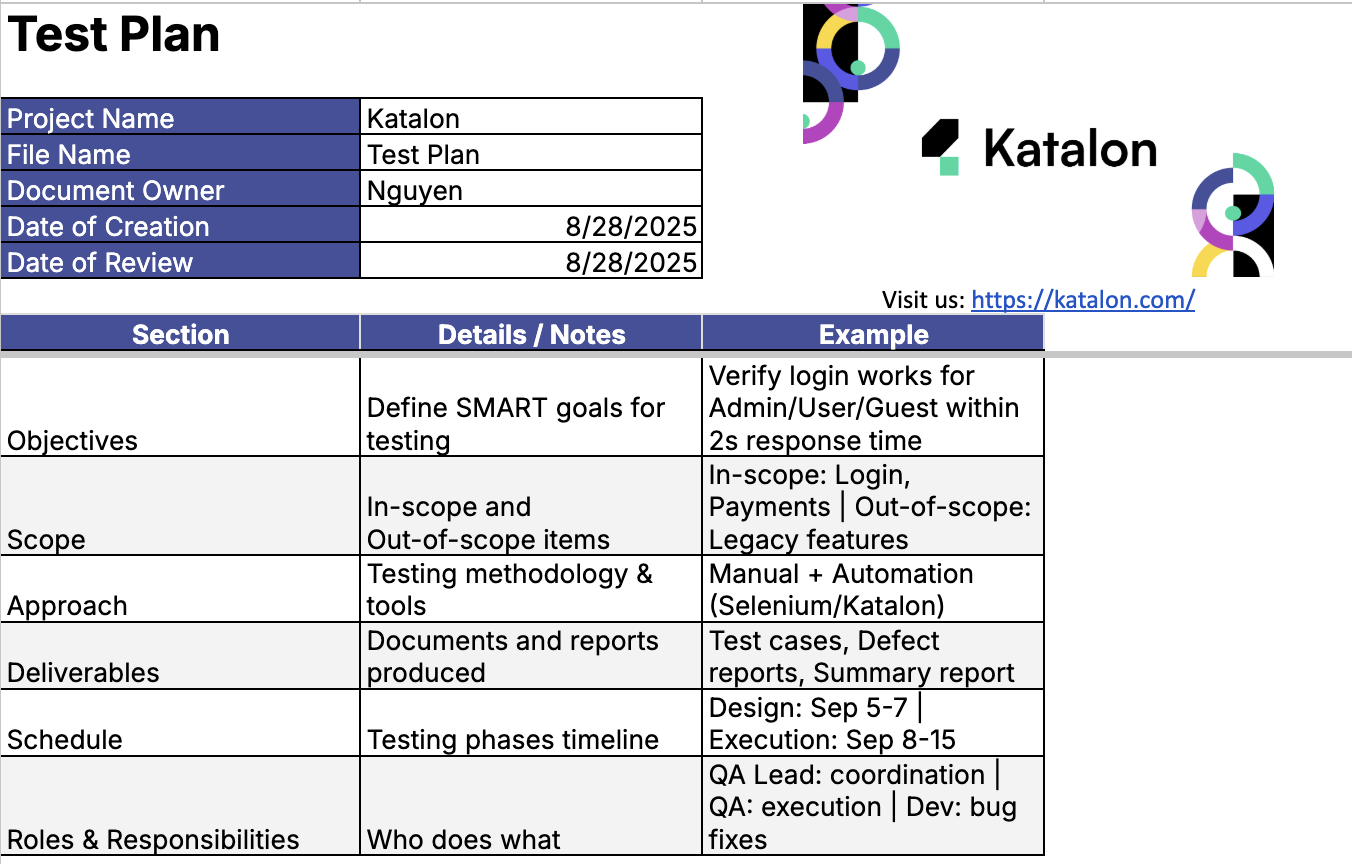
Strong objectives turn a test plan from a checklist into a mission. They give your team clarity, focus, and measurable direction.
We recommend using the SMART framework. Keep your objectives Specific, Measurable, Achievable, Relevant, and Time-bound. This makes your test plan template more actionable and easier to review as projects evolve.
For example:
- Too broad: “Test user authentication.”
- Better: “Verify successful and failed login attempts for new and returning users across desktop and mobile within five working days.”
Here’s a tip most teams overlook. Fewer objectives often lead to sharper execution. When everything is a priority, nothing gets the focus it deserves. Choose what matters most and align your test coverage accordingly.
Say you’re launching a payment module. You could try to cover every possible feature. Or you could prioritize high-risk flows, like card payment failures and discount application. This keeps your QA time focused where impact is highest.
Set clear objectives, revisit them regularly, and make sure each one ties directly back to product risk or customer value. Your team will move faster and test smarter.
Defining scope with surgical precision
Scope defines what you will test and just as importantly, what you will not. A well-scoped test plan template helps teams stay focused, avoid distractions, and surface hidden risks early.
Let’s break it down.
In-scope means features or areas you will actively test in this cycle. This can include new functionality, critical workflows, or integrations under change. Out-of-scope means anything that is intentionally excluded, like legacy modules, unsupported devices, or experiments still under development.
Here’s an example. You are testing a rewards program rollout. In scope might be point accrual, redemption logic, and balance display. Out of scope might be coupon stacking or edge-case fraud detection. These are noted, but planned for future cycles.
To prioritize clearly, use a table that maps features to their importance and associated risk. This keeps test design and time allocation grounded in impact.
| Feature | Priority | Risk Level |
|---|---|---|
| Checkout with loyalty points | High | High |
| Earn points via referrals | Medium | Medium |
| Balance view on profile | Low | Low |
Hidden risks often live at the edges. Think of third-party tools, error handling under load, or changes in shared components. Even if they feel stable, they deserve a quick scan during planning. Call them out early so they are not forgotten later.
Scope is a spotlight. Use it to direct your energy where it matters most. Everything else becomes noise control.
Entry and exit criteria you actually want to use
Entry and exit criteria bring structure to your test lifecycle. They define when testing should begin and when it is safe to stop. But for these criteria to work, they must drive real alignment across teams.
Too often, teams rely on metrics like “95 percent test cases passed.” This sounds useful, but it lacks context. Which test cases? Which systems? Were blockers reviewed? Did business teams sign off?
Great criteria go deeper. They reflect the real status of readiness and risk. They also encourage collaboration between QA, Dev, and Product. A solid test plan template makes room for all of these dimensions.
| Entry Criteria | Exit Criteria | Approved By |
|---|---|---|
| User stories approved and test cases written | All critical defects resolved and verified | QA Lead |
| Test environment set up and data seeded | Pass rate of 100 percent for P0 cases | Product Manager |
| Dependencies confirmed with Dev and Ops | Stakeholder sign-off on test summary report | Project Owner |
These checkpoints make progress visible. They also build trust. When entry and exit gates are clear, teams move forward with confidence. Everyone knows what is expected, who approves, and what comes next.
Approach and methodology that reflect reality
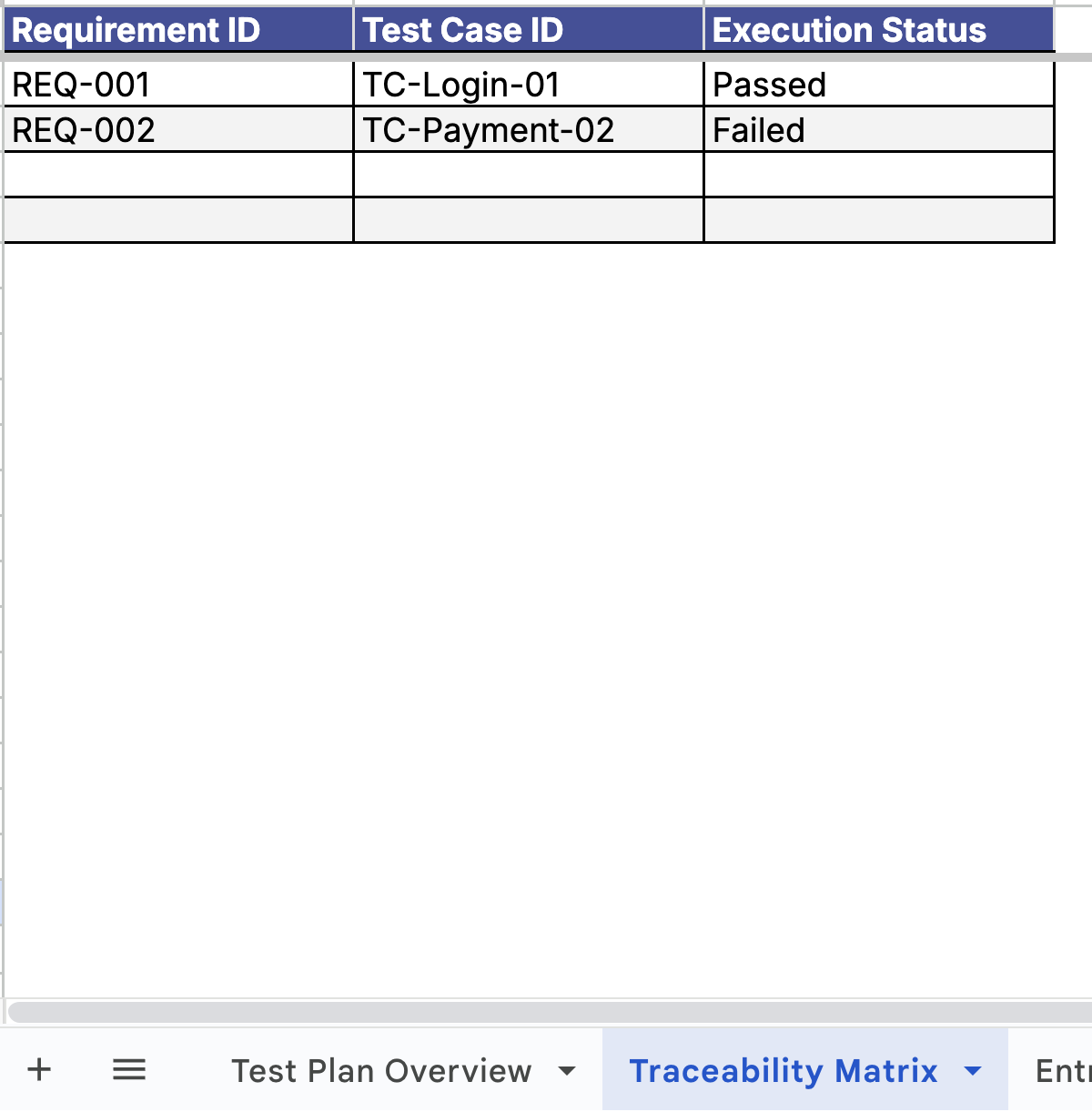
The best test plans are built on methods that match your team’s workflow. They consider people, tools, and release speed. That means your approach must be flexible enough to support both manual and automated testing when needed.
Manual testing works well for exploratory scenarios, usability checks, or one-time verifications. It adds human insight where automation falls short. On the other hand, automation is ideal for stable, repetitive tests with high ROI. Login flows, data validation, and API tests are great places to start.
Most teams use a hybrid model. They combine the precision of automation with the adaptability of manual testing. A solid test plan template lets you outline both clearly so the entire team knows what is tested, how, and by whom.
Agile teams benefit from embedding testing directly into their sprint process. That includes writing test cases during story grooming, executing tests during development, and feeding QA insights back into the backlog without delay.
Continuous QA loops matter. They help you catch issues earlier, test smarter with every sprint, and move toward release with fewer surprises. Methodology is not just theory—it is how you keep quality visible and actionable from day one.
Deliverables that people will actually read

Testing is not just about execution. It is also about communication. The best test plans produce deliverables that inform decisions and drive action across teams.
Your test plan template should include space for key outputs like test cases, defect reports, execution logs, and summary reports. Each of these tells part of the story. Together, they give stakeholders a clear picture of quality.
But here is what makes a real difference—structure your deliverables so they are easy to absorb. For test cases, keep steps concise and consistent. For defect reports, link directly to test cases and include reproduction steps and severity levels.
The summary report deserves special attention. Product managers, leads, and executives may not read every line. But they will look at the visuals. A one-slide snapshot can go a long way.
Try this layout:
- Title: Sprint 22 QA Summary
- Test coverage: percent of features tested, high-priority areas
- Execution result: pass rate, fail rate, blocked cases
- Defect trend: total open, closed, severity breakdown
- Key risks: what still needs attention
- Next steps: release readiness, pending retests
Visuals like charts and heatmaps make these points clearer. They speed up reviews and reduce follow-up questions. And when people actually read the deliverables, testing becomes a stronger part of the development conversation.
Scheduling and resource allocation without chaos
A great test plan is not just about what to test. It is also about when, by whom, and in what order. Scheduling and resource allocation bring predictability to your QA process and help teams stay focused as deadlines approach.
Start by breaking the work into atomic phases. Think of planning, test design, test execution, defect triage, and reporting. Assign clear owners to each phase. If your test plan template includes this structure, visibility improves across all levels of the team.
Every phase has dependencies. Development must finish before system tests begin. The staging environment must be ready before full regression can start. Mapping these helps avoid last-minute blockers.
Risk management that doesn’t look dumb
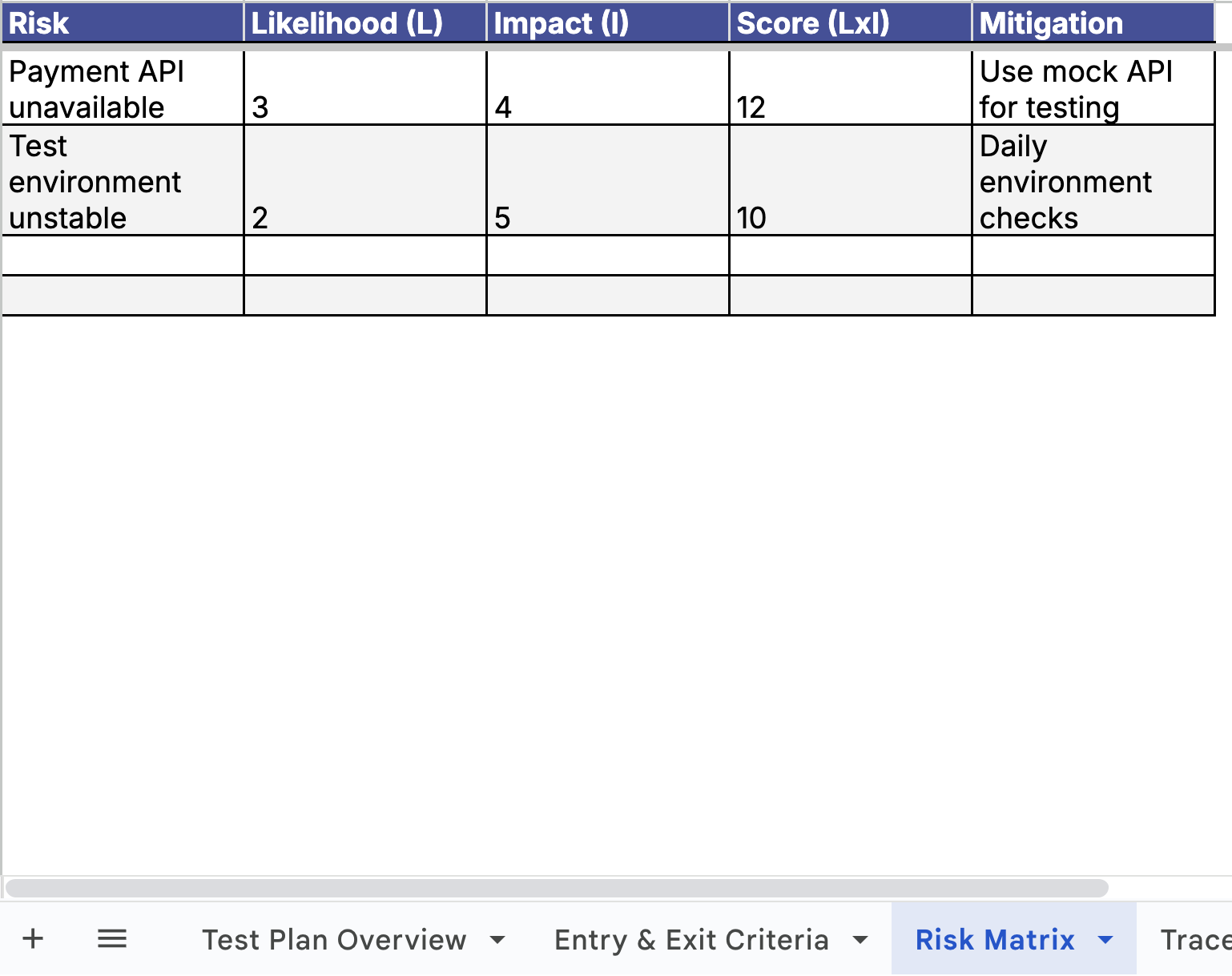
Risk is a part of every project. The value of your test plan increases when it accounts for real-world risks before they turn into real-world blockers.
The best approach is simple and effective. Rate each risk by Likelihood × Impact, then plan a mitigation step and assign an owner. When this is built directly into your test plan template, it forces early thinking and better coordination.
Let’s go beyond the usual defect risk. Think about the less obvious but equally disruptive risks: unstable environments, late-breaking API changes, even overlapping vacations during test cycles. These hit timelines hard unless called out early.
| Risk | L × I Score | Mitigation Plan | Owner |
|---|---|---|---|
| Environment instability during regression | 4 × 4 = 16 | Lock staging for QA only during test window | DevOps Lead |
| Unplanned API changes from upstream teams | 3 × 5 = 15 | Subscribe to API changelogs and sync weekly | QA Lead |
| Key QA team members on leave | 2 × 4 = 8 | Reassign test cases in advance and share backup plan | QA Manager |
Every risk you catch early saves hours or days down the line. By making risk part of your test plan, not an afterthought, so you keep testing predictable, visible, and ready for change.
Metrics that matter: how to show QA value
Metrics are how QA tells its story. When used well, they bring clarity, justify effort, and support better product decisions. Your test plan template should make space for the ones that matter most.
Go beyond basic pass rates. A number like “96 percent passed” only matters if you also know what was tested, how deeply, and what risks remain. Good QA metrics are layered and connected.
Start with these:
- Test coverage: percent of user stories, requirements, or risk areas tested
- Defect density: number of defects per test case or feature area
- Release confidence: a composite signal based on blocker rate, retest cycles, and stakeholder approval
Visuals help make these numbers meaningful. Dashboards, color-coded tables, or even trendlines across sprints show progress in ways everyone can absorb quickly.
Here is a simple example of a story-driven metric view:
| Metric | Value | Insight |
|---|---|---|
| Test coverage | 92% | Most core flows covered, API regression pending |
| Defect density | 1.3 per story | Spike due to checkout module, now stabilized |
| Release confidence | High | Blockers resolved, test suite passed, PM signed off |
Use metrics to show value, not just activity. Done well, they highlight QA’s role in delivering quality, speed, and confidence to every release.
How to make your test plan readable, shareable, and actionable
The best test plans are easy to read and even easier to act on. Whether it is a junior QA, a senior developer, or a product manager, your document should make sense in five minutes or less.
Start by using structured sections. Every part of your test plan template should serve a purpose. Use clear headings, bullet points, and short paragraphs to organize your ideas. If something can be expressed as a table, do it. Tables scan faster than text.
Here is what that looks like in practice:
- Use bullet points for scope, objectives, and test environments
- Use tables for timelines, risk tracking, and metrics
- Add examples for test cases or defect reports so others can follow your lead
Include only what is necessary for execution and alignment. Avoid long intros or repeated definitions. Instead, focus on the parts that will guide actual testing and communication.
If you borrow from templates or open-source examples, make them your own. Add your system context, your test data sources, and your actual workflows. This gives your plan weight and makes it usable across cycles.
Readable means skimmable. Shareable means accessible to anyone involved. Actionable means clear next steps and zero ambiguity. That is what makes a test plan worth reading and reusing.
Lessons learned and pro tips from real QA professionals
The smartest test plans often come from real-world experience. Behind every polished test plan template is a team that learned what works through trial, iteration, and shipping under pressure.
Here are some of the best insights we have seen from QA professionals across industries:
- Automate smart, not everything. Focus on tests that give you speed, stability, and return. Automate login, APIs, and high-volume flows. Leave exploratory and edge-case checks for manual testers who can spot nuance.
- A short plan can outperform a 50-page document. One startup lead built a one-pager with scope, objectives, and timelines. It kept everyone aligned across design, engineering, and QA. That release shipped early.
- Stakeholders value clarity over completeness. Executives want to know “are we ready” and “what are the risks.” A clean summary slide beats a long PDF every time.
Here is when you can break the rules:
If your team is small and shipping fast, your plan can be lean. If you are testing a risky integration, go deep with risk modeling. If your org values visual thinking, use dashboards over spreadsheets. The format should reflect how your team works best.
Real QA success is not about sticking to theory. It is about adapting structure to your system, your team, and your goals. That is what makes your test plan effective in the real world.
|
